

Pinecone
AIA managed, production-grade vector database for storing, indexing, and querying large-scale embeddings with low-latency semantic search.
Pinecone
A managed, production-grade vector database for storing, indexing, and querying large-scale embeddings with low-latency semantic search.
About Pinecone
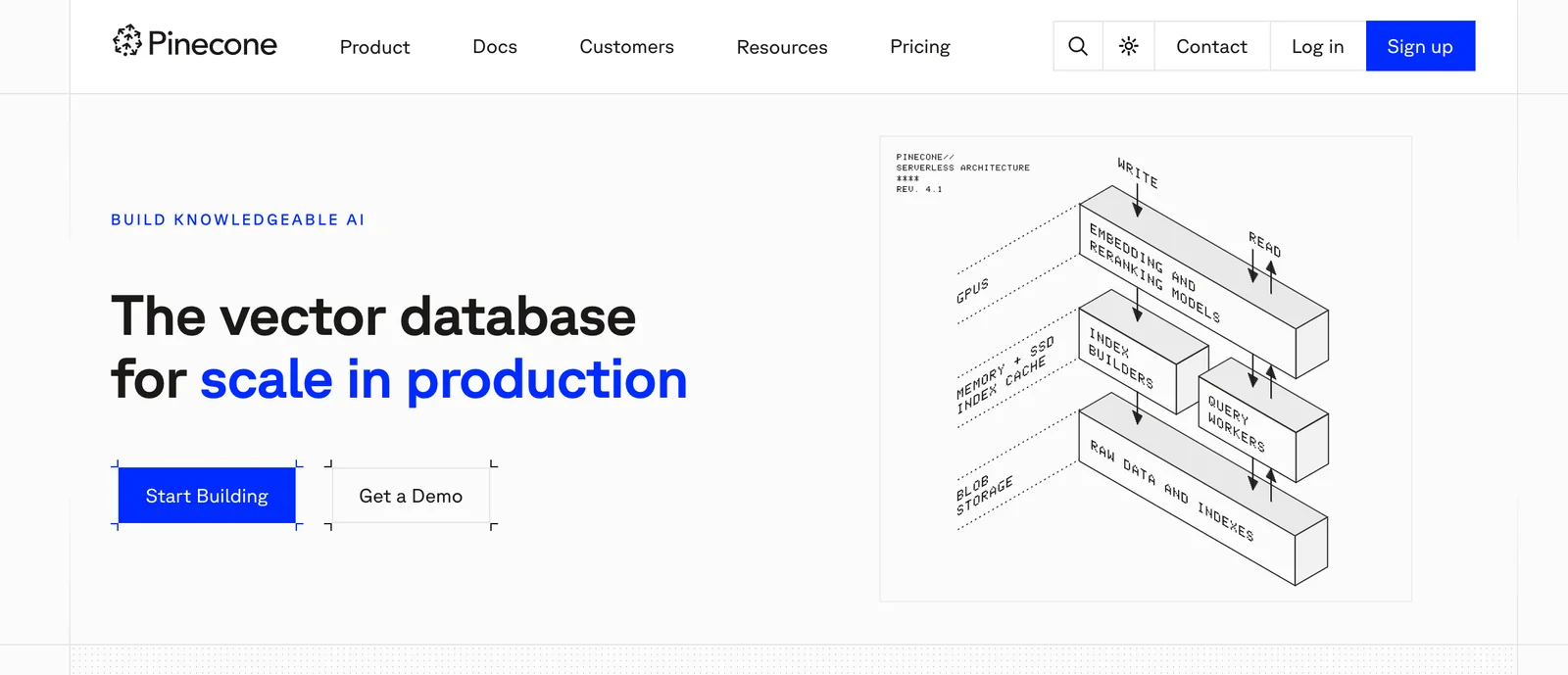
Pinecone is a fully managed vector database designed to store, index, and query high-dimensional vector embeddings at production scale. It provides low-latency similarity search across billions of items via simple API calls and SDKs, enabling retrieval-augmented generation, semantic search, recommendation systems, and other embedding-based workflows. Pinecone exposes REST and gRPC endpoints with public OpenAPI specifications, integrates with RAG frameworks and developer tools, and focuses on scalability, reliability, and production-ready operations for knowledge-centric AI applications.
Screenshots
Key Features
Use Cases



Frequently asked questions about Pinecone
What are the pricing options for Pinecone?
Pinecone offers a flexible pricing model, including a freemium tier, pay-as-you-go options, and enterprise plans. The free tier supports small workloads, while the paid plans are customized based on usage, features, and scalability, catering to various business needs.
Key Points
- Freemium Model: Access to a free serverless tier for small-scale applications.
- Pay-as-You-Go: Pricing based on usage, making it cost-effective for different workloads.
- Enterprise Plans: Tailored solutions for larger organizations with specific requirements.
Detailed Explanation
Pinecone's pricing structure is designed to accommodate a variety of users, from individual developers to large enterprises.
-
Free Tier:
- Ideal for testing and small projects, the free tier allows new users to explore Pinecone's capabilities without incurring costs. It provides basic features suitable for small-scale applications such as personal projects or initial development phases.
-
Pay-as-You-Go:
- This option is perfect for businesses that need scalability without a long-term commitment. Users are charged based on usage metrics like the number of queries, data storage, and compute power. This model is beneficial for startups and growing businesses, as it allows them to manage costs effectively while scaling their operations.
-
Enterprise Plans:
- Tailored for larger organizations, these plans offer advanced features such as enhanced security, dedicated support, and custom integrations. Pricing for enterprise plans typically varies based on specific needs and the volume of usage, making it a flexible choice for companies with extensive data requirements.
Best Practices / Tips
- Evaluate Your Needs: Before selecting a plan, assess your project requirements, such as data volume and query frequency, to choose the most cost-effective option.
- Start with the Free Tier: Utilize the free tier to understand the platform's capabilities and gauge your workload needs before committing to a paid plan.
- Monitor Usage: Keep an eye on your usage metrics to avoid unexpected costs with the pay-as-you-go model. Regularly reviewing your usage can help optimize your spending.
Additional Resources
How can I get started using Pinecone?
To get started using Pinecone, sign up for a free account on their website. After creating your account, you'll gain access to the API, enabling you to create and manage vector indexes efficiently for your AI applications, enhancing search relevance and performance.
Key Points
- Create a Free Account: Sign up on Pinecone's official website.
- Access API Documentation: Utilize the available resources to integrate Pinecone into your applications.
- Manage Vector Indexes: Learn how to create and maintain vector indexes for optimized results.
Detailed Explanation
Pinecone is a managed vector database designed for machine learning applications, particularly those involving search and recommendations. Here's how you can get started:
-
Sign Up:
- Go to the Pinecone website.
- Click on "Get Started for Free" to create an account.
- Verify your email address to activate your account.
-
Access the API:
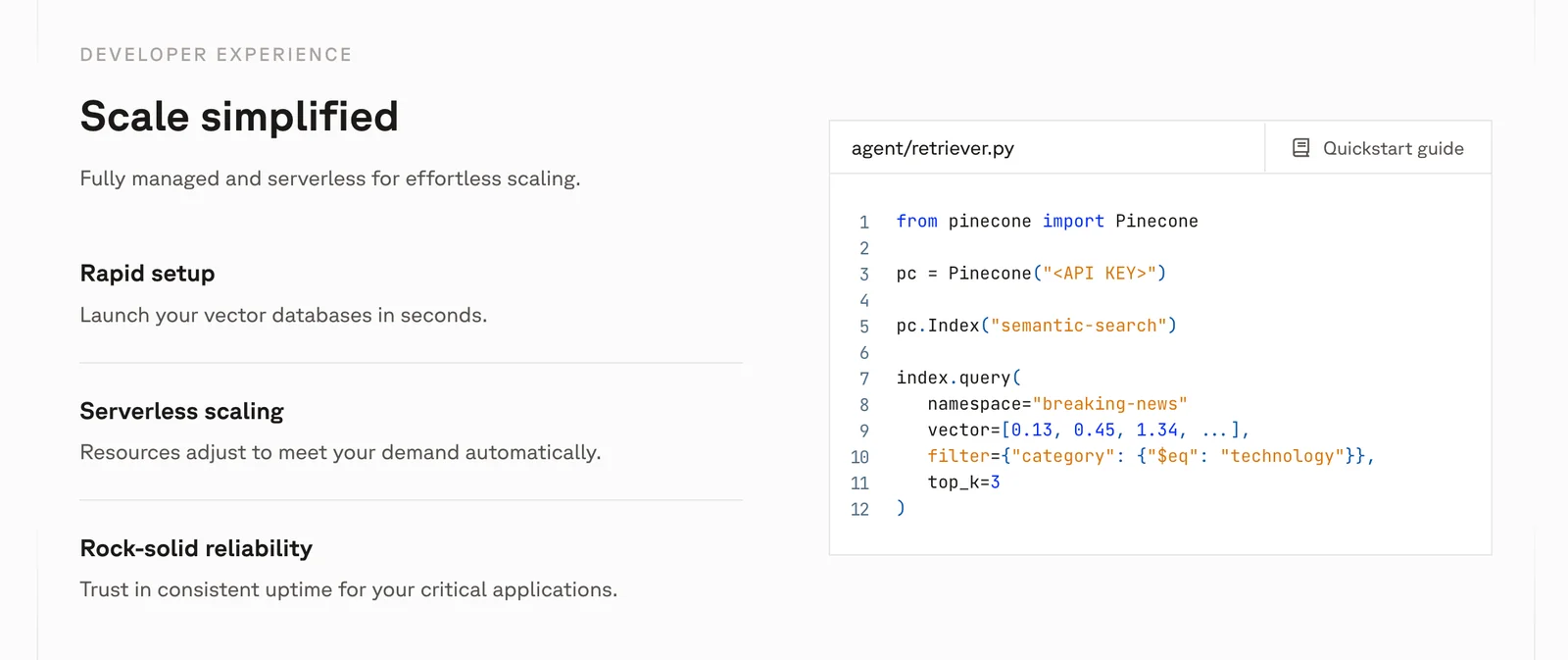
- Once logged in, navigate to the API documentation. Pinecone provides comprehensive guides and code examples in various programming languages, including Python and JavaScript.
- Familiarize yourself with the API endpoints for creating, updating, and deleting vector indexes.
-
Create a Vector Index:
- Use the API to create your first vector index. This index will store your vector embeddings and enable efficient similarity searches.
- Example: If you have a set of image embeddings, you can create an index that allows for quick retrieval of similar images based on user queries.
-
Integrate with Your Application:
- Utilize the SDKs and libraries provided by Pinecone to integrate the vector database with your existing applications. This integration enhances functionalities like personalized recommendations and semantic search.
Best Practices / Tips
- Start Small: Begin with a small dataset to understand the workflow before scaling up your vector indexes.
- Monitor Usage: Keep track of your API usage to avoid hitting limits, especially during the free trial. Pinecone offers pricing plans that can accommodate larger projects as you grow.
- Optimize Vector Representations: Invest time in optimizing how you create vectors from your data, as this directly impacts the performance of searches and recommendations.
Additional Resources
What are the key features of Pinecone?
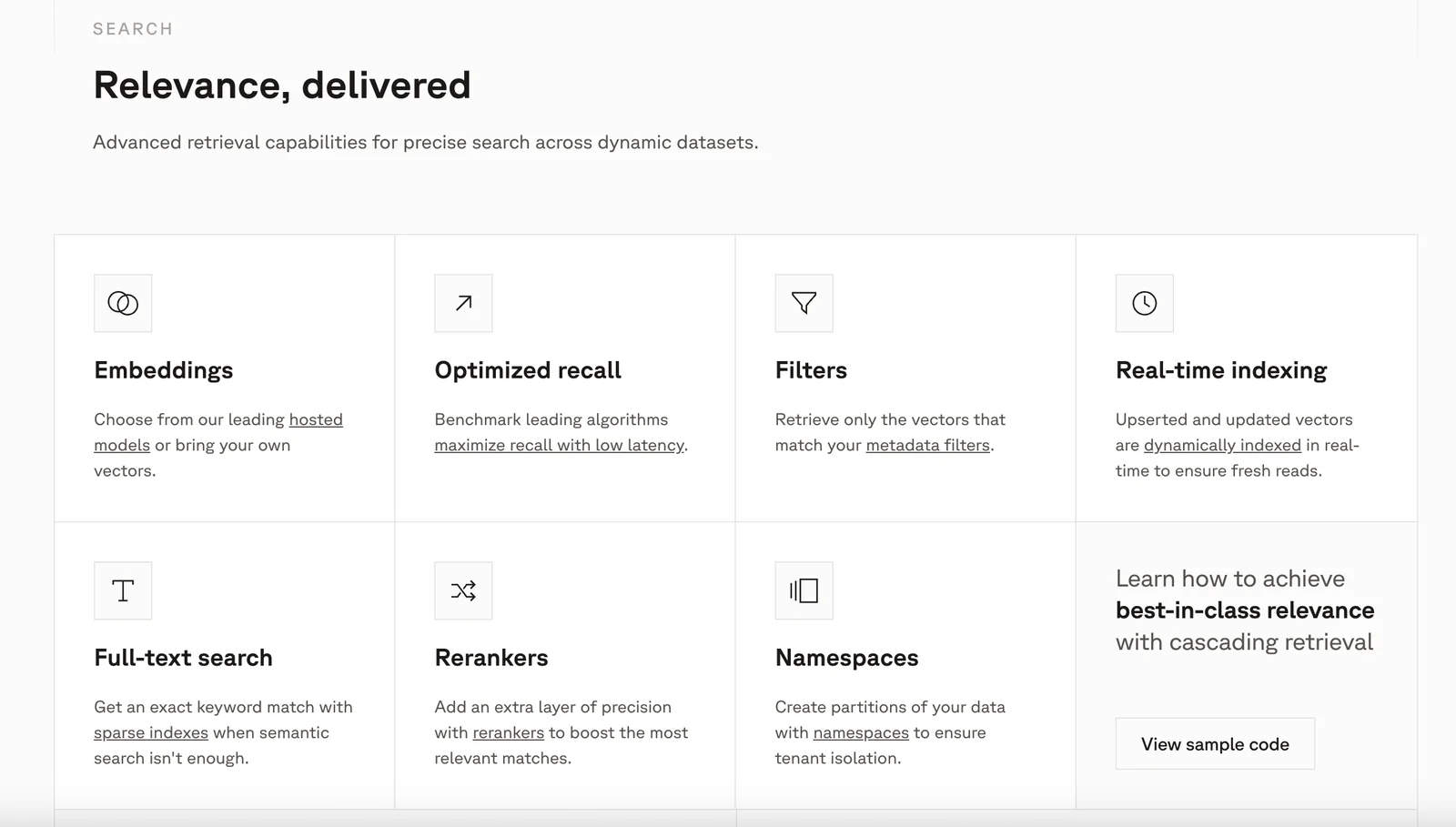
Pinecone offers key features such as managed vector indexes, low-latency similarity search, API access, and production-grade reliability. It enhances search capabilities with embedding integration and contextual retrieval, making it suitable for applications in AI, machine learning, and real-time data processing.
Key Points
- Managed Vector Indexes: Simplifies the handling of vector data.
- Low-Latency Similarity Search: Provides rapid results for high-performance applications.
- API Access: Facilitates easy integration into various software environments.
Detailed Explanation
Pinecone is a cutting-edge vector database designed for AI applications that require fast and efficient similarity searches. Here’s a more in-depth look at its key features:
Managed Vector Indexes
Pinecone abstracts the complexities of managing vector indexes. Users can create and maintain high-dimensional vector spaces without the need for extensive infrastructure setup. This feature is particularly beneficial for developers focusing on machine learning and data science, as it allows them to concentrate on building and optimizing algorithms rather than managing database logistics.
Low-Latency Similarity Search
Pinecone is optimized for low-latency performance, which means it can quickly return results even when handling large datasets. This is crucial for applications like recommendation systems and real-time search engines, where speed directly impacts user experience. For instance, if a user searches for similar items on an e-commerce platform, Pinecone can deliver relevant results almost instantaneously.
API Access
With robust API access, Pinecone allows developers to seamlessly integrate its functionality into their applications. This accessibility means you can easily connect your existing systems to Pinecone’s vector database, supporting various programming languages and frameworks. Developers can manage data operations, perform searches, and retrieve results with simple API calls, enhancing productivity and reducing development time.
Embedding Integration and Contextual Retrieval
Pinecone supports advanced embedding techniques, allowing users to leverage models that convert text, images, and other data types into vectors. This capability enhances contextual retrieval by ensuring that searches are relevant to user intent and the specific context of their queries. For example, in a customer support chatbot, Pinecone can help the bot understand and provide accurate answers based on the context of the user’s questions.
Best Practices / Tips
- Optimize Vector Embeddings: Use high-quality models for generating embeddings to improve search accuracy.
- Monitor Performance: Regularly analyze query performance and index health to ensure optimal operation.
- Utilize Batch Operations: When working with large datasets, employ batch operations for faster indexing and querying.
Additional Resources
By understanding these features and best practices, users can effectively leverage Pinecone for their AI-driven applications, ensuring high performance and scalability.
How does Pinecone compare to other vector databases?
Pinecone distinguishes itself from other vector databases through its fully managed infrastructure, exceptional low-latency performance, and seamless integration capabilities. It also offers a freemium model, allowing users to explore its features easily, along with scalable options that accommodate a wide range of workloads.
Key Points
- Managed Infrastructure: Pinecone handles all operational aspects, allowing users to focus on development.
- Low-Latency Performance: Optimized for fast query responses, crucial for real-time applications.
- Freemium Model: Offers an entry point for users to test functionalities without upfront costs.
Detailed Explanation
Pinecone is designed for machine learning applications that require efficient, scalable vector search. Unlike traditional databases, Pinecone is purpose-built to handle high-dimensional vector data, which is essential for AI models that deal with text, images, and other unstructured data.
-
Managed Infrastructure: Pinecone provides a fully managed service, which means users do not need to worry about server maintenance, scaling, or uptime. This service allows organizations to deploy machine learning applications quickly and efficiently without the overhead of managing physical resources or infrastructure.
-
Low-Latency Performance: With a focus on speed, Pinecone achieves low-latency performance, making it ideal for applications where response time is critical, such as recommendation systems, real-time search, and chatbots. Its design optimizes data retrieval, ensuring that queries are processed rapidly, even under heavy loads.
-
Freemium Model and Scalability: Pinecone's freemium model allows developers to start with no initial investment, making it accessible for startups and individual developers. As workloads grow, users can scale their services seamlessly, accommodating increased demands without needing to change platforms.
Best Practices / Tips
- Utilize the Freemium Model: Take advantage of the freemium offering to test features and capabilities without financial commitment.
- Optimize Vector Dimensions: Keep the number of dimensions in your vectors manageable to ensure optimal performance and lower latency.
- Monitor Performance Regularly: Use Pinecone’s analytics to track query performance and adjust configurations as needed to improve efficiency.
Additional Resources
Does Pinecone provide API access for integration?
Yes, Pinecone provides robust API access through both REST and gRPC APIs, empowering developers to seamlessly integrate advanced vector search capabilities into their applications and workflows, enhancing data retrieval and analysis efficiency.
Key Points
- API Types: Pinecone supports REST and gRPC APIs.
- Integration Ease: Developers can easily incorporate vector search features.
- Use Cases: Ideal for applications in machine learning, AI, and data analytics.
Detailed Explanation
Pinecone’s API access is designed for developers seeking to implement high-performance vector search functionalities. With both REST and gRPC options, developers can choose the method that best fits their application's architecture.
REST API
The REST API offers a straightforward HTTP interface, making it easy to interact with Pinecone’s services using standard web technologies. This is particularly useful for applications built with JavaScript, Python, or any language that can send HTTP requests.
gRPC API
The gRPC API, on the other hand, is optimized for performance and supports bi-directional streaming, which can be beneficial for real-time applications. It works seamlessly with languages such as Go, Java, and C++, allowing for efficient communication between services.
Use Cases
- E-commerce: Enhancing product recommendations by analyzing user behavior and preferences.
- Content Management: Enabling smart search features in large databases of articles or media.
- Machine Learning: Facilitating similarity searches in high-dimensional datasets, improving models' performance.
Best Practices / Tips
- Choose the Right API: Assess your application’s needs to determine whether REST or gRPC is more appropriate. For simpler applications, REST might suffice; for high-performance needs, consider gRPC.
- Rate Limiting: Familiarize yourself with Pinecone's rate limits to avoid interruptions in service.
- Optimize Queries: Use filters and metadata effectively to enhance search relevance and speed.
Additional Resources
Explore more AI Ai Tools tools
Browse all Ai Tools tools →Compare Pinecone: vs Agents Never Sleep · vs Port Radar for macOS · vs SubtitleGenerator · vs Zero