

Kimi K2 Thinking
AIOpen SourceFreeOpen-source large-scale 'thinking' Mixture-of-Experts LLM by Moonshot AI focused on advanced reasoning and tool-enabled workflows.
Kimi K2 Thinking
Open-source large-scale 'thinking' Mixture-of-Experts LLM by Moonshot AI focused on advanced reasoning and tool-enabled workflows.
About Kimi K2 Thinking
Kimi K2 Thinking is Moonshot AI's open-source 'thinking' variant of the Kimi K2 family, implemented as a Mixture-of-Experts (MoE) model designed for advanced reasoning, tool-calling, and high-capacity tasks. The Kimi K2 series uses a hybrid Kimi Linear attention architecture and MoE routing to deliver very large effective parameter capacity (reported as 32B activated parameters and ~1T total parameters across experts) while remaining efficient for frontier knowledge, math, and coding tasks. The Thinking variant includes support for structured tool-calling and reasoning parsers (e.g., integrations used with SGLang), provides deployment guidance and compressed safetensors for distribution, and is intended for self-hosting and research use where high compute and storage resources are available.
Screenshots

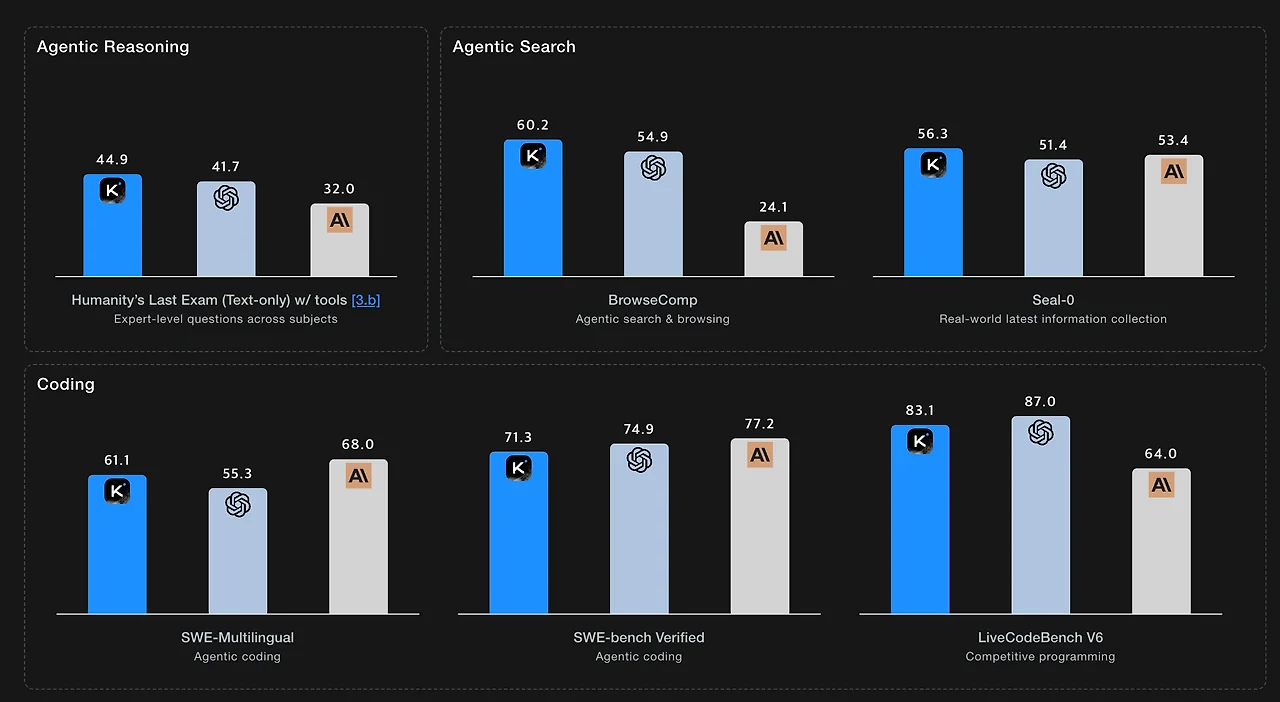
Key Features
Use Cases



Frequently asked questions about Kimi K2 Thinking
What are the free and paid pricing options for Kimi K2 Thinking?
Kimi K2 Thinking offers a free open-source model, while paid options on the Moonshot platform begin at $0.15 per 1 million tokens for cache hits. Various tiers are available to cater to different usage needs, making it flexible for both individual and enterprise users.
Key Points
- Free Open-Source Model: Kimi K2 Thinking is accessible to everyone without any cost.
- Paid Options: Pricing starts at $0.15 per 1 million tokens for cache hits.
- Flexible Tiers: Different pricing tiers accommodate various usage demands.
Detailed Explanation
Kimi K2 Thinking is a powerful AI tool designed for various applications, available in both free and paid versions. The free open-source model allows developers, researchers, and enthusiasts to explore its features and integrate it into their projects without any financial commitment. This model is ideal for experimentation and personal use.
For users with higher demands, the paid options on the Moonshot platform provide scalable solutions. Starting at $0.15 per 1 million tokens for cache hits, this pricing model is structured to accommodate users based on their volume of usage. As usage increases, users can choose from several tiers, which may offer additional features or benefits, such as enhanced performance or priority support.
For instance, businesses needing to process large datasets or engage in frequent AI interactions can benefit from the tiered pricing structure, ensuring they only pay for what they use while maximizing efficiency.
Best Practices / Tips
- Evaluate Your Needs: Before choosing a pricing tier, assess your expected usage. If you anticipate high-volume interactions, opting for a paid tier may save costs in the long run.
- Monitor Token Usage: Keep track of your token consumption to avoid unexpected charges. Many platforms provide dashboards to help manage usage effectively.
- Explore Free Resources: Utilize the free open-source model to test features and capabilities before committing to a paid plan.
Additional Resources
How does Kimi K2 Thinking's Mixture-of-Experts architecture enhance performance?
Kimi K2 Thinking's Mixture-of-Experts architecture significantly enhances performance by activating around 32 billion parameters from a total of approximately 1 trillion. This selective activation allows the system to perform complex reasoning tasks efficiently, reducing computational costs while maintaining high accuracy and speed.
Key Points
- Selective Parameter Activation: Activates only the necessary parameters for each task.
- Resource Efficiency: Reduces compute costs while delivering high performance.
- Enhanced Reasoning Capabilities: Supports complex tasks without overloading the system.
Detailed Explanation
Kimi K2 Thinking leverages a Mixture-of-Experts (MoE) architecture, which is a revolutionary approach to handling large-scale machine learning models. By activating only a subset of its parameters—specifically, around 32 billion out of 1 trillion—Kimi K2 can manage high-capacity reasoning tasks without the extensive computational burden typically associated with such large models.
How It Works
-
Task-Specific Activation: When a specific task is presented, Kimi K2 identifies which experts (subsets of parameters) are most relevant to that task. This means that only a fraction of the model is utilized, leading to faster processing times and lower energy consumption.
-
Scalability: This architecture allows Kimi K2 to scale efficiently. As the model grows, the system can add more experts without a linear increase in computational costs, making it adaptable to various applications, from natural language processing to complex decision-making processes.
-
Example Use Case: In a scenario where Kimi K2 is used for language translation, it activates the most relevant language pairs, optimizing its performance and reducing the time and resources needed for translation tasks.
Best Practices / Tips
- Choose the Right Tasks: To maximize the benefits of the Mixture-of-Experts architecture, select tasks that can leverage the model's ability to activate specific sets of parameters.
- Monitor Performance: Regularly assess the model's output to ensure that the task-specific experts are delivering optimal results. Adjust the selection process based on performance metrics.
- Experiment with Configurations: Explore different configurations of expert activations to find the most efficient setup for your specific use case, balancing performance and resource consumption.
Additional Resources
How do I get started using Kimi K2 Thinking for my projects?
To get started using Kimi K2 Thinking for your projects, download the open-source model weights from Hugging Face and follow the deployment instructions in the documentation. Ensure your system meets the required compute resources for effective hosting and performance.
Key Points
- Download model weights from Hugging Face.
- Follow the official documentation for deployment.
- Verify your compute resources meet the requirements.
Detailed Explanation
Kimi K2 Thinking is an advanced AI tool designed to enhance various projects, be it in natural language processing, data analysis, or machine learning applications. To initiate your journey with Kimi K2 Thinking:
-
Download the Model Weights: Visit Hugging Face and search for Kimi K2 Thinking. You will find the model weights available for download. Select the appropriate version that fits your project needs.
-
Review the Documentation: The official documentation is your best friend. It contains step-by-step guidelines on how to set up the model, configure settings, and deploy it effectively. Pay close attention to sections that cover installation prerequisites and configuration options.
-
Check Compute Resources: Kimi K2 Thinking requires specific hardware capabilities. Make sure your system has sufficient CPU/GPU power, memory, and storage. For instance, a minimum of 16 GB RAM and a decent GPU (like NVIDIA GTX 1060 or equivalent) is recommended for optimal performance.
-
Set Up Your Environment: Ensure you have Python installed, along with necessary libraries such as TensorFlow or PyTorch, depending on your preference. Virtual environments can also help manage dependencies efficiently.
-
Run Sample Codes: After setup, start with sample codes provided in the documentation to familiarize yourself with the functionality and performance of Kimi K2 Thinking. Modify these examples to fit your project's specific needs.
Best Practices / Tips
- Regular Updates: Keep an eye on updates from Hugging Face to ensure you’re using the latest version of Kimi K2 Thinking for improved features and performance.
- Community Engagement: Join forums or groups related to Kimi K2 Thinking to gain insights, tips, and support from other users.
- Testing and Validation: Before deploying your project in a production environment, conduct thorough testing and validation to ensure accuracy and reliability.
- Resource Management: Monitor your compute resources during initial runs to avoid bottlenecks. Use cloud services if local resources are insufficient.
Additional Resources
By following these steps and guidelines, you’ll be well on your way to successfully integrating Kimi K2 Thinking into your projects.
What are the technical requirements for deploying Kimi K2 Thinking?
Deploying Kimi K2 Thinking requires significant computational resources, including a multi-terabyte disk space and multi-GPU setups. It is designed to be compatible with SGLang and supports integration with various tools for optimal efficiency and performance in AI-driven tasks.
Key Points
- Substantial compute resources are essential.
- Multi-terabyte disk space is necessary for data storage.
- Compatibility with SGLang enhances functionality.
Detailed Explanation
Kimi K2 Thinking is an advanced AI tool that necessitates robust technical infrastructure for effective deployment. Here are the key technical requirements:
-
Compute Resources: To ensure smooth operation, a high-performance setup is crucial. Typically, this involves:
- Multi-GPU Configurations: Utilizing multiple GPUs can significantly accelerate processing times, especially for tasks involving deep learning and large datasets. For instance, using NVIDIA's A100 GPUs can improve performance due to their high throughput.
- Multi-Terabyte Disk Space: Adequate storage capacity is vital for housing large datasets, models, and outputs generated by Kimi K2. A minimum of 5 TB is often recommended for comprehensive projects.
-
Software Compatibility: Kimi K2 Thinking is built to work seamlessly with SGLang, a specialized programming language tailored for AI applications. This compatibility allows users to leverage SGLang’s features for efficient coding and development.
-
Integration Capabilities: The platform supports integration with various tools and systems, enhancing its adaptability in different environments. This includes compatibility with cloud platforms (like AWS or Google Cloud) and other AI tools, which facilitate the deployment and scaling of Kimi K2 projects.
Example Use Case
For organizations looking to implement Kimi K2 Thinking, a typical deployment might involve setting up a server with at least 64 GB of RAM, a multi-GPU setup with NVIDIA GPUs, and utilizing cloud storage solutions to manage extensive datasets efficiently.
Best Practices / Tips
- Plan Your Infrastructure: Before deploying, assess your computational needs based on the expected workload. This will help in choosing the right hardware components.
- Monitor Performance: Use performance monitoring tools to track resource utilization and optimize your setup accordingly.
- Regular Updates: Keep your software and drivers updated to ensure compatibility and performance enhancements.
Additional Resources
Utilizing the right technical requirements and following best practices will enable you to deploy Kimi K2 Thinking effectively, maximizing its capabilities in your projects.
Why should I choose Kimi K2 Thinking over other AI models?
Kimi K2 Thinking is preferred over other AI models due to its superior reasoning capabilities, support for tool-calling, and open-source nature. Its innovative Mixture-of-Experts architecture enhances efficiency in tackling complex problems, making it a leading choice for developers and researchers alike.
Key Points
- Advanced Reasoning Capabilities: Kimi K2 Thinking excels in logical reasoning, allowing for nuanced problem-solving.
- Tool-Calling Support: Integrates seamlessly with various tools, enhancing its functionality.
- Open-Source Accessibility: Freely available for customization and community collaboration.
Detailed Explanation
Kimi K2 Thinking distinguishes itself through its advanced reasoning capabilities, which empower the model to analyze and interpret data more effectively than traditional AI systems. This is particularly beneficial in fields such as natural language processing (NLP) and complex data analytics, where understanding context and multi-step reasoning is crucial.
The tool-calling support feature allows Kimi K2 Thinking to integrate with external APIs and software tools, enhancing its versatility. For instance, when working on a data-driven project, users can leverage various data visualization tools or databases directly within their workflows, streamlining processes and improving overall productivity.
Moreover, Kimi K2 Thinking is open-source, which means developers can access the source code to modify and adapt the model for specific needs. This openness fosters a collaborative environment, encouraging innovation and continuous improvement. For organizations, this can translate to significant cost savings since they can tailor the model without the constraints of proprietary software licensing.
Best Practices / Tips
- Explore Communities: Engage with the open-source community to share knowledge and discover unique use cases.
- Leverage Tool Integrations: Take full advantage of the tool-calling feature by integrating Kimi K2 Thinking with other AI and data management tools to maximize efficiency.
- Stay Updated: Regularly check for updates and improvements in Kimi K2 Thinking to utilize the latest features and enhancements.
Additional Resources
By choosing Kimi K2 Thinking, users can benefit from a powerful, adaptable AI model that is designed for efficiency and collaboration, setting it apart from conventional AI solutions.
Explore more AI Ai Models tools
Browse all Ai Models tools →Browse by use case: Code Generation
Compare Kimi K2 Thinking: vs SWE-2 · vs Desert Ant Labs · vs Hy4 preview · vs Soup CLI