

Google Stitch
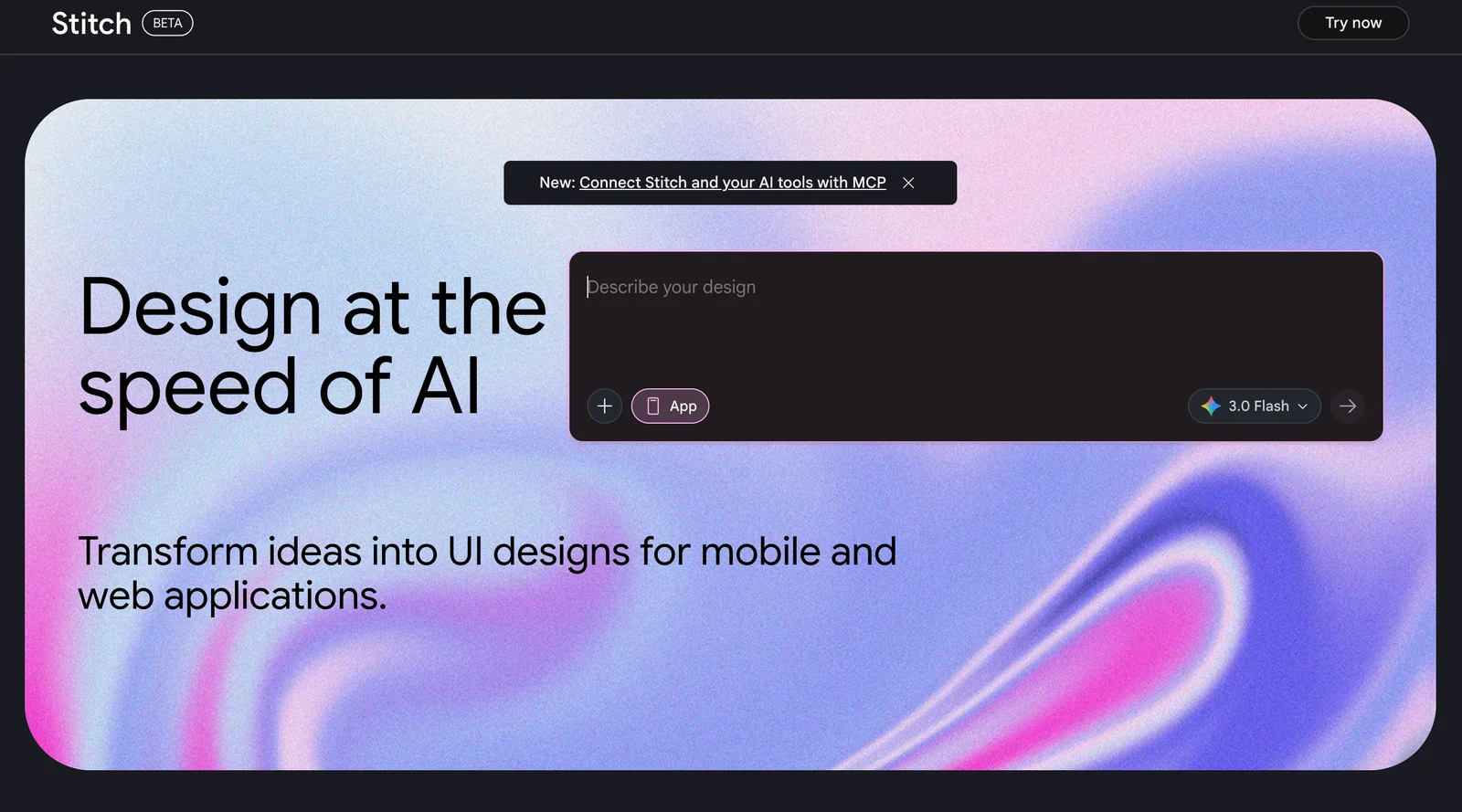
AIFreeGenerates UI designs for mobile and web from prompts, sketches, or images to speed design ideation and prototyping.
Google Stitch
Generates UI designs for mobile and web from prompts, sketches, or images to speed design ideation and prototyping.
About Google Stitch
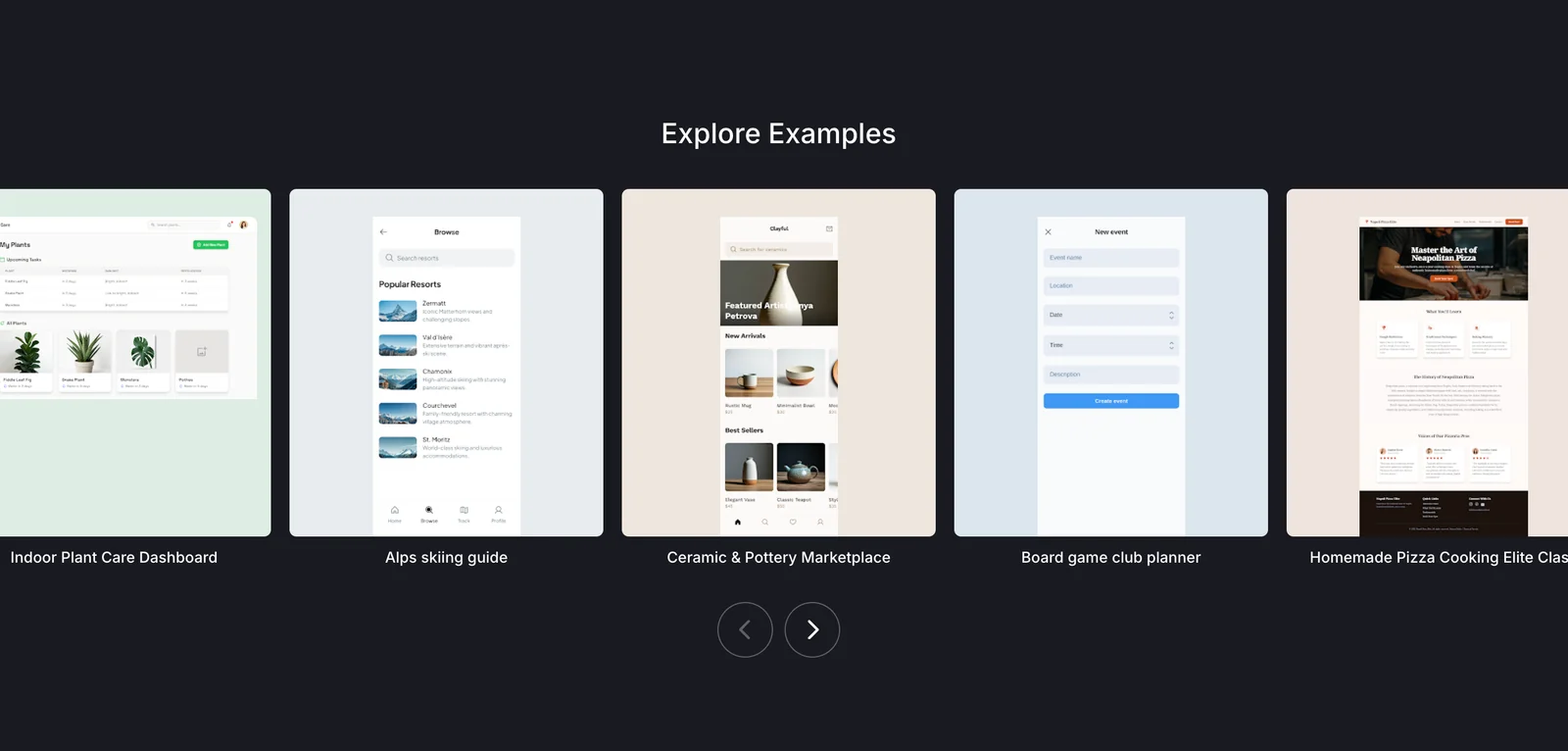
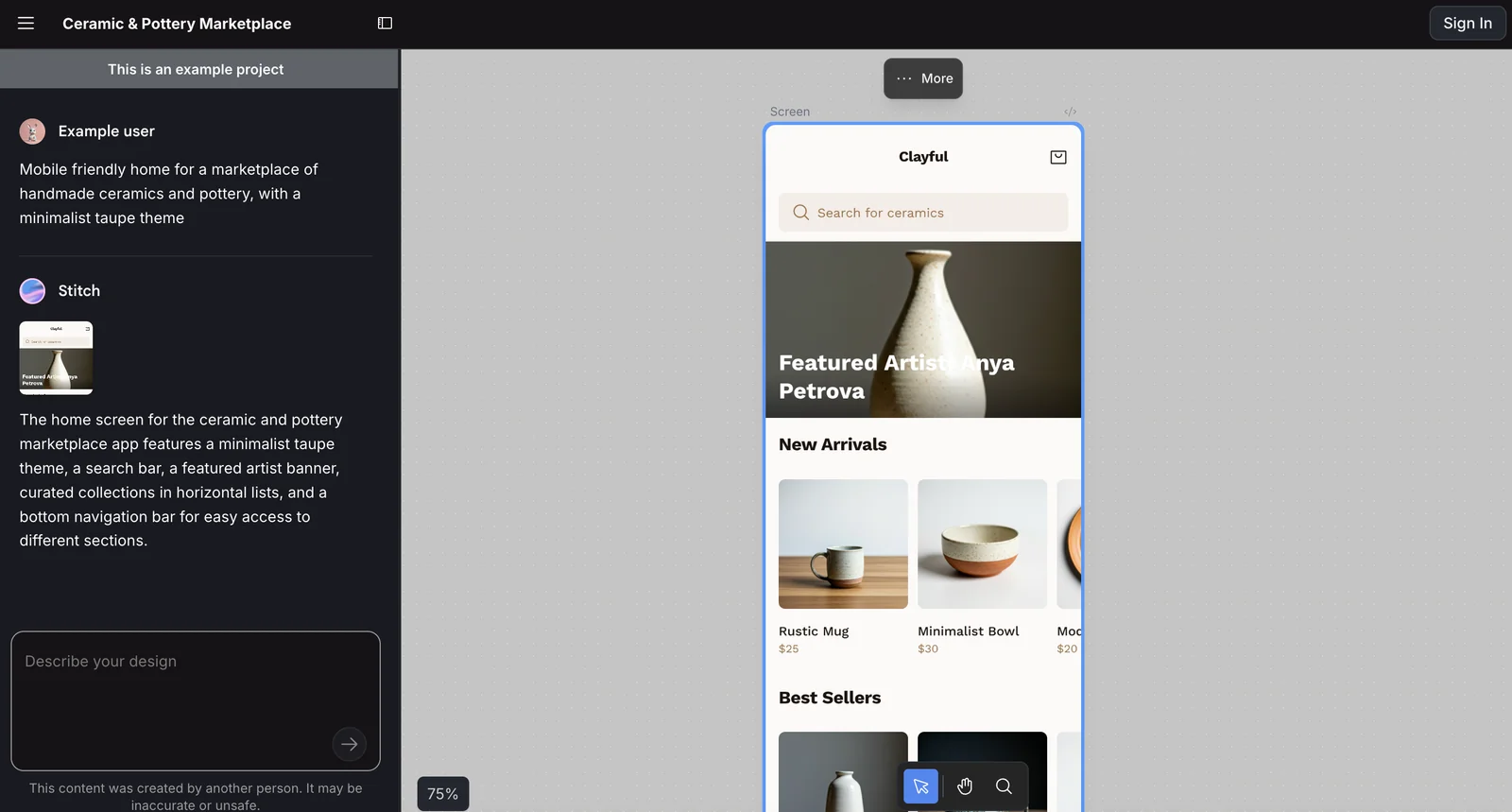
Stitch is a Google-developed tool that generates user interfaces for mobile and web applications to accelerate design ideation and prototyping. It can transform ideas, sketches, and images into UI screens, and is offered alongside tooling for integration with Google Cloud (MCP) and command-line workflows. Stitch provides developer-oriented integrations such as a Gemini CLI extension and an MCP server/proxy for hosting and managing Stitch API access, authentication, and IAM configuration. The combination of on-demand UI generation and cloud/CLI integration aims to shorten the gap between visual design and developer handoff.
Screenshots
Key Features
Use Cases



Frequently asked questions about Google Stitch
How do I get started with Google Stitch?
To get started with Google Stitch, visit stitch.withgoogle.com and sign in using your Google account. You can explore features like text-to-UI and image-to-UI for free through Google Labs, allowing you to create user interfaces quickly and efficiently.
Key Points
- Sign Up: Create an account using your Google credentials.
- Explore Features: Familiarize yourself with text-to-UI and image-to-UI tools.
- Free Access: Enjoy free usage through Google Labs with no hidden charges.
Detailed Explanation
Google Stitch is designed for developers and designers looking to streamline UI creation. After signing in, you will be greeted with a user-friendly dashboard. Here’s how to navigate the platform effectively:
-
Sign In: Use your existing Google account for a seamless sign-in experience.
-
Explore Features:
- Text-to-UI: Input textual descriptions, and Stitch will generate UI components based on your input. For example, typing "Create a login form" will result in an automatically generated form with input fields and buttons.
- Image-to-UI: Upload an image, and Stitch will analyze its layout to create a matching user interface. This is particularly useful for designers who want to convert mockups into functional UI elements quickly.
-
Experiment: Don’t hesitate to experiment with different prompts and images to see various outputs. This will help you understand the capabilities and limitations of the tool.
Best Practices / Tips
- Use Clear Descriptions: When utilizing the text-to-UI feature, be specific in your prompts for better results. Instead of saying "button," specify "red submit button."
- Iterate and Refine: If the generated UI doesn’t meet your expectations, refine your input and try again. This iterative process can lead to significantly improved outputs.
- Stay Updated: Google regularly updates its tools; check back frequently for new features or enhancements that can optimize your workflows.
Additional Resources
- Google Stitch Official Documentation
- Google Labs Overview
- Community Forums for user discussions and tips.
Is Google Stitch easy to use for beginners?
Yes, Google Stitch is easy to use for beginners. Its user-friendly design allows anyone to create UI designs from prompts or images without needing advanced technical skills. The intuitive interface, combined with step-by-step guides, makes it accessible to users of all experience levels.
Key Points
- User-Friendly Interface: Designed for ease of use, even for non-technical users.
- Step-by-Step Guidance: Offers tutorials and guides to facilitate the design process.
- Versatile Design Capabilities: Allows creation from text prompts or images, catering to diverse needs.
Detailed Explanation
Google Stitch provides an intuitive platform for beginners to create user interface designs effortlessly. Users can start by entering design prompts or uploading images, which Stitch then transforms into UI layouts. The interface includes drag-and-drop features, making the design process seamless and enjoyable.
Example Use Cases:
- Startups: Entrepreneurs can quickly prototype app interfaces to present to investors.
- Freelancers: Designers can use Stitch to generate layouts for clients without spending hours on manual design.
- Educators: Teachers can create interactive learning materials for students, enhancing engagement.
The platform offers various templates and design elements, allowing users to customize their designs according to their vision. Additionally, the community forum provides a space for beginners to share tips and ask questions.
Best Practices / Tips
- Explore Templates: Start with pre-designed templates to understand layout and design principles.
- Utilize Tutorials: Follow the built-in tutorials to maximize your use of features and tools.
- Iterate Designs: Don’t hesitate to experiment with different prompts and layouts to discover what works best.
- Seek Feedback: Share your designs with peers or on forums to get constructive feedback and improve your skills.
Additional Resources
By leveraging these resources, beginners can quickly become proficient in using Google Stitch to create stunning UI designs.
What features does Google Stitch offer for UI design?
Google Stitch provides robust features for UI design, including prompt-to-UI generation, image and sketch import capabilities, Figma export support, and CLI integration for advanced users. In Standard Mode, users can generate around 350 designs monthly for free, making it a versatile tool for designers.
Key Points
- Prompt-to-UI Generation: Quickly transform text prompts into user interfaces.
- Image and Sketch Import: Seamlessly integrate designs from various sources.
- Figma Export Support: Easily export designs to Figma for further refinement.
Detailed Explanation
Google Stitch is a powerful UI design tool that leverages AI to streamline the design process.
-
Prompt-to-UI Generation: This feature allows designers to input text prompts that the AI then converts into functional UI designs. This can significantly speed up the design workflow, particularly during the brainstorming phase.
-
Image and Sketch Import: Users can import existing images and sketches directly into Stitch, enabling quick transformations into digital formats. This feature is particularly useful for designers who start their creative process on paper or with rough sketches, allowing them to maintain their original concepts while transitioning to digital designs.
-
Figma Export Support: Once designs are created, users can export them directly to Figma, one of the leading design tools in the industry. This seamless integration allows for further editing and collaboration within teams, enhancing productivity.
-
CLI Integration: For advanced users, Google Stitch offers Command Line Interface (CLI) integration, allowing developers to automate design workflows and integrate Stitch into their existing toolchains. This feature is particularly beneficial for teams looking to customize their design process with scripts and automated tasks.
-
Free Monthly Usage: Users can generate approximately 350 designs per month in Standard Mode at no cost. This allows designers to explore the tool’s capabilities without a financial commitment, making it accessible for startups and individual designers.
Best Practices / Tips
- Utilize Prompts Effectively: Experiment with various text prompts to see how different inputs influence design outcomes. Being specific can yield better results.
- Leverage Image Imports: Don’t hesitate to use images and sketches as starting points. This can save time and preserve creative ideas.
- Figma Workflow: Make the most of the Figma export feature by setting up your Figma projects before importing designs. This organization can enhance collaboration and streamline the design process.
Additional Resources
What are the technical requirements to use Google Stitch?
To use Google Stitch, you need a Google account for access. Familiarity with Google Cloud Platform (GCP) is essential for utilizing advanced features, particularly for authentication and Identity and Access Management (IAM) configurations. Ensuring compliance with system requirements is crucial for a seamless experience.
Key Points
- Google Account Required: Users must have a Google account to access Google Stitch.
- Familiarity with GCP: Understanding Google Cloud Platform is beneficial for advanced features.
- IAM Configurations: Knowledge of Identity and Access Management is necessary for security and access control.
Detailed Explanation
Google Stitch is a powerful data integration tool that enables users to efficiently move and transform data across various sources into Google Cloud. Here are the technical requirements you'll need to consider:
-
Google Account: Creating a Google account is the first step. This account will grant you access to Google Stitch and its features.
-
Google Cloud Platform (GCP): A working knowledge of GCP is important. Google Stitch operates within the GCP ecosystem, so understanding how to navigate the platform will enhance your ability to manage data effectively.
-
IAM Configuration: Identity and Access Management (IAM) is critical for securing your data. Ensure that you configure IAM roles and permissions correctly to control who can access different aspects of your data integration processes. This includes setting up users, roles, and permissions that align with your organization’s security policies.
-
Technical Specifications: Users should ensure their systems meet any technical prerequisites outlined in the GCP documentation, which may include specific browser versions, network configurations, and other requirements.
-
Data Sources: Google Stitch supports a wide range of data sources, including Google Sheets, BigQuery, and various external databases. Confirm that your data sources are compatible with the platform.
Best Practices / Tips
-
Understand IAM Roles: Spend time learning about the different IAM roles available in GCP to optimize your use of Google Stitch. This will ensure that your data remains secure while allowing the right individuals access to necessary features.
-
Regularly Review Permissions: Conduct periodic reviews of IAM configurations to make sure they align with your current data access needs and security policies.
-
Stay Updated: Google frequently updates its tools and platforms. Regularly check for any changes in Google Stitch functionality or system requirements to maintain optimal performance.
-
Utilize Training Resources: Engage with Google’s official training materials and documentation to enhance your proficiency with Google Stitch and the broader GCP ecosystem.
Additional Resources
How does Google Stitch compare to other UI design tools?
Google Stitch excels in its free access and rapid generation of UI designs from text or images, making it a standout choice for early-stage design work. Unlike many paid tools, it focuses on quick ideation, allowing designers to explore concepts without financial commitment.
Key Points
- Free Access: Google Stitch is entirely free, making it accessible to all users.
- Rapid Design Generation: Quickly turn text or images into UI designs, ideal for brainstorming.
- User-Friendly Interface: Intuitive design tools enhance the user experience for both beginners and professionals.
Detailed Explanation
Google Stitch is revolutionizing the UI design landscape by offering a free platform where users can generate stunning designs in mere minutes. Its ability to create UI prototypes from simple text prompts or uploaded images sets it apart from traditional design software like Adobe XD or Sketch, which often come with hefty subscription fees.
For instance, a user can input a phrase like "create a modern e-commerce homepage" and receive a tailored design prototype instantly. This rapid ideation process is perfect for designers in the early brainstorming phase, allowing them to visualize concepts without the pressure of cost.
Additionally, Google Stitch stands out through its user-friendly interface. Even beginners can easily navigate its features, making it an ideal tool for startups or individual freelancers testing out design ideas before investing in more complex software. In contrast, tools like Figma or InVision, while powerful, can have steeper learning curves and higher costs.
Best Practices / Tips
- Leverage Templates: Use pre-existing templates to kickstart your design process.
- Iterate Quickly: Take advantage of the rapid generation feature by experimenting with multiple concepts in one session.
- Integrate Feedback: Share designs with team members for quick feedback, ensuring you refine your ideas effectively.
Common pitfalls include relying solely on automated designs without adding personal touches or contextual relevance. Always aim to customize generated designs to align with your specific brand identity and user experience goals.
Additional Resources
Explore more AI Ai Agents tools
Browse all Ai Agents tools →Browse by use case: Code Generation · Automation & Productivity
Compare Google Stitch: vs Apache Maka · vs Construct Computer · vs ShogunAI · vs fx