

Z Image Turbo
AIOpen SourceFreeA 6B-parameter, efficient text-to-image model (Z-Image-Turbo) optimized for few-step sampling, photorealism, and English–Chinese text rendering.
Z Image Turbo
A 6B-parameter, efficient text-to-image model (Z-Image-Turbo) optimized for few-step sampling, photorealism, and English–Chinese text rendering.
About Z Image Turbo
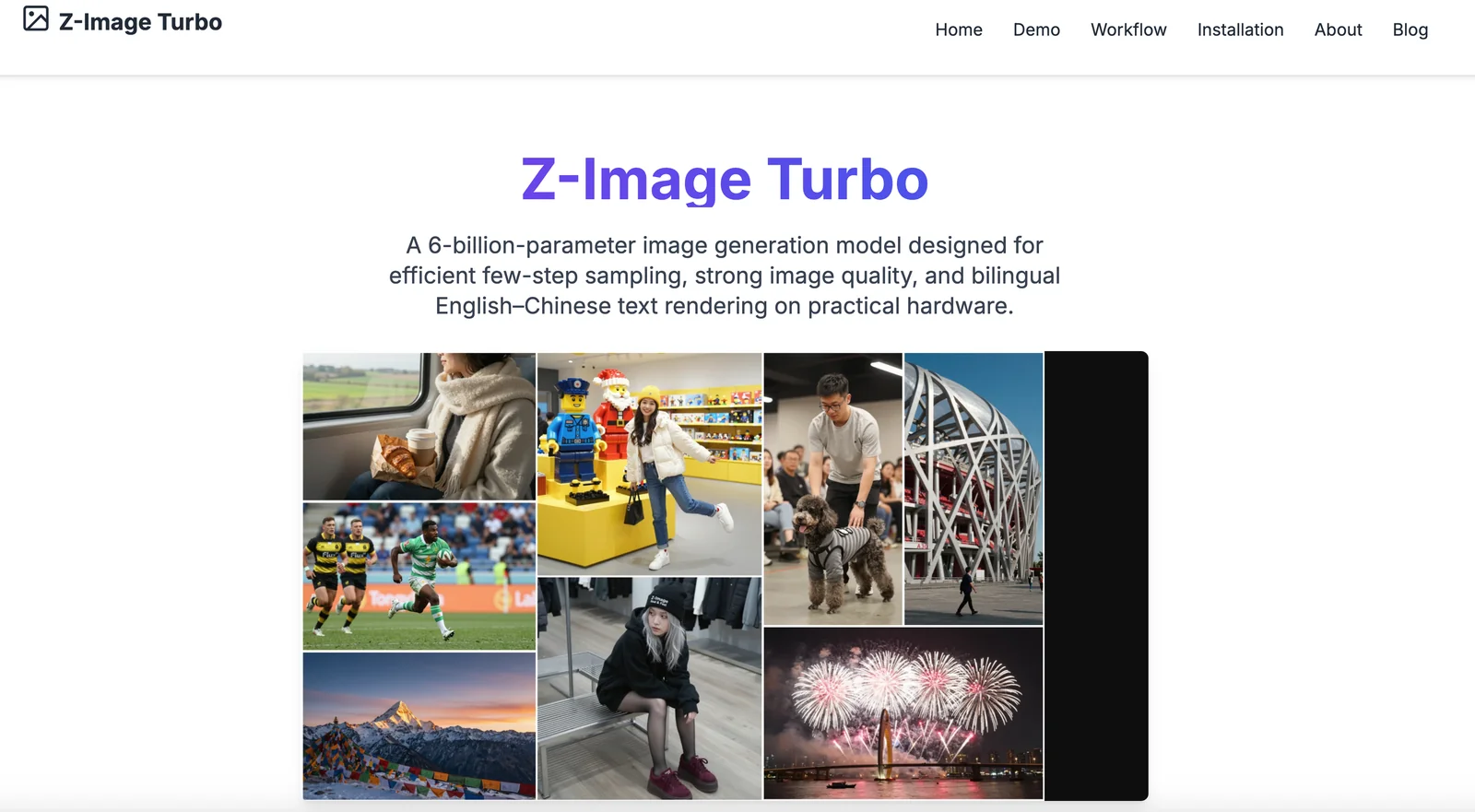
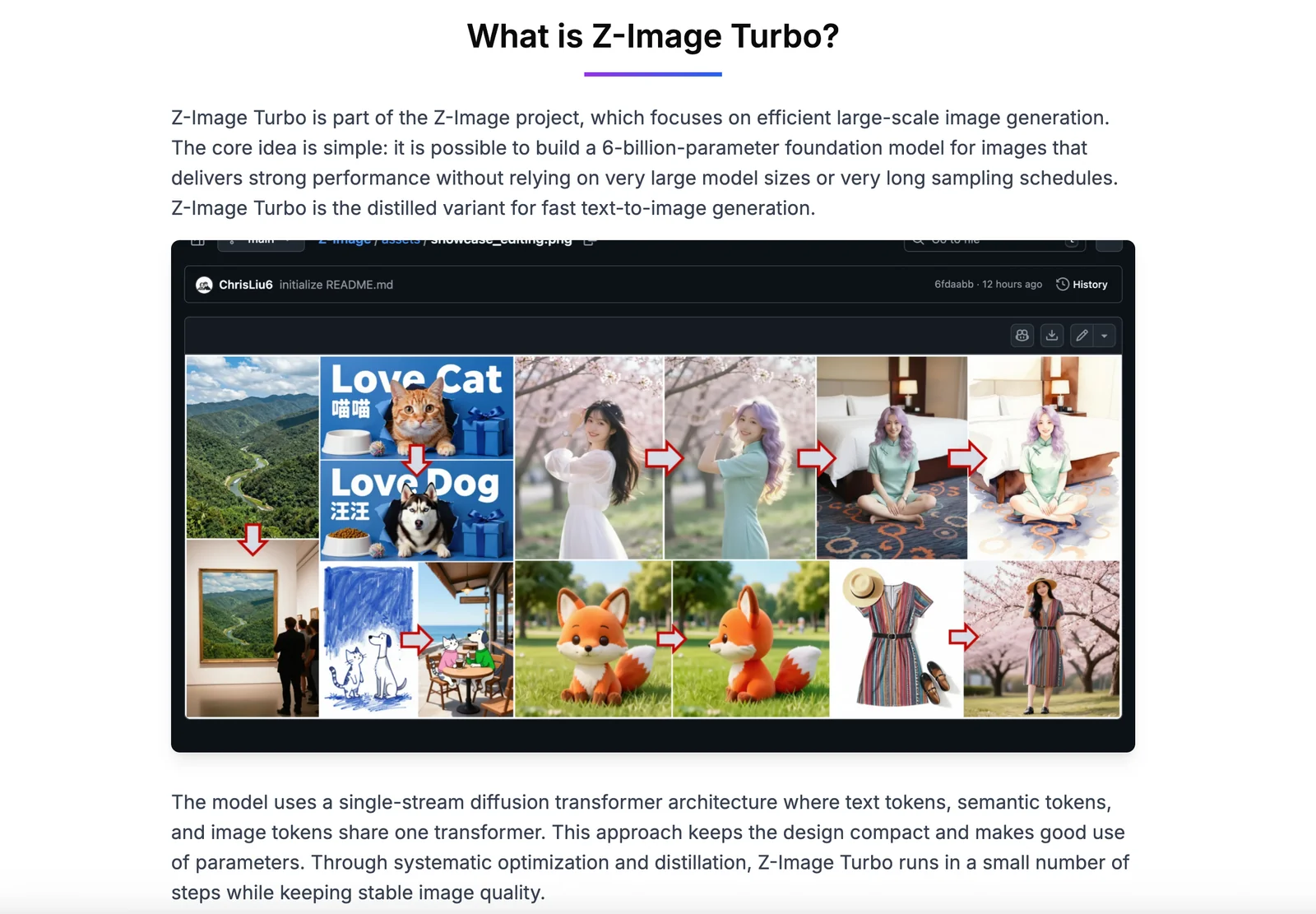
Z-Image-Turbo is a distilled 6B-parameter text-to-image foundation model built on a single-stream diffusion transformer (S3-DiT). It is engineered for very efficient few-step sampling (default 8 NFEs) to enable low-latency inference on enterprise GPUs and practical deployment on 16 GB consumer GPUs. The model emphasizes photorealistic image quality, robust instruction adherence, and accurate bilingual (English & Chinese) text rendering. Its stack integrates a Qwen 4B text encoder for conditioning, a Flux VAE, and training/distillation techniques (DMDR/DMD+RL) to compress capabilities into a fast inference model while supporting low-precision formats (bfloat16, FP8) and downstream integrations (Diffusers, ComfyUI, local MPS/CUDA pipelines).
Screenshots
Key Features
Use Cases



Frequently asked questions about Z Image Turbo
What are the pricing options for Z Image Turbo?
Z Image Turbo offers a variety of pricing options, including a free open-source model and hosted plans starting at $0. Users receive 10 credits per month for casual use, with additional paid plans available for those needing higher volume capabilities.
Key Points
- Free Open-Source Model: Accessible for everyone.
- Hosted Plans: Starting at $0, suitable for light users.
- Paid Plans: Available for heavy users requiring more credits.
Detailed Explanation
Z Image Turbo provides flexibility in its pricing structure, catering to both casual users and businesses that require extensive image processing capabilities.
-
Free Open-Source Model: This option allows users to download and run Z Image Turbo on their own servers. This is perfect for developers and organizations that want to customize the tool according to their specific needs without incurring any costs.
-
Hosted Plans: The hosted version starts at $0, providing an entry point for users who want to utilize Z Image Turbo without technical setup. With this plan, users get 10 credits each month, which is ideal for light users or for testing the platform’s capabilities.
-
Paid Plans: For users with higher volume needs, Z Image Turbo offers tiered paid plans. These plans provide additional credits, enabling users to process more images per month. Pricing and credit limits for these plans vary, so it is advisable to check the official website for the most current rates.
Best Practices / Tips
- Assess Your Needs: Before choosing a plan, evaluate your expected usage to determine if the free model suffices or if you need to invest in a paid plan.
- Monitor Credit Usage: Keep track of your credit consumption to avoid unexpected charges or service interruptions with paid plans.
- Explore Customization: If you opt for the open-source model, consider customizing the software to better fit your workflow or specific requirements.
Additional Resources
What unique features does Z Image Turbo provide for text-to-image generation?
Z Image Turbo features a powerful 6B-parameter model designed for efficient few-step sampling, delivering stunning photorealism and precise bilingual rendering of English and Chinese text. This unique combination makes it an ideal tool for various creative applications, including advertising, art, and content generation.
Key Points
- 6B-Parameter Model: Enables advanced text-to-image generation.
- Efficient Few-Step Sampling: Reduces processing time while maintaining quality.
- Bilingual Capability: Supports English and Chinese text for broader accessibility.
Detailed Explanation
Z Image Turbo stands out in the realm of text-to-image generation due to its robust 6B-parameter model. This model is specifically engineered to produce high-quality images with a focus on photorealism, making it suitable for various industries such as marketing, entertainment, and graphic design.
Efficient Few-Step Sampling
One of the most impressive features of Z Image Turbo is its efficient few-step sampling process. Traditional models often require extensive iterations to achieve the desired quality, but this tool significantly reduces that number. Users can generate high-quality images in just a few steps, which not only saves time but also resources, making it an attractive option for professionals and hobbyists alike.
Bilingual Rendering
Another notable aspect of Z Image Turbo is its accurate bilingual rendering capability. The model can seamlessly interpret and generate images based on both English and Chinese text inputs. This feature is particularly beneficial for businesses targeting diverse markets, allowing for effective marketing campaigns and visual storytelling that resonates with a broader audience.
Versatile Applications
The versatility of Z Image Turbo extends to various creative projects. From social media content to advertising visuals, this tool can adapt to different needs. Artists can experiment with unique concepts, while marketers can create compelling visuals that enhance brand messaging.
Best Practices / Tips
- Start Simple: Begin with straightforward prompts to gauge the model's capabilities before progressing to complex requests.
- Utilize Bilingual Features: Leverage the bilingual capabilities for projects aimed at diverse linguistic audiences to maximize engagement.
- Iterate Quickly: Take advantage of the few-step sampling to quickly iterate on designs and refine ideas without long wait times.
Additional Resources
- Z Image Turbo Official Documentation for in-depth technical specifications and user guides.
- Text-to-Image Generation Techniques to explore broader methodologies and tools in the field.
- Bilingual Marketing Strategies for insights on effectively reaching multilingual markets.
How do I start using Z Image Turbo for my projects?
To start using Z Image Turbo for your projects, download the model from repositories like Hugging Face or GitHub. Follow the provided setup documentation for local installation. Alternatively, you can quickly trial the model through hosted versions available at z-image.app.
Key Points
- Download from reputable sources like Hugging Face or GitHub.
- Follow the setup documentation for local installation.
- Use hosted versions for quick trials without local setup.
Detailed Explanation
Z Image Turbo is a powerful AI tool for image enhancement and processing. To begin, navigate to either Hugging Face or GitHub to download the model. Ensure you have Python installed on your machine, as it is crucial for running the model efficiently.
-
Download the Model:
- Visit the Hugging Face Model Hub or GitHub Repository and search for "Z Image Turbo."
- Download the latest version of the model files, ensuring you also get any dependencies listed in the documentation.
-
Local Setup:
- Install necessary libraries by running
pip install -r requirements.txtin your command line. - Follow the setup guide in the README file provided with the download to configure paths and environment variables.
- Install necessary libraries by running
-
Using Hosted Versions:
- For a faster start, access the hosted version at z-image.app. This allows you to experiment with the model without the need for local installation.
- Simply upload your images, adjust settings as needed, and view results directly in your browser.
Best Practices / Tips
- Check System Requirements: Ensure your system meets the hardware and software requirements specified in the documentation to avoid installation issues.
- Use Virtual Environments: For local setups, consider using virtual environments (like
venvorconda) to manage dependencies cleanly. - Explore Example Projects: Review example projects provided in the documentation or community forums for practical insights and inspiration on how to effectively use Z Image Turbo.
Additional Resources
- Z Image Turbo GitHub Repository: For code, issues, and contributions.
- Hugging Face Model Hub: To find additional models and related tools.
- Official Documentation: For detailed setup instructions and troubleshooting tips.
What are the technical requirements for running Z Image Turbo locally?
Running Z Image Turbo locally requires a powerful GPU with at least 16GB of VRAM for optimal performance. It supports bfloat16 and FP8 precision formats, and is designed to run on CUDA platforms, ensuring high-speed inference for processing large images efficiently.
Key Points
- Minimum GPU Requirement: 16GB VRAM
- Supported Precision Formats: bfloat16 and FP8
- Platform Compatibility: CUDA
Detailed Explanation
To successfully run Z Image Turbo locally, you need to meet specific hardware and software requirements. The most critical component is the GPU. A graphics processing unit with at least 16GB of VRAM is essential for handling high-resolution images and complex computations without lag.
Z Image Turbo utilizes advanced precision formats, specifically bfloat16 and FP8. These formats are designed to optimize memory usage and speed up processing times significantly. For example, bfloat16 allows for efficient training and inference in AI models, while FP8 helps in reducing the data footprint during computations.
Additionally, this tool is optimized to run on CUDA platforms, which are essential for leveraging NVIDIA GPUs' parallel processing capabilities. Ensure that you have the latest version of CUDA installed, as it enhances the overall performance of the Z Image Turbo application.
Best Practices / Tips
- Check GPU Compatibility: Before setup, verify that your GPU supports CUDA and has the required VRAM. Recommended GPUs include NVIDIA RTX 3080 or higher.
- Keep Drivers Updated: Regularly update your GPU drivers to ensure compatibility and performance improvements.
- Optimize Settings: Adjust the model parameters and precision settings in Z Image Turbo according to your hardware capabilities for the best performance.
- Monitor Resource Usage: Use system monitoring tools to track GPU temperature and memory usage during operation to prevent overheating or crashes.
Additional Resources
How does Z Image Turbo compare to other text-to-image models?
Z Image Turbo excels in text-to-image generation by offering exceptional sampling efficiency and bilingual support, enabling rapid creation of high-quality visuals. Its open-source framework provides greater flexibility and customization compared to proprietary alternatives, making it a top choice for developers and creative professionals.
Key Points
- Sampling Efficiency: Z Image Turbo uses fewer steps for faster image generation.
- Bilingual Support: It accommodates multiple languages, enhancing accessibility.
- Open-Source Advantage: Offers flexibility and customization that proprietary models lack.
Detailed Explanation
Z Image Turbo distinguishes itself in the competitive landscape of text-to-image models through its innovative design and features.
1. Sampling Efficiency
Z Image Turbo employs an advanced sampling technique that reduces the number of steps needed to produce high-quality images. For instance, while many models might require 50-100 iterations, Z Image Turbo can achieve similar results in just 20-30 steps. This efficiency not only speeds up the creative process but also decreases computational costs.
2. Bilingual Capabilities
With support for various languages, Z Image Turbo allows users to generate images from text prompts in both English and other languages such as Spanish or Mandarin. This feature broadens its usability, making it an ideal tool for international projects or multi-lingual content creation. For example, a marketing team can create promotional images that resonate with diverse audiences without switching tools.
3. Open-Source Nature
Being open-source means that developers can modify the code, integrate it into their applications, or contribute to its improvement. This is in stark contrast to proprietary models, which often limit user flexibility and customization. Users can take advantage of the community-driven enhancements, ensuring that Z Image Turbo evolves to meet changing user needs.
Best Practices / Tips
- Experiment with Prompts: Test various text prompts to discover the full potential of Z Image Turbo. Include specific adjectives or styles to refine your results.
- Utilize Community Resources: Engage with the Z Image Turbo community for tips, code snippets, and collaborative projects.
- Monitor Performance: Keep track of generation times and quality to adjust your usage patterns for optimal efficiency.
Additional Resources
Explore more AI Ai Models tools
Browse all Ai Models tools →Browse by use case: Image Generation
Compare Z Image Turbo: vs Mouse-1 · vs Milliseconds.ai · vs SWE-2 · vs Desert Ant Labs