

SeedancePro
AIPro AI video generator that turns text or images into multi-shot, cinematic-quality videos with smooth motion and consistent characters.
SeedancePro
Pro AI video generator that turns text or images into multi-shot, cinematic-quality videos with smooth motion and consistent characters.
About SeedancePro
SeedancePro (Seedance AI) is a professional AI-driven video generator by ByteDance that converts text prompts or input images into cinematic, multi-shot videos. It focuses on multi-camera storytelling, producing smooth camera motion, consistent character appearances across shots, and HD visual output. The tool automates scene composition and shot sequencing to create narrative-driven video content quickly, enabling creators to generate polished cinematic clips without traditional production pipelines.
Screenshots
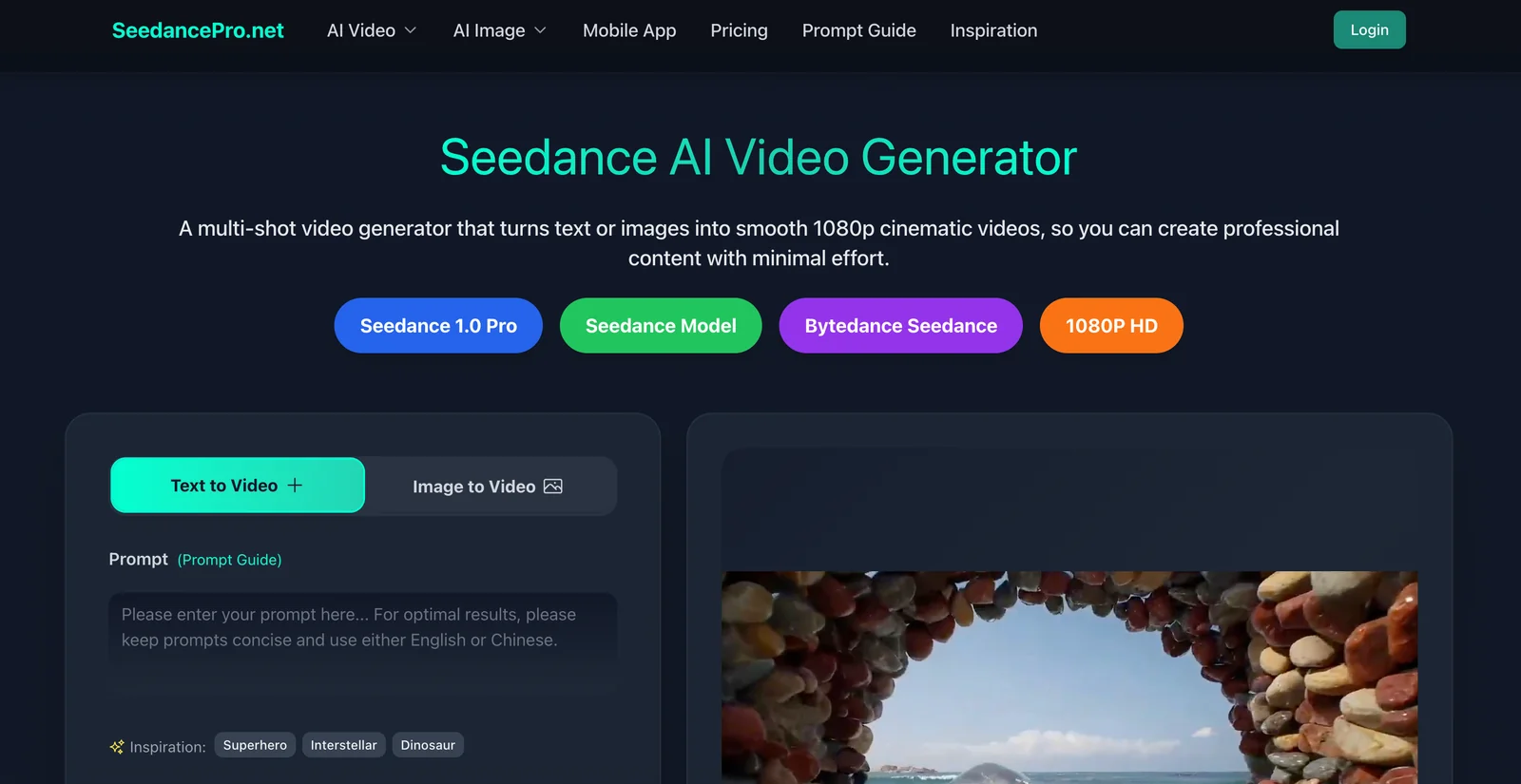
Key Features
Use Cases


Frequently asked questions about SeedancePro
What are the pricing options available for SeedancePro?
SeedancePro offers a freemium pricing model that includes a free tier with basic features, as well as custom pricing options for Pro and Enterprise plans. The Pro version provides advanced controls and faster processing capabilities. For specific pricing details, it is best to contact SeedancePro directly.
Key Points
- Freemium Model: SeedancePro provides a free tier for basic usage.
- Pro and Enterprise Plans: Advanced features available in these paid options.
- Custom Pricing: Pricing varies based on user needs and requirements.
Detailed Explanation
SeedancePro’s pricing structure is designed to accommodate a variety of users, from casual individuals to large enterprises.
-
Free Tier:
- Ideal for beginners or those wanting to explore SeedancePro's capabilities without commitment.
- Includes essential features for basic tasks, allowing users to get familiar with the interface and functions.
-
Pro Plan:
- Tailored for professionals or businesses that require enhanced features.
- Offers advanced controls, quicker processing speeds, and potentially additional integrations or support services.
- Pricing for the Pro plan is typically based on user volume or specific feature sets needed.
-
Enterprise Plan:
- This plan is customized based on the organization’s specific needs, including scalability and additional services.
- Ideal for larger companies that need tailored solutions and dedicated support.
- Pricing is negotiated directly with SeedancePro and may include bulk discounts or special terms.
For exact pricing and more detailed information on what each plan includes, contacting SeedancePro’s sales team is highly recommended.
Best Practices / Tips
- Evaluate Your Needs: Before selecting a plan, assess your usage requirements and desired features. This will help in choosing the most appropriate plan.
- Use the Free Tier Wisely: Take full advantage of the free tier to test the platform and understand its functionalities before upgrading.
- Contact Support for Custom Plans: If you’re a large organization or have unique needs, reach out directly for a tailored solution that fits your budget and requirements.
Additional Resources
What features does SeedancePro provide for video generation?
SeedancePro offers advanced features for video generation, including seamless text-to-video and image-to-video transformations, multi-shot storytelling capabilities, smooth motion rendering, and consistent character portrayal across scenes. It produces high-definition visuals, making it ideal for professional projects and creative storytelling.
Key Points
- Text-to-Video Transformations: Convert scripts directly into engaging videos.
- Image-to-Video Capabilities: Turn static images into dynamic visual narratives.
- Multi-Shot Storytelling: Create complex stories using multiple scenes efficiently.
Detailed Explanation
SeedancePro is a cutting-edge video generation tool that utilizes artificial intelligence to streamline the creative process.
-
Text-to-Video Transformations: This feature enables users to input scripts, which SeedancePro then transforms into visually compelling videos. The AI analyzes the text to create relevant scenes, ensuring that the narrative flows smoothly. For example, a script about a travel adventure can be turned into a vibrant video showcasing various destinations.
-
Image-to-Video Capabilities: Users can upload images, which the software animates to create engaging videos. This is particularly useful for businesses looking to showcase products or services dynamically. For instance, an e-commerce site can turn product images into promotional videos, enhancing customer engagement.
-
Multi-Shot Storytelling: SeedancePro allows creators to stitch together various scenes, enabling complex storytelling without needing extensive video editing skills. This feature is perfect for marketers and content creators who need to produce engaging videos quickly, as it simplifies the production process.
-
Smooth Motion Rendering: The platform ensures high-quality motion rendering, making transitions between scenes fluid and visually appealing. This aspect is crucial for maintaining audience engagement and delivering a professional-looking final product.
-
Character Consistency: By maintaining character appearance and personality traits across different scenes, SeedancePro helps in building a coherent narrative. This is essential for animated stories or brand mascots, ensuring that viewers can connect with the characters throughout the video.
Best Practices / Tips
- Script Preparation: Write clear, engaging scripts that outline the key messages you want to convey. The more detailed the input, the better the output.
- Image Selection: Choose high-quality images for the image-to-video feature to ensure the best results. Clear visuals enhance overall video quality.
- Scene Planning: Use the multi-shot storytelling feature strategically. Plan your scenes in advance to maintain a logical flow and enhance viewer engagement.
- Test Different Styles: Experiment with various animation styles and transitions to find what resonates best with your target audience.
Additional Resources
How do I get started using SeedancePro for my video projects?
To get started with SeedancePro for your video projects, visit their official website and sign up for a free account. After registration, you can create videos by entering text prompts or uploading images to generate stunning cinematic content tailored to your vision.
Key Points
- Sign Up for a Free Account: Access all features without initial costs.
- User-Friendly Interface: Simple tools for creating engaging videos.
- Text and Image Integration: Combine text prompts with images for dynamic content.
Detailed Explanation
SeedancePro is designed to simplify video creation, making it accessible for both beginners and experienced users. Here’s how to get started:
- Visit the Official Website: Navigate to SeedancePro's homepage to access their services.
- Create Your Free Account: Click on the "Sign Up" button and fill out the required fields. You may need to verify your email to activate your account.
- Explore the Dashboard: Once logged in, familiarize yourself with the dashboard. The user interface is intuitive, allowing you to quickly find tools for video creation.
- Start Creating Videos:
- Text Prompts: Enter descriptive text prompts related to your project. For example, “A serene sunset over the ocean” will help generate a corresponding video.
- Image Upload: You can also upload images. Combine them with text to enhance the visual storytelling aspect of your videos.
By following these steps, you’ll be able to create cinematic videos that captivate your audience.
Best Practices / Tips
- Be Descriptive: When using text prompts, use vivid language to achieve better results.
- Experiment with Features: Don’t hesitate to explore different styles and formats available within SeedancePro to find what resonates best with your audience.
- Preview Your Videos: Always preview your generated videos before finalizing to ensure they meet your expectations.
- Use High-Quality Images: Upload high-resolution images for the best visual results.
Additional Resources
- SeedancePro User Guide
- Video Creation Tips
- Community Forum for user discussions and support.
Do I need technical skills to use SeedancePro effectively?
No, you don’t need technical skills to use SeedancePro effectively. It’s designed for users at all skill levels, featuring an intuitive interface that allows beginners to create cinematic videos effortlessly. Simply enter your script or upload images to start creating stunning content right away.
Key Points
- User-Friendly Interface: SeedancePro caters to both beginners and experienced users.
- No Technical Knowledge Required: You can create videos without prior experience in video editing.
- Quick Start: Enter scripts or upload images to generate videos instantly.
Detailed Explanation
SeedancePro is crafted with user experience in mind, making it accessible to everyone. The platform leverages AI technology to streamline the video creation process. Here’s how to get started:
- Sign Up: Create a free account on SeedancePro to access its features.
- Choose Your Project Type: Select whether you want to create a promotional video, tutorial, or any other format.
- Input Your Script or Images: Enter your text directly or upload images. The AI will analyze this content to generate a storyboard.
- Customize Your Video: Use the drag-and-drop functionality to rearrange scenes, add effects, or incorporate music from the built-in library.
- Preview and Export: Once satisfied with your edits, preview the video to ensure everything looks perfect before exporting it in your desired format.
This step-by-step process exemplifies how even those with no prior experience can produce professional-quality videos.
Best Practices / Tips
- Start Simple: Begin with short videos to familiarize yourself with the interface.
- Utilize Tutorials: Check out SeedancePro’s onboarding tutorials to maximize your use of features.
- Experiment with Features: Try various styles and effects to find what resonates with your audience.
- Seek Feedback: Share your videos with friends or colleagues for constructive criticism.
- Avoid Overcomplication: Focus on a clear message instead of overwhelming viewers with too many elements.
Additional Resources
By leveraging SeedancePro's user-friendly design and powerful features, anyone can create captivating videos, regardless of their technical background.
How does SeedancePro compare to other AI video generators?
SeedancePro distinguishes itself from other AI video generators by delivering cinematic-quality videos that feature advanced tools like multi-camera storytelling and character consistency. Unlike many competitors that prioritize basic video creation, SeedancePro focuses on producing polished, film-like finishes ideal for professional use.
Key Points
- Cinematic Quality: SeedancePro provides high-definition video output suitable for various professional applications.
- Multi-Camera Storytelling: This feature allows users to create engaging narratives by switching between different angles seamlessly.
- Character Consistency: Ensures that characters appear uniform throughout the video, enhancing the storytelling experience.
Detailed Explanation
SeedancePro excels in the competitive landscape of AI video generators by offering features that cater to both amateur and professional filmmakers.
-
Cinematic Quality: With a resolution that supports 4K output, SeedancePro ensures that every frame delivers stunning visual clarity. This is particularly beneficial for marketing campaigns, short films, and educational content, where visual impact is paramount.
-
Multi-Camera Storytelling: This feature allows users to set up multiple virtual cameras, enabling dynamic storytelling. For instance, if you're creating a tutorial or a product review, you can show different perspectives of the product, making the content more engaging and informative.
-
Character Consistency: Maintaining character look and feel throughout a video enhances viewer immersion. This is essential for narrative-driven content, such as animated stories and advertisements, where character recognition plays a significant role in audience connection.
Best Practices / Tips
- Leverage Multi-Camera Features: Use the multi-camera storytelling feature to enhance your narrative. Plan your scenes in advance to maximize visual variety.
- Focus on Script Quality: A strong script complements SeedancePro's capabilities. Invest time in writing compelling dialogue and story arcs.
- Experiment with Different Styles: Utilize the cinematic settings to experiment with various video styles. This can help you determine what resonates best with your audience.
Additional Resources
By understanding and utilizing these features, users can enhance their video projects significantly, making SeedancePro a top choice among AI video generators.
Explore more AI Ai Services tools
Browse all Ai Services tools →Browse by use case: Video Generation
Compare SeedancePro: vs BAND for Developers · vs NitroStack · vs GBrain · vs MentionBird