

Reflection
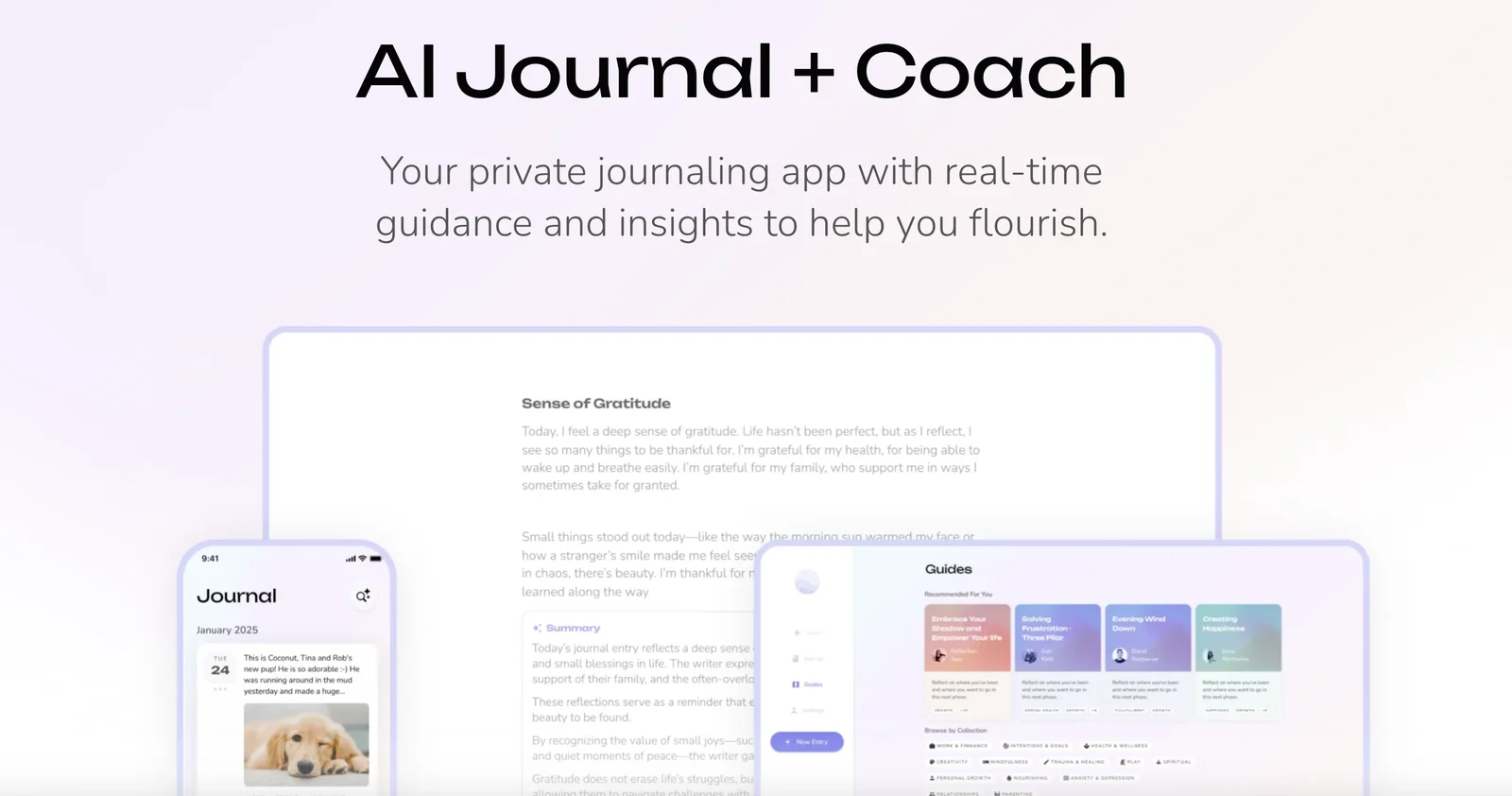
AIAI-powered journaling app and coach that provides guided prompts and insights to support mental health and yearly self-reflection.
Reflection
AI-powered journaling app and coach that provides guided prompts and insights to support mental health and yearly self-reflection.
About Reflection
Reflection is an AI-driven journaling application and mental wellness coach that helps users build consistent self-reflection habits using guided prompts, real-time feedback, and AI-generated insights. It runs on web, iOS, macOS and Android, focusing on privacy and secure personal journaling while offering coaching-style guidance to clarify thoughts, track wellbeing, and support personal growth. Reflection's value lies in combining structured prompts, automated insights, and cross-device access to turn journaling into actionable self-reflection practices such as annual reviews and habit formation.
Screenshots


Key Features
Use Cases



Frequently asked questions about Reflection
What is the pricing structure for the 2025 Annual Review app?
The 2025 Annual Review app features a free tier for basic journaling and premium plans priced at $5.99 per month or $47.99 annually. A promotional annual plan is offered for $35.99, while lifetime access ranges from $124.99 to $249.99, catering to various user needs.
Key Points
- Free tier includes basic journaling features.
- Premium plans: $5.99/month or $47.99/year; promotional annual plan at $35.99.
- Lifetime access options range from $124.99 to $249.99.
Detailed Explanation
The 2025 Annual Review app is designed to accommodate different user preferences through its tiered pricing structure.
-
Free Tier: This option provides users with essential journaling features, making it perfect for those who want to try the app without financial commitment.
-
Premium Subscription: Users who require advanced features can choose the monthly plan at $5.99 or opt for the annual plan at $47.99, which is more cost-effective over time.
-
Promotional Annual Plan: For a limited time, users can take advantage of the promotional annual subscription priced at $35.99, offering significant savings compared to the standard annual price.
-
Lifetime Access: Users who prefer a one-time payment can opt for lifetime access, with prices varying from $124.99 to $249.99. The price difference typically reflects the range of features included, catering to both casual users and those seeking comprehensive tools.
Best Practices / Tips
- Evaluate Your Needs: Before committing to a premium plan, assess your journaling habits and feature requirements to choose the most suitable option.
- Take Advantage of Promotions: Keep an eye on promotional offers to maximize savings, especially if you plan to use the app long-term.
- Explore Free Features: Start with the free tier to familiarize yourself with the app's interface and capabilities before upgrading.
Additional Resources
What key features does the 2025 Annual Review app provide?
The 2025 Annual Review app offers essential features like guided prompts for structured reflection, AI-generated insights and summaries, cross-platform access, habit-building tools, and a privacy-focused design that ensures secure journaling. These features collectively enhance user experience and promote consistent personal growth.
Key Points
- Guided Reflection Prompts: Structured prompts help users reflect on their personal and professional growth.
- AI-Generated Insights: AI technology analyzes user input to provide personalized summaries and insights.
- Cross-Platform Access: Users can access the app on multiple devices, including smartphones, tablets, and desktops.
Detailed Explanation
The 2025 Annual Review app is designed to facilitate deeper self-reflection and personal development. Here’s a closer look at its key features:
Guided Reflection Prompts
The app provides various prompts that guide users through reflective questions. These prompts are categorized into themes such as career, relationships, and health. For example, a prompt might ask, "What achievements are you most proud of this year?" This structured approach encourages comprehensive reflection, making it easier for users to identify their accomplishments and areas for improvement.
AI-Generated Insights
Using advanced AI algorithms, the app analyzes user responses to generate personalized insights. For instance, after completing a year's worth of reflections, the app can summarize trends in your thoughts, highlighting areas where you’ve shown growth or recurring challenges. This feature not only saves time but also provides valuable context for future planning.
Cross-Platform Access
The app supports cross-platform functionality, allowing users to access their reflections and insights from any device. Whether you're using a smartphone during your commute or a desktop at home, your data syncs seamlessly across platforms. This flexibility ensures that users can engage with their journaling practice anytime and anywhere.
Habit-Building Tools
To foster consistent journaling habits, the app includes tools like reminders and progress tracking. Users can set daily or weekly reminders to complete their reflections, ensuring that they stay on track. The progress tracking feature visually represents your journaling frequency and milestones, motivating users to maintain their habit.
Privacy-Focused Design
Understanding the importance of security in personal journaling, the app employs robust privacy measures. All data is encrypted, and users can choose to keep their reflections private or share them selectively. This design empowers users to express themselves freely without concerns about data breaches.
Best Practices / Tips
- Set a Regular Schedule: To maximize the benefits, set aside specific times each week for journaling.
- Use Prompts Thoughtfully: Choose prompts that resonate with your current life stage or challenges for deeper insights.
- Leverage AI Insights: Regularly review your AI-generated summaries to identify patterns and adjust your personal goals accordingly.
Additional Resources
How do I get started with the 2025 Annual Review app?
To get started with the 2025 Annual Review app, simply download it from the official website or your device's app store. Create an account, and then explore the user-friendly interface, which includes guided prompts for daily journaling to enhance your reflective practices.
Key Points
- Download the app from the official website or app store.
- Create an account to access personalized features.
- Utilize guided prompts for effective daily journaling.
Detailed Explanation
The 2025 Annual Review app is designed to facilitate personal reflection and goal-setting. Follow these steps to get started:
-
Download the App: Visit the official website or search for "2025 Annual Review" in your device’s app store (available on both iOS and Android). The app is free to download with optional premium features.
-
Create an Account: After downloading, open the app and follow the prompts to create an account. You'll need to provide basic information like your email address and a password. Consider enabling notifications to keep up with daily journaling prompts.
-
Explore the Interface: Once logged in, familiarize yourself with the user-friendly interface. The main dashboard features daily prompts, a calendar view for tracking entries, and sections for setting annual goals. You can customize your profile to receive tailored prompts based on your interests.
-
Daily Journaling: Engage with the guided prompts provided daily. These prompts are designed to help you reflect on your experiences, set intentions, and track your progress throughout the year.
-
Utilize Additional Features: Explore other features such as mood tracking, reminders for journaling, and the option to share insights with a community of users for added motivation.
Best Practices / Tips
- Set a Routine: Dedicate a specific time each day for journaling to cultivate a consistent habit.
- Be Honest and Open: The more genuine your entries, the more you will benefit from the reflective process.
- Use Tags and Categories: Organize your entries using tags to easily revisit past reflections or themes.
Avoid common pitfalls such as skipping days or rushing through prompts. Take your time to reflect deeply for maximum benefit.
Additional Resources
- Official Documentation for user guides and FAQs.
- User Community Forum for tips and shared experiences from other users.
- Blog on Personal Development for additional insights on journaling and reflection.
Can the 2025 Annual Review app integrate with other tools or APIs?
Yes, the 2025 Annual Review app can integrate seamlessly with companion AI journaling apps and offers robust API configuration options. This includes model selection and API key management, allowing advanced users to customize functionalities and enhance their experience.
Key Points
- Integration Capabilities: The app connects with AI journaling tools for enriched user experience.
- API Configuration: Users can manage API keys and select models for tailored functionalities.
- Enhanced Functionality: Custom integrations help streamline workflows and improve data management.
Detailed Explanation
The 2025 Annual Review app is designed to work harmoniously with various AI journaling apps, enhancing productivity and user engagement. For example, users can synchronize their journaling data with the app to maintain a holistic view of their yearly progress.
Integration with AI Journaling Apps
This integration allows users to automatically import entries, insights, and trends from their journaling activities. Popular companion apps include Day One and Journey, which can provide additional context and reflections, enriching the Annual Review process.
API Configuration
Advanced users can take advantage of the app’s API configuration settings. By accessing the API management section, users can:
- Select Models: Choose different AI models for analysis and insights based on their needs, such as sentiment analysis or trend detection.
- Manage API Keys: Generate and manage API keys for secure access, ensuring that integrations remain safe and functional.
For instance, a user might set up the API to pull daily journal entries into the Annual Review app, allowing for a comprehensive analysis of their year.
Best Practices / Tips
- Regularly Update API Keys: Ensure that your API keys are current to maintain seamless integrations.
- Explore Compatibility: Check compatibility with various AI journaling apps before integration.
- Utilize Sandbox Environment: If available, use a sandbox environment to test integrations without affecting live data.
Additional Resources
By leveraging the integration and API capabilities of the 2025 Annual Review app, users can significantly enhance their productivity and achieve more insightful annual reflections.
How does 2025 Annual Review compare to other journaling apps?
2025 Annual Review stands out among journaling apps by integrating AI insights, guided prompts, and a strong emphasis on mental health. Its unique features allow for structured reflections and prioritize user privacy, making it an ideal choice for comprehensive year-end reviews.
Key Points
- AI Insights: Uses artificial intelligence to provide personalized reflection.
- Guided Prompts: Offers structured questions to facilitate deeper thinking.
- Privacy Features: Ensures user data is secure and confidential.
Detailed Explanation
2025 Annual Review differentiates itself by utilizing AI insights that analyze your journaling patterns and suggest tailored reflections. For example, if you frequently journal about stress, the app might prompt you to explore coping strategies or reflect on positive experiences from the past year.
Additionally, the guided prompts are designed to encourage users to think critically about their year. Unlike generic journaling apps, 2025 Annual Review includes specific questions that guide you through various aspects of your life, such as personal growth, achievements, and challenges faced. This structured approach helps users maintain focus and clarity while journaling.
The privacy features of 2025 Annual Review are robust, ensuring that all your entries are encrypted and stored securely. This is particularly appealing for users concerned about data protection, especially in an era where privacy is paramount. The app's commitment to user confidentiality sets a benchmark in the journaling space, making it a trustworthy option.
Best Practices / Tips
- Consistency: Set a regular schedule for journaling to reap the full benefits of reflective writing.
- Explore AI Suggestions: Take advantage of the AI features by reviewing past entries and using them to inform your current reflections.
- Focus on Mental Health: Use the app not just as a record-keeping tool but as a means to enhance your mental well-being by addressing emotional challenges.
Additional Resources
Explore more AI Ai Services tools
Browse all Ai Services tools →Compare Reflection: vs Claude Academy · vs Switchyard · vs Router by Ramp · vs Supernova