

Questas
AICreate interactive choose-your-own-adventure stories with AI-generated images and videos.
Questas
Create interactive choose-your-own-adventure stories with AI-generated images and videos.
About Questas
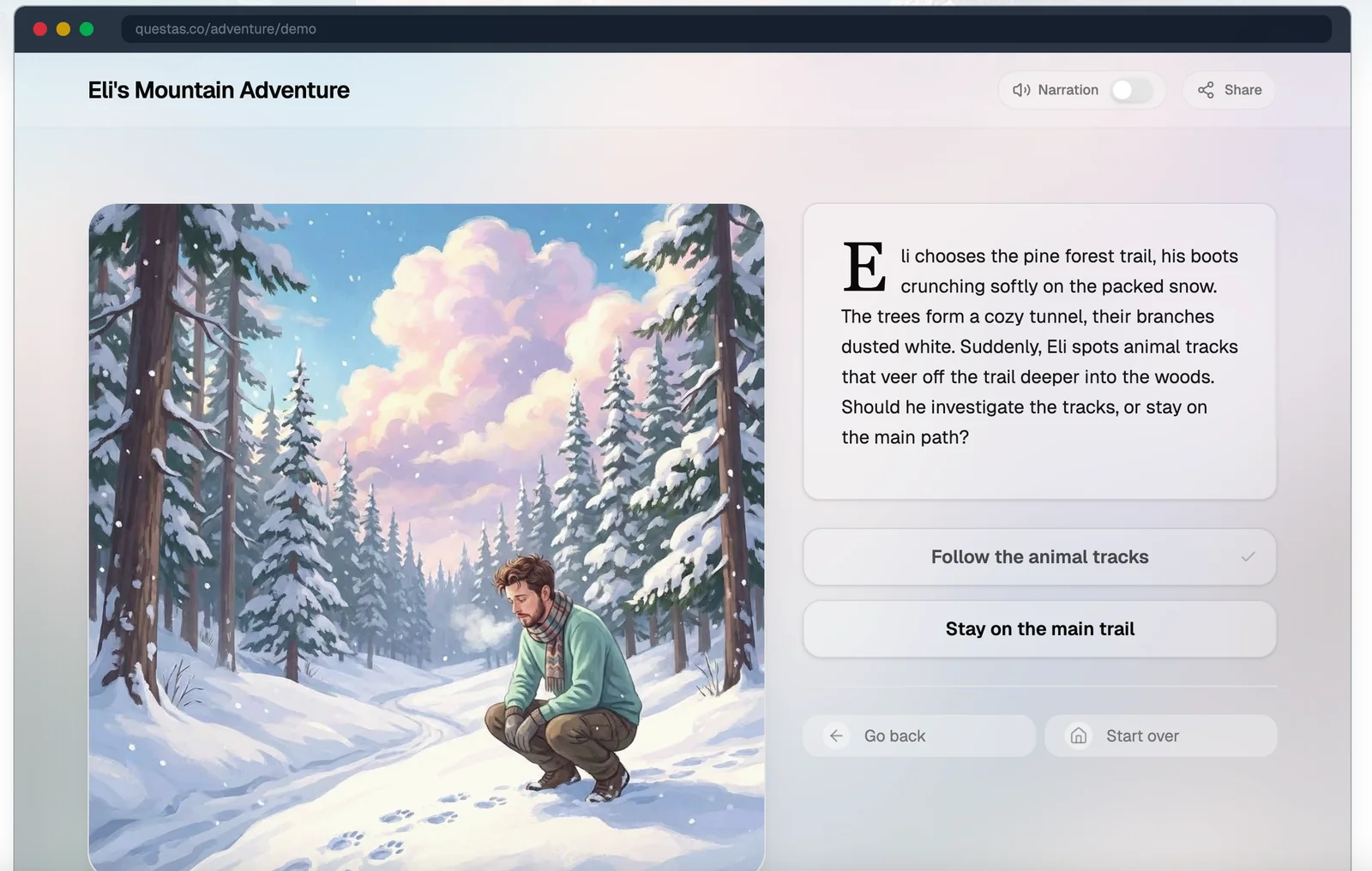
Questas is a web-based platform for building interactive, branching stories that combine text with AI-generated images and short videos. Users can begin with a character and a simple concept and use Questas' tools to expand those ideas into branching narratives, multimedia scenes, and decision-driven outcomes. The platform emphasizes intuitive design to make interactive storytelling accessible to creators without technical experience, enabling richer, visual choose-your-own-adventure experiences.
Screenshots
Key Features
Use Cases


Frequently asked questions about Questas
What are the pricing options for Questas?
Questas offers a freemium model, featuring a free tier for users to create interactive stories and generate basic AI images and videos. For users seeking advanced features and increased usage limits, custom pricing options are available upon request from Questas.
Key Points
- Freemium Model: Users can access basic features for free.
- Custom Pricing: Advanced features come with tailored pricing.
- User Engagement: Interactive stories and AI-generated content enhance user experience.
Detailed Explanation
Questas provides a versatile platform that allows users to dive into interactive storytelling and multimedia content creation. The freemium model enables anyone to start using the platform without financial commitment. Users can create engaging stories and utilize basic AI functionalities, including generating images and videos.
For those who need more robust tools, such as higher storage capacity, additional templates, or advanced AI capabilities, Questas offers custom pricing. This means that businesses or creators with specific needs can discuss their requirements with the Questas team to find a pricing plan that suits their goals.
Use Case Example:
- Educators: Teachers can use the free tier to create interactive lessons and storytelling exercises for students, which can boost engagement.
- Content Creators: Bloggers or video producers can leverage advanced features for enhanced creativity, making their content more appealing to audiences.
Best Practices / Tips
- Start with Free Tier: Begin using the free version to familiarize yourself with the platform's capabilities before committing to a paid plan.
- Assess Your Needs: Determine which advanced features you truly require. This assessment can help you negotiate a better deal when contacting Questas for custom pricing.
- Stay Updated: Regularly check Questas’ website or subscribe to newsletters for updates about new features or promotional pricing options.
Additional Resources
How does the branching story builder work in Questas?
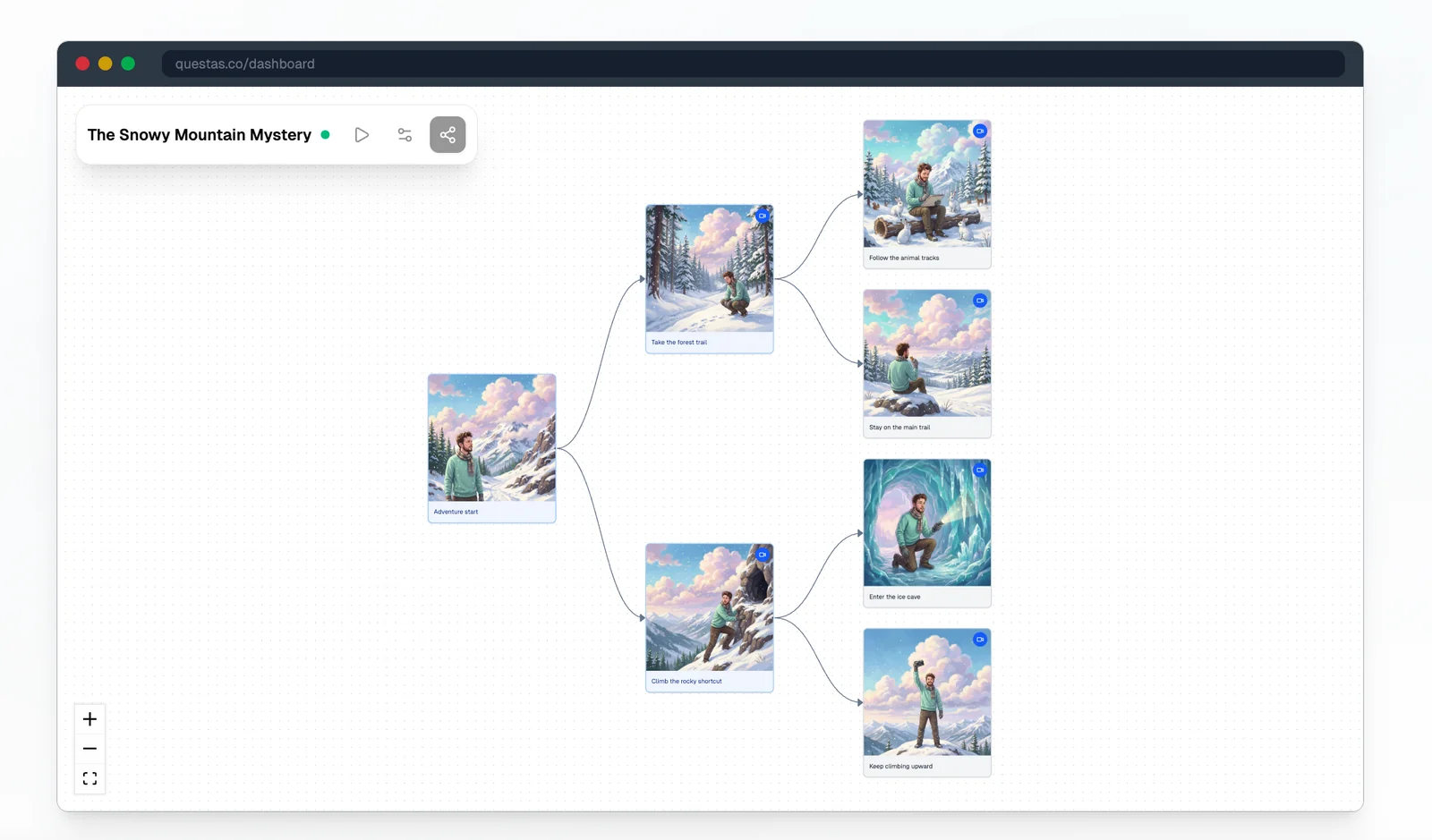
The branching story builder in Questas allows users to create interactive narratives featuring decision nodes that lead to multiple story outcomes. This tool enhances user engagement by allowing readers to make choices that impact the storyline, creating a personalized experience in interactive fiction.
Key Points
- Visual Narrative Design: The builder provides an intuitive interface for crafting stories.
- Decision Nodes: Users can insert choices that alter the course of the narrative.
- Enhanced Engagement: The interactive design fosters deeper connections with readers.
Detailed Explanation
The branching story builder in Questas is designed to empower writers and creators to craft dynamic narratives. Here’s how it works:
-
Visual Interface: The platform features a user-friendly drag-and-drop interface, making it easy for anyone to design complex storylines without needing extensive coding skills. Users can visually map out their narratives, making it easier to see the flow of choices and outcomes.
-
Creating Decision Nodes: Users can add decision points in the story where characters face choices. Each node can lead to various paths, allowing for different endings based on the choices made. For example, a character might choose to confront a villain or seek help from a friend, leading to entirely different plot developments.
-
Multiple Outcomes: By incorporating various decision nodes, creators can produce multiple story arcs. This not only increases replayability but also allows readers to explore different scenarios. For instance, a story could have three distinct endings based on the choices made throughout the narrative.
-
User Engagement: The interactive nature of branching stories enhances user engagement. Readers become active participants in the narrative, which can lead to higher retention rates and more profound emotional connections to the story.
Best Practices / Tips
- Plan Your Story: Before diving into the builder, outline your narrative structure on paper. Identify key decision points and potential outcomes.
- Keep It Simple: Start with a few decision nodes and expand as you get comfortable. Avoid overwhelming your readers with too many choices at once.
- Test Your Story: Play through your story multiple times to ensure all paths are coherent and satisfying. This helps identify any dead ends or confusing transitions.
- Gather Feedback: Share your story with beta readers to gather insights on their experiences and refine the narrative based on their input.
Additional Resources
How can I start creating stories with Questas?
To start creating stories with Questas, simply sign up for a free account on their official website. The platform features an intuitive design interface that allows users to easily navigate and quickly set up their first interactive narrative within minutes.
Key Points
- Free Account Setup: Sign up for free to access all features.
- User-Friendly Interface: Designed for easy navigation and creation.
- Interactive Narratives: Create stories that engage readers with choices.
Detailed Explanation
Creating stories with Questas is a straightforward process. Here’s a step-by-step guide to get you started:
-
Sign Up:
- Visit the Questas website.
- Click on the “Sign Up” button.
- Fill in the required details, including your email and password, or sign up using social media accounts.
-
Explore the Dashboard:
- Once logged in, you’ll be directed to your dashboard.
- Familiarize yourself with the layout—navigation menus are clearly labeled.
-
Start a New Project:
- Click on “Create New Story” to begin.
- Choose from various templates designed for different genres and story types, such as adventure, mystery, or educational narratives.
-
Craft Your Story:
- Use the drag-and-drop editor to add text, images, and interactive elements.
- Incorporate choices that allow readers to make decisions, influencing the story's outcome.
-
Preview and Publish:
- Use the preview feature to see how your story looks and functions.
- Once satisfied, hit “Publish” to make your story live.
Questas also offers tutorials and community support to help you refine your storytelling skills.
Best Practices / Tips
- Engage Your Audience: Add multiple choice paths to keep readers invested in the story.
- Use Rich Media: Incorporate images and audio clips to enhance the narrative experience.
- Iterate Based on Feedback: Share your stories with friends or community members for constructive criticism.
- Regularly Update Content: Keep your stories fresh by adding new scenarios or branching paths.
Additional Resources
By following these steps and tips, you’ll be well on your way to creating engaging and interactive stories with Questas.
What are the technical requirements for using Questas?
Questas is a web-based platform that requires only a modern browser and an internet connection for access. There are no specific installation requirements, making it user-friendly across various devices such as desktops, laptops, tablets, and smartphones.
Key Points
- Web-Based Accessibility: No installations needed.
- Browser Compatibility: Works with modern browsers like Chrome, Firefox, or Edge.
- Device Flexibility: Accessible on multiple devices, enhancing user experience.
Detailed Explanation
Questas is designed for seamless use across different environments, emphasizing accessibility and convenience. Users can access Questas from any device with internet capabilities, including:
- Desktops and Laptops: Ideal for business users who require a robust interface for detailed analysis and reporting.
- Tablets and Smartphones: Perfect for on-the-go access, allowing users to interact with the platform from anywhere, whether in a meeting or while commuting.
To get started with Questas, simply open a modern web browser—such as Google Chrome, Mozilla Firefox, or Microsoft Edge—and navigate to the Questas website. This eliminates the need for any downloads or complex installation processes, making it accessible for users of all technical backgrounds.
Best Practices / Tips
- Update Your Browser: Ensure you are using the latest version of your browser for optimal performance and security.
- Stable Internet Connection: A reliable internet connection is crucial for uninterrupted access to the platform.
- Device Compatibility Check: Test Questas on different devices to determine which offers the best user experience for your needs.
Additional Resources
- Questas Official Documentation - Comprehensive guides and user manuals.
- Browser Compatibility Guidelines - Information on supported browsers and troubleshooting tips.
- User Community Forum - Connect with other users for tips and best practices.
How does Questas compare to other interactive story creation tools?
Questas distinguishes itself from other interactive story creation tools by offering AI-generated images and videos, which enhance storytelling depth. Its character-first workflow and multimedia node integration provide a more engaging and immersive experience, elevating user interaction compared to traditional platforms.
Key Points
- AI-Generated Multimedia: Questas utilizes AI to create unique images and videos.
- Character-First Workflow: Focuses on character development to drive narratives.
- Enhanced User Interaction: Multimedia nodes allow for diverse storytelling options.
Detailed Explanation
Questas leverages artificial intelligence to automatically generate images and videos tailored to the narrative, allowing creators to focus more on storytelling than on sourcing visuals. This feature is particularly beneficial for writers and educators looking to create engaging content quickly.
For instance, a fantasy story about a dragon can have unique, AI-generated visuals of the dragon in various environments, enhancing the reader's imagination. In contrast, traditional tools often require users to manually search for images, which can be time-consuming and limit creativity.
The character-first workflow emphasizes character development at the narrative's core. Users can create intricate character profiles that influence the story's direction and outcomes, making the experience more dynamic. This approach contrasts with conventional tools that often prioritize plot over character, leading to less engaging narratives.
Moreover, the multimedia node integration allows creators to insert audio, images, and videos at critical points in the story. This feature enables interactive elements, such as character dialogues that can be voiced by AI or background sounds that can enhance specific scenes, creating a richer storytelling environment.
Best Practices / Tips
- Start with Character Profiles: Focus on developing well-rounded characters before building your story.
- Utilize AI Features: Take full advantage of AI-generated content to save time and enhance creativity.
- Interactive Elements: Incorporate multimedia nodes to keep your audience engaged and encourage exploration of the narrative.
- Test Different Scenarios: Experiment with branching paths and outcomes to see which resonates best with your audience.
Additional Resources
Explore more AI Ai Services tools
Browse all Ai Services tools →Browse by use case: Image Generation · Video Generation
Compare Questas: vs BAND for Developers · vs NitroStack · vs GBrain · vs MentionBird