
NoteGPT
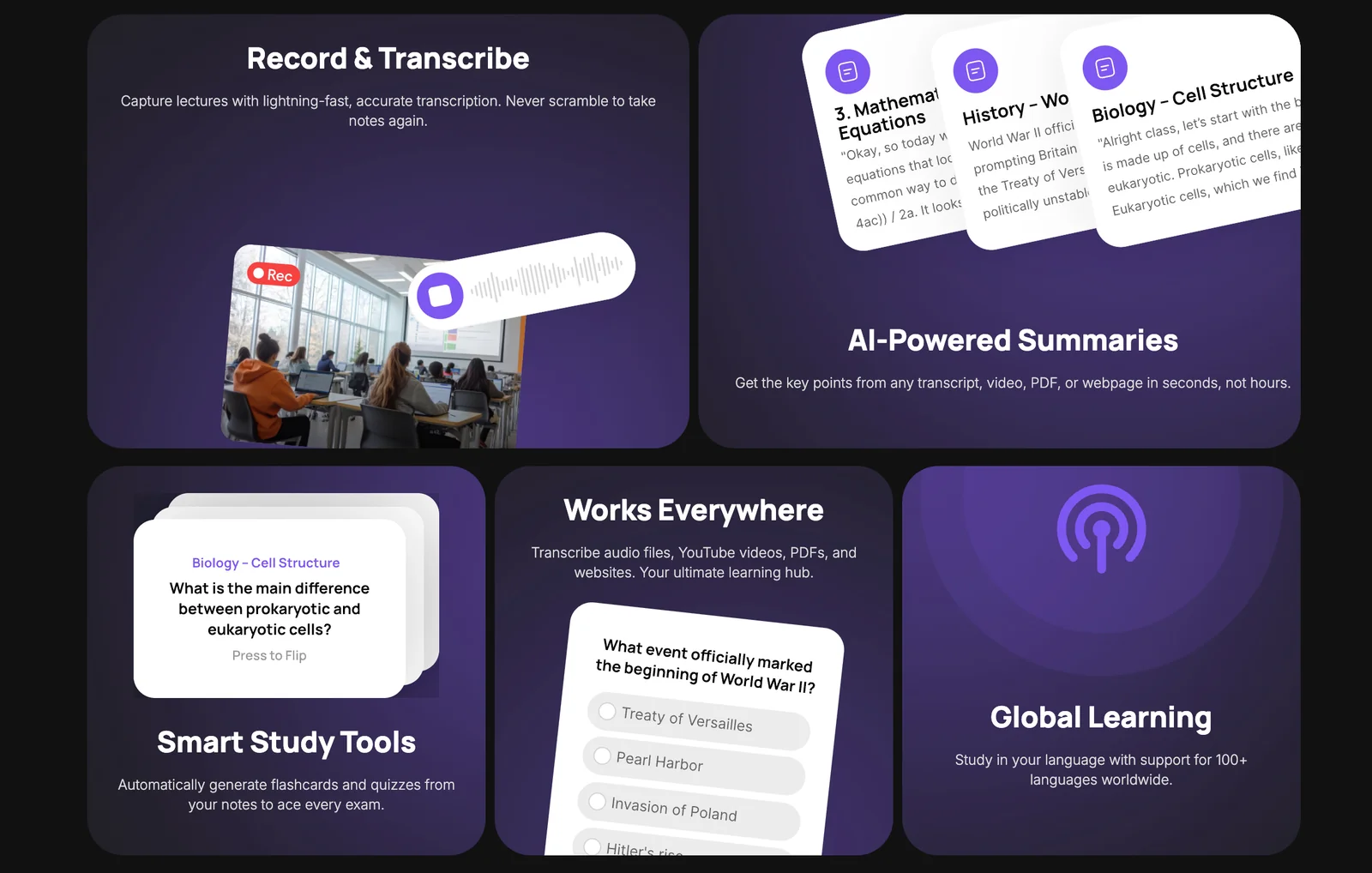
AIRecords classes, transcribes speech accurately, and automatically converts recordings into polished study materials.
NoteGPT
Records classes, transcribes speech accurately, and automatically converts recordings into polished study materials.
About NoteGPT
NoteGPT is a summary-focused note-taking tool that records lectures and classroom sessions, transcribes spoken words with high accuracy, and automatically generates polished study materials from those transcriptions. It is designed to let learners stay present during instruction while producing usable notes, summaries, and study-ready content without manual note-taking. The tool emphasizes reliable transcription and automated conversion of raw audio into structured learning assets to improve retention and review efficiency.
Screenshots


Key Features
Use Cases


Frequently asked questions about NoteGPT
What is the pricing structure for NoteGPT?
NoteGPT follows a freemium pricing model. Users can access a free tier that offers essential features like class recording, audio transcription, and summary generation. For detailed pricing information on premium tiers, it’s best to contact NoteGPT directly as specifics are not listed on their website.
Key Points
- Freemium Model: NoteGPT offers a free tier for basic functionality.
- Core Features: Users can record classes, transcribe audio, and generate summaries.
- Contact for Pricing: Paid tier details are not publicly available; direct inquiries are recommended.
Detailed Explanation
NoteGPT is designed to enhance learning and note-taking experiences through its innovative features. The freemium model allows users to explore its capabilities without financial commitment. The free tier includes:
- Class Recording: Users can easily record lectures or meetings, making it useful for students and professionals alike.
- Audio Transcription: This feature converts spoken words into text, helping users capture information quickly and efficiently.
- Summary Generation: After recording and transcribing, NoteGPT can summarize the content, saving users time on reviewing lengthy notes.
While the free tier is beneficial, NoteGPT also offers premium features aimed at advanced users, such as enhanced storage, collaboration tools, and priority customer support. To learn more about these paid options, potential users are encouraged to reach out to NoteGPT directly via their website or customer service.
Best Practices / Tips
- Explore the Free Tier: Start with the free version to understand the tool’s capabilities before committing to a paid plan.
- Utilize Transcription: Make the most out of the audio transcription feature for better note accuracy and to aid in studying.
- Stay Updated: Regularly check NoteGPT’s website or subscribe to their newsletters for updates on pricing and new features.
Additional Resources
By leveraging NoteGPT’s tools effectively, users can significantly enhance their learning and productivity.
How does NoteGPT transcribe audio recordings?
NoteGPT transcribes audio recordings using cutting-edge speech recognition technology, achieving high accuracy in converting spoken words into text. This ensures that transcriptions are precise and reliable, making them particularly useful for students, professionals, and anyone needing accurate written records of their audio content.
Key Points
- High Accuracy: NoteGPT ensures word-for-word precision in transcriptions.
- User-Friendly Interface: The tool offers an intuitive design for seamless usage.
- Versatile Applications: Ideal for students, journalists, and researchers needing quick transcriptions.
Detailed Explanation
NoteGPT employs advanced algorithms that analyze audio signals and convert them into written text. This process involves several steps:
- Audio Input: Users can upload various audio formats, such as MP3 or WAV, directly to the NoteGPT platform.
- Processing: The speech recognition engine processes the audio, identifying phonemes and context to create accurate transcriptions.
- Editing Tools: After transcription, users can edit the text to correct any minor errors, enhancing accuracy further.
- Export Options: Transcriptions can be saved in multiple formats, including TXT and DOCX, facilitating easy sharing and integration into other applications.
This technology is particularly beneficial for students and professionals requiring lectures, interviews, or meetings to be transcribed quickly and accurately.
Best Practices / Tips
- Clear Audio Quality: Ensure your audio recordings are of high quality to improve transcription accuracy. Avoid background noise and speak clearly.
- Use Keywords: If the audio contains specific terminology, including a glossary can help NoteGPT recognize these terms better.
- Review and Edit: Always review the transcription for any discrepancies, especially with specialized vocabulary or names.
Additional Resources
How can I get started with NoteGPT for class recordings?
To get started with NoteGPT for class recordings, sign up on their official website at note.gpt. After registration, you can easily record your classes, and NoteGPT will automatically transcribe the audio and generate concise summaries, making it easier for you to review and study later.
Key Points
- Simple Registration: Create an account on the NoteGPT website.
- Automatic Transcription: The tool transcribes your recordings in real-time.
- Summarization Features: NoteGPT generates concise summaries for easy revision.
Detailed Explanation
Starting with NoteGPT involves a few straightforward steps. First, visit the official NoteGPT website and click on the Sign Up button. Fill out the necessary information to create your account. Once registered, you can log in and access the main dashboard.
To record a class, simply click on the Record button. NoteGPT supports different recording formats, allowing you to choose the one that suits your needs best. While recording, the AI tool operates in the background, capturing audio and transcribing it in real-time.
After your session, the transcription will be available for review. NoteGPT not only provides the text but also offers a feature to summarize the key points discussed in the class. This is particularly useful for students looking to study efficiently without going through lengthy transcripts.
For example, if you recorded a 60-minute lecture, you can quickly review the generated summary instead of sifting through all the transcriptions, helping you focus on crucial information.
Best Practices / Tips
- Use High-Quality Audio: Ensure your recording is clear by using a good microphone. Background noise can affect transcription accuracy.
- Plan Your Sessions: Outline the main topics you’ll cover in your class to help the AI generate better summaries.
- Regularly Review Transcriptions: After each class, take a few minutes to read through the transcriptions. This will help you catch any errors and ensure accuracy.
Additional Resources
Does NoteGPT integrate with other educational tools?
As of now, NoteGPT does not publicly specify integration capabilities with third-party educational tools. Users seeking information about API functionalities or potential integrations are encouraged to visit the official NoteGPT website or reach out to their support team for detailed assistance.
Key Points
- Integration Status: No specified third-party integrations currently.
- User Inquiry: For specific integration questions, users should contact support.
- API Functionality: Potential for future updates on integration capabilities exists.
Detailed Explanation
NoteGPT is primarily designed as an AI-powered educational tool, focusing on enhancing note-taking and learning experiences. Currently, the platform's integration capabilities with other educational tools like Learning Management Systems (LMS) or digital collaboration platforms remain unspecified. This means that while NoteGPT is robust in its functionalities, users looking for seamless integration with tools like Google Classroom, Microsoft Teams, or other educational software may need to explore alternative solutions or wait for future updates from the developers.
For users interested in potential integration, reaching out to NoteGPT's customer support could provide insights into current capabilities and any planned enhancements. Additionally, the official website may offer documentation or updates regarding API access, which could allow developers to create custom integrations or leverage NoteGPT's functionalities in conjunction with other applications.
Best Practices / Tips
- Contact Support: If you have specific integration needs, don’t hesitate to reach out to NoteGPT’s support team for clarification and assistance.
- Explore Alternatives: Look into other educational tools that offer direct integrations if immediate functionality is critical.
- Stay Updated: Frequently check NoteGPT’s official website and blog for announcements about new features or integrations.
Additional Resources
What are the advantages of using NoteGPT compared to traditional note-taking?
NoteGPT offers significant advantages over traditional note-taking by automating the process, allowing students to concentrate on lectures. It generates accurate transcriptions and refined summaries, making study materials more organized and easily accessible, thereby increasing efficiency and retention compared to handwritten or typed notes.
Key Points
- Automation: Streamlines the note-taking process.
- Accuracy: Provides precise transcriptions and summaries.
- Accessibility: Enhances the organization of study materials.
Detailed Explanation
NoteGPT leverages advanced AI technology to transform the note-taking experience. Unlike traditional methods, where students may miss crucial information while writing, NoteGPT captures every detail in real-time. This automation allows for uninterrupted focus during lectures.
How NoteGPT Works
- Real-Time Transcription: As lectures occur, NoteGPT transcribes spoken content into text instantly. This ensures no vital points are overlooked.
- Polished Summaries: After the lecture, NoteGPT can summarize the key topics, making it easier for students to review and study efficiently.
- Searchable Notes: Notes taken with NoteGPT can be easily searched for specific topics or keywords, unlike conventional handwritten notes, which can be cumbersome to sift through.
Use Cases
- Students: Ideal for university lectures, where the volume of information can be overwhelming.
- Professionals: Useful in meetings and conferences to ensure all details are captured accurately.
- Researchers: Facilitates the gathering of information from various sources and organizes it systematically.
Best Practices / Tips
- Integrate with Other Tools: Use NoteGPT in conjunction with digital calendars and task management apps to enhance productivity.
- Review Regularly: Schedule time to go through the summaries to reinforce learning and retention.
- Customize Settings: Adjust the AI settings to suit your pace of learning and the complexity of the subject matter to maximize efficiency.
Additional Resources
Explore more AI Ai Services tools
Browse all Ai Services tools →Compare NoteGPT: vs BAND for Developers · vs NitroStack · vs GBrain · vs MentionBird