

Mujo AI
AITurn a single product photo into marketplace-ready images and sales-optimized copy to create full ecommerce listings quickly.
Mujo AI
Turn a single product photo into marketplace-ready images and sales-optimized copy to create full ecommerce listings quickly.
About Mujo AI
Mujo AI is a platform that converts product data and a single product photo into a complete set of marketplace-ready images and conversion-focused listing copy. It combines AI-powered image generation, templating, and automated content workflows to produce visuals and sales copy at scale. The tool is designed for fast bulk listing creation, consistent brand presentation, and improved listing conversion across ecommerce marketplaces.
Screenshots

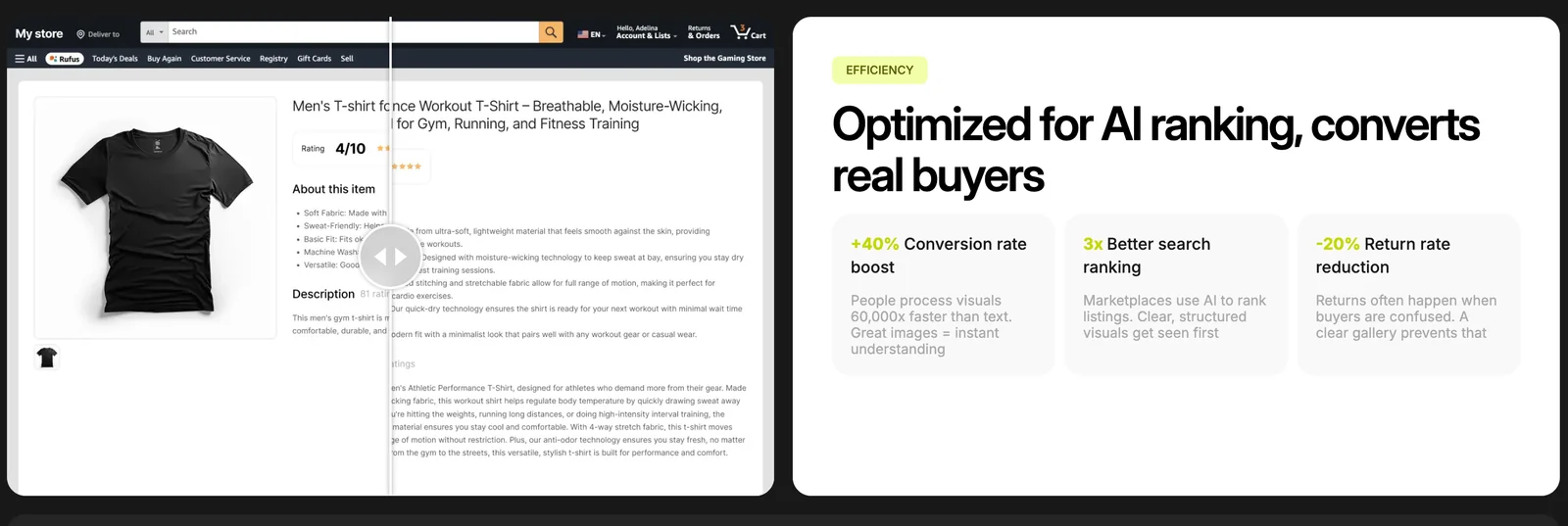

Key Features
Use Cases


Frequently asked questions about Mujo AI
What pricing plans are available for Mujo AI?
Mujo AI offers a range of pricing plans starting at $32 per month and extending up to $600 per month. However, specific details about the features included in each plan and billing cycles are not clearly provided on their official website.
Key Points
- Pricing ranges from $32 to $600 per month.
- Features and billing cycles are not clearly defined.
- Plans may include varying levels of access and capabilities.
Detailed Explanation
Mujo AI provides various pricing tiers to accommodate different user needs. Starting at $32 per month, the basic plan likely offers essential features suitable for individual users or small businesses. As you move up to higher tiers, such as the $600 plan, users can expect more advanced functionalities, possibly including enhanced AI capabilities, increased data storage, or priority support.
The lack of detailed information on the official site regarding what each pricing tier entails can make it challenging for potential customers to make informed decisions. For example, businesses may want to understand how features like data analytics, customer support, or integrations with other tools vary across the plans.
To get a clearer picture of which plan might be best for your needs, consider reaching out to Mujo AI's customer service. They often have insights about current promotions, trial periods, or custom solutions that could be beneficial.
Best Practices / Tips
- Assess Your Needs: Determine what features are essential for your business before choosing a plan.
- Contact Support: Don’t hesitate to ask Mujo AI for detailed explanations of each plan's features.
- Trial Periods: Look for any trial offers to test the service before committing to a higher-tier plan.
Additional Resources
How does Mujo AI help in creating product listings?
Mujo AI simplifies the creation of product listings by transforming a single product photo into multiple, marketplace-ready images and generating sales-optimized copy. This tool accelerates the e-commerce listing process, allowing sellers to efficiently present their products across various online platforms.
Key Points
- Image Transformation: Converts one photo into multiple high-quality images.
- Sales-Optimized Copy: Generates persuasive and SEO-friendly product descriptions.
- Efficiency: Streamlines the listing process for quicker market readiness.
Detailed Explanation
Mujo AI utilizes advanced artificial intelligence to enhance product listings significantly. When you upload a single product image, Mujo AI processes it to create several variations, including different angles, lifestyle shots, and even infographics that highlight features. This not only saves time but also helps in visual storytelling, which is crucial for attracting potential buyers.
In addition to imagery, Mujo AI generates compelling product descriptions tailored to optimize search engine visibility. The AI analyzes market trends and keywords to ensure that the copy resonates with target audiences. For instance, if you sell running shoes, Mujo AI may incorporate phrases like "breathable material" and "perfect for long-distance runners," enhancing your product's chances of appearing in relevant searches.
Use Cases:
- Small Businesses: Perfect for small business owners who need to create multiple listings quickly without the budget for professional photography.
- E-commerce Platforms: Ideal for sellers on platforms like Amazon, eBay, or Etsy, where eye-catching visuals and effective descriptions can drive sales.
- Inventory Management: Helps streamline inventory by providing consistent product images and descriptions across multiple listings.
Best Practices / Tips
- Upload High-Quality Images: Ensure your initial image is clear and well-lit for the best transformations.
- Utilize All Features: Explore all the options Mujo AI offers, including image variations and copy suggestions.
- Review Generated Content: Always proofread the generated copy to add personal touches and ensure brand voice consistency.
- A/B Testing: Test different versions of images and descriptions to see which performs better in terms of engagement and sales.
Additional Resources
How can I start using Mujo AI for my e-commerce business?
To start using Mujo AI for your e-commerce business, visit their official website and explore their services. You can begin by uploading a product photo, which allows you to generate customized images and product listings optimized for various online marketplaces.
Key Points
- User-Friendly Interface: Mujo AI provides an intuitive platform that simplifies the process of creating product listings.
- Image Generation: Uploading a product photo enables automatic image generation tailored for your e-commerce needs.
- Marketplace Optimization: Generated listings are optimized for popular platforms like Amazon, eBay, and Etsy.
Detailed Explanation
To effectively use Mujo AI, follow these steps:
-
Create an Account: Start by signing up on the Mujo AI website. The registration process is quick and straightforward, requiring only your email address and a password.
-
Upload Product Images: After logging in, navigate to the image upload section. You can upload high-quality images of your products. Mujo AI's algorithms analyze these images to generate appealing and relevant visuals.
-
Generate Listings: Once your images are uploaded, you can generate product listings. Mujo AI creates comprehensive descriptions, titles, and tags based on the uploaded images. This feature ensures your listings are not only visually appealing but also keyword-optimized for better search visibility.
-
Select Marketplaces: Choose the specific online marketplaces where you want to publish your product listings. Mujo AI customizes the generated content to meet the unique requirements of each platform, enhancing your chances of sales.
-
Review and Publish: Before publishing, review the generated listings. You can make edits or adjustments to ensure they align with your brand voice. Once satisfied, you can publish directly to your chosen marketplaces.
Example Use Case
For instance, if you sell handmade jewelry, upload a clear image of your necklace. Mujo AI might generate a vibrant image showcasing your product from various angles and create a description highlighting its unique features, materials, and pricing.
Best Practices / Tips
- Use High-Quality Images: Ensure that the images you upload are high-resolution and well-lit to get the best results from Mujo AI.
- Optimize Keywords: Include relevant keywords in your product descriptions to maximize visibility in search results.
- Regularly Update Listings: Keep your listings fresh by regularly updating images and descriptions based on seasonal trends or new product launches.
- Monitor Performance: Track the performance of your listings to understand which images and descriptions drive the most sales, allowing for continuous optimization.
Additional Resources
Does Mujo AI integrate with e-commerce platforms?
Yes, Mujo AI does integrate with e-commerce platforms. While specific integration details may not be explicitly stated, it is optimized for generating export-ready assets, which indicates compatibility with popular e-commerce platforms like Shopify, WooCommerce, and Magento.
Key Points
- Export-Ready Asset Generation: Mujo AI produces high-quality assets suitable for e-commerce.
- Compatibility with Major Platforms: Designed to work seamlessly with platforms like Shopify and WooCommerce.
- User-Friendly Interface: Easy to navigate and integrate into existing workflows.
Detailed Explanation
Mujo AI is an innovative tool designed to streamline the creation of export-ready assets for e-commerce businesses. This capability implies its compatibility with major e-commerce platforms.
-
Integration with Popular Platforms: Although specific integration features are not detailed, Mujo AI is built to facilitate the generation of product images, descriptions, and other marketing materials that can be directly uploaded to platforms like Shopify, WooCommerce, and Magento. For instance, if you create a product image using Mujo AI, it can easily be downloaded and uploaded to your Shopify store without any formatting issues.
-
Use Cases: Businesses can use Mujo AI to enhance their online presence by quickly generating professional-quality images and content for their e-commerce listings. For example, a clothing retailer could leverage Mujo AI to create a series of lifestyle images showcasing their products, which can then be uploaded to their online store.
-
Step-by-Step Guidance: To integrate Mujo AI into your e-commerce workflow, follow these steps:
- Create an Account: Sign up for Mujo AI to access its features.
- Generate Assets: Use the tool to create images and descriptions for your products.
- Download and Upload: Download the generated assets and upload them to your e-commerce platform.
Best Practices / Tips
- Optimize Asset Quality: Always ensure that the generated assets meet your e-commerce platform's specifications for dimensions and file sizes to avoid complications during uploads.
- Regular Updates: Keep your product listings fresh by regularly generating new images and descriptions through Mujo AI.
- Utilize Analytics: Monitor the performance of new listings to understand which assets resonate best with your audience. Adjust your content strategy accordingly.
Additional Resources
How does Mujo AI compare to other e-commerce listing tools?
Mujo AI differentiates itself from other e-commerce listing tools by providing automated content workflows and bulk listing capabilities, enabling businesses to create extensive catalogs quickly while maintaining consistent branding. This level of efficiency and automation is often lacking in competing platforms.
Key Points
- Automated Content Workflows: Streamlines the creation of product descriptions.
- Bulk Listing Capabilities: Allows for rapid catalog expansion.
- Consistent Branding: Ensures uniformity across listings, enhancing brand recognition.
Detailed Explanation
Mujo AI's automated content workflows simplify the process of generating product descriptions, titles, and metadata. By leveraging advanced AI algorithms, users can create tailored content that resonates with their target audience, improving SEO and conversion rates. This feature is particularly beneficial for large e-commerce businesses that need to manage thousands of listings without sacrificing quality.
In contrast, many traditional e-commerce listing tools require manual input for each product, leading to inconsistencies and time-consuming processes. For example, while a competitor may allow for bulk uploads, they often lack the nuanced automation that Mujo AI provides, which can significantly hinder scalability.
Additionally, the bulk listing feature of Mujo AI enables users to upload multiple products at once, drastically reducing the time spent on catalog creation. This is particularly useful during sales events or product launches when speed is critical. Users can also customize templates to ensure that their branding is coherent across all platforms, fostering a stronger brand identity.
Best Practices / Tips
- Utilize Templates: Leverage Mujo AI's customizable templates for uniformity.
- Regular Updates: Keep your product listings up-to-date with the latest trends and customer feedback.
- Monitor Performance: Utilize analytics tools to track the performance of your listings and make data-driven adjustments.
- Engage with Customers: Collect reviews and feedback to enhance product listings and improve SEO.
Additional Resources
Explore more AI Ai Services tools
Browse all Ai Services tools →Browse by use case: Image Generation · Automation & Productivity
Compare Mujo AI: vs BAND for Developers · vs NitroStack · vs GBrain · vs MentionBird