

Model Context Protocol
AIOpen SourceFreeAn open standard protocol that connects LLMs to external data sources and tools to share rich contextual information securely.
Model Context Protocol
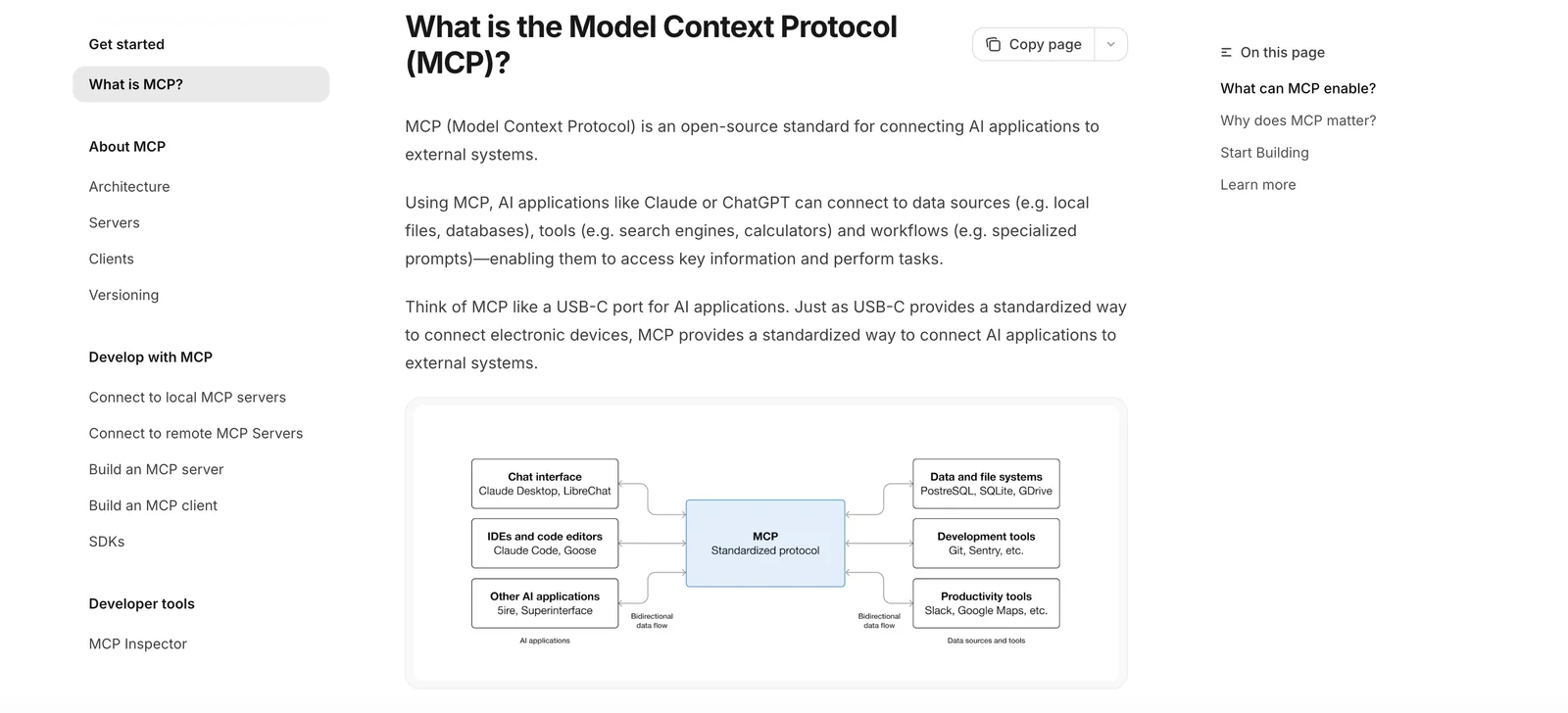
An open standard protocol that connects LLMs to external data sources and tools to share rich contextual information securely.
About Model Context Protocol
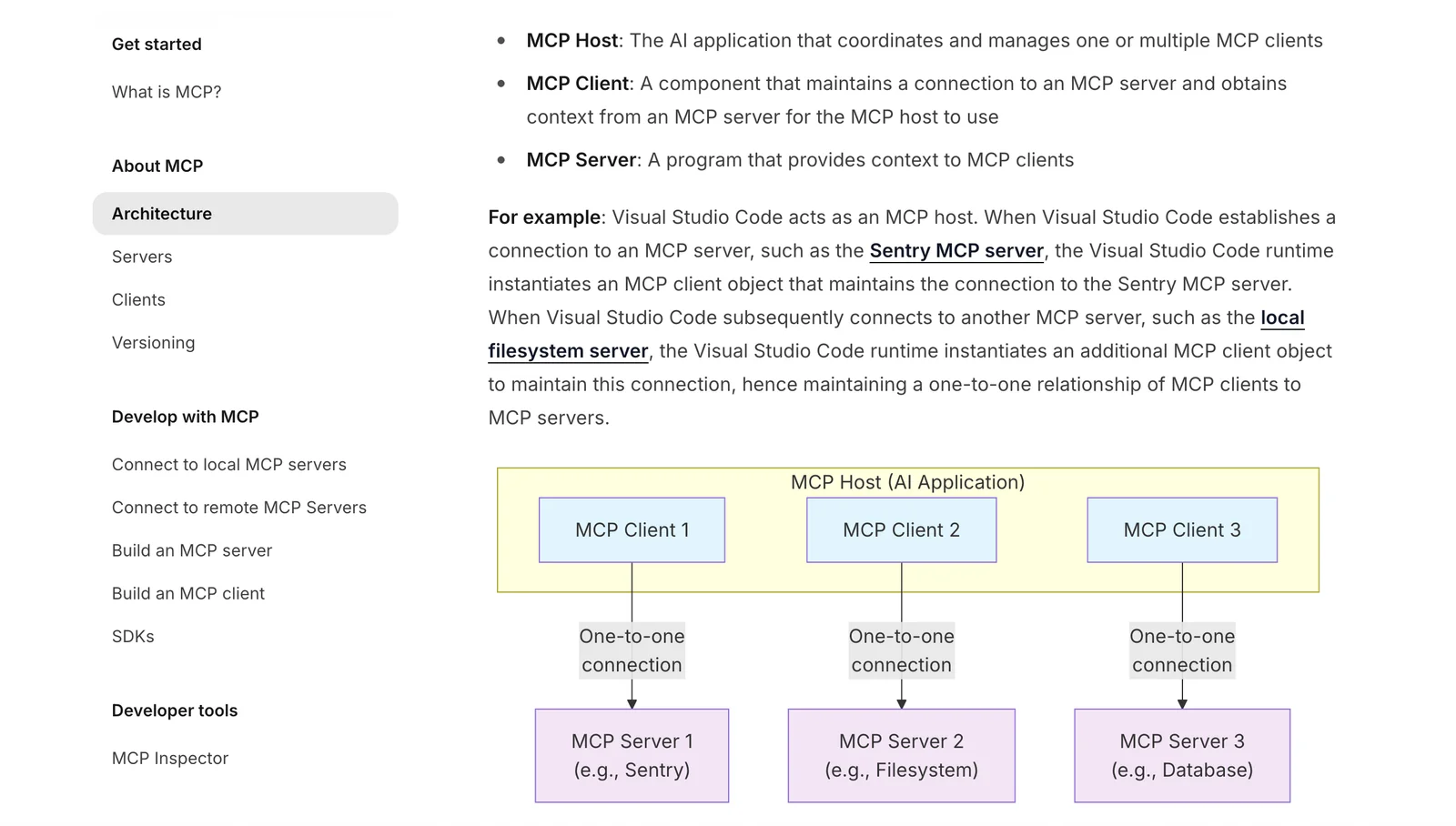
The Model Context Protocol (MCP) is an open, client-server protocol that standardizes how applications expose and share context with large language models (LLMs). MCP lets developers run or register MCP servers that surface data sources, tools, and actions so AI clients (such as chat assistants or IDE agents) can discover and request contextual information in a secure, auditable way. The project provides a specification, reference implementations, SDKs and examples to integrate repositories, business systems, and developer tooling, and is maintained as an open-source initiative led by Anthropic with contributions from the community and major platform partners.
Screenshots
Key Features
Use Cases



Frequently asked questions about Model Context Protocol
What is the pricing for Model Context Protocol?
The Model Context Protocol (MCP) is free to implement and use, with no licensing fees associated. However, costs can emerge from hosting or utilizing third-party MCP server implementations, which typically range from $300 to over $6,000 per month depending on the service provider and features required.
Key Points
- No Licensing Fees: The MCP itself has no associated licensing costs.
- Hosting Costs: Users may incur expenses for hosting solutions.
- Third-Party Implementations: Costs can vary significantly based on service providers.
Detailed Explanation
The Model Context Protocol is designed to facilitate seamless communication between AI models and applications. While the protocol itself does not impose any licensing fees, users must consider the additional costs related to hosting and third-party server implementations.
Hosting Solutions
When implementing MCP, you may need to choose a hosting provider to run your server. The monthly costs for hosting can vary widely based on the provider, server specifications, and the level of service required. Here are some common hosting options:
- Shared Hosting: Suitable for small-scale applications, typically costing between $300 to $1,000 per month.
- Dedicated Servers: For larger applications requiring robust performance, costs can range from $1,000 to $3,000 monthly.
- Cloud Hosting: Offers scalability and flexibility, with costs often exceeding $6,000 per month for high-demand environments.
Third-Party MCP Server Implementations
Many businesses opt to use third-party providers for their MCP server requirements. These providers may offer additional features such as enhanced security, data analytics, and customer support, which can justify the higher costs. It’s crucial to compare different providers based on your specific needs, budget, and expected usage levels.
Best Practices / Tips
- Assess Usage Needs: Determine your projected usage and select a hosting solution that can scale accordingly.
- Compare Providers: Take the time to review multiple hosting and implementation providers to find the best fit for your budget and technical requirements.
- Plan for Future Growth: Choose a service that allows for easy upgrades as your application scales.
Additional Resources
What are the key features of the Model Context Protocol?
The Model Context Protocol (MCP) offers key features such as standardized context exchange, secure two-way connections, a client-server architecture, and extensibility for various tools and actions. These features facilitate rich contextual information sharing, enhancing inter-device communication and integration across different applications.
Key Points
- Standardized Context Exchange: Ensures uniformity in data sharing.
- Secure Two-Way Connections: Protects data integrity and privacy.
- Client-Server Architecture: Supports scalable integration for multiple applications.
Detailed Explanation
The Model Context Protocol is designed to streamline communication between AI systems and other applications. Here’s a deeper look at its key features:
-
Standardized Context Exchange:
- MCP establishes a common framework for how context data is shared between applications. This standardization allows for seamless integration, reducing the time and effort needed for developers to create custom solutions. For instance, a smart home device can share its status with a voice assistant universally, regardless of the manufacturer.
-
Secure Two-Way Connections:
- Security is paramount in data exchange. MCP utilizes encryption methods to establish secure two-way connections, ensuring that data sent and received remains confidential. This feature is crucial for applications handling sensitive information, such as health data in medical applications.
-
Client-Server Architecture:
- The client-server model allows multiple applications to connect and interact with a central server, enabling efficient data management and sharing. This architecture is particularly beneficial for large-scale applications where consistent updates and real-time data sharing are necessary, like in enterprise software solutions.
-
Extensibility for Tools and Actions:
- MCP is designed to be extensible, allowing developers to create additional tools and actions that can utilize the protocol. This flexibility means that new features can be added without disrupting existing functionalities, making it easier to adapt to evolving user needs.
Best Practices / Tips
- Implement Security Protocols: Always prioritize security by using strong encryption methods when implementing MCP to safeguard sensitive data.
- Test Extensibility: Before deploying new tools or actions, conduct thorough testing to ensure they integrate smoothly with existing systems.
- Adopt Standardization Early: Integrate standardized context exchange practices in the early stages of development to avoid integration headaches later on.
Additional Resources
- Model Context Protocol Official Documentation
- Getting Started with Model Context Protocol
- Best Practices for Secure Data Exchange
By leveraging these features and best practices, developers can maximize the effectiveness of the Model Context Protocol in their applications, fostering improved interoperability and user experience.
How do I start using the Model Context Protocol?
To start using the Model Context Protocol (MCP), visit the official MCP website for detailed documentation and reference implementations. You can create your own MCP server or client based on the provided open standard, allowing for versatile integration in AI applications.
Key Points
- Official MCP website provides essential documentation.
- Reference implementations are available for practical guidance.
- You can implement a custom MCP server or client.
Detailed Explanation
The Model Context Protocol (MCP) is an open standard designed to facilitate communication between AI models and their contextual environments. To begin using MCP, follow these steps:
-
Visit the Official Website: Access the MCP resources at MCP Official Site. This site contains the specification documents, tutorials, and examples to help you understand the protocol's structure and functionality.
-
Documentation Review: Start with the foundational documents that explain how MCP works. This includes understanding the data formats, communication methods, and the overall architecture of the protocol.
-
Reference Implementations: Check out the reference implementations provided on the site. These examples demonstrate how to set up an MCP server and client, showcasing best practices and common use cases. This will give you a practical understanding of how to apply MCP in your projects.
-
Develop Your Own Implementation: Based on the documentation and examples, you can begin creating your own MCP server or client. Ensure you adhere to the standards outlined in the specifications to maintain compatibility with other systems.
-
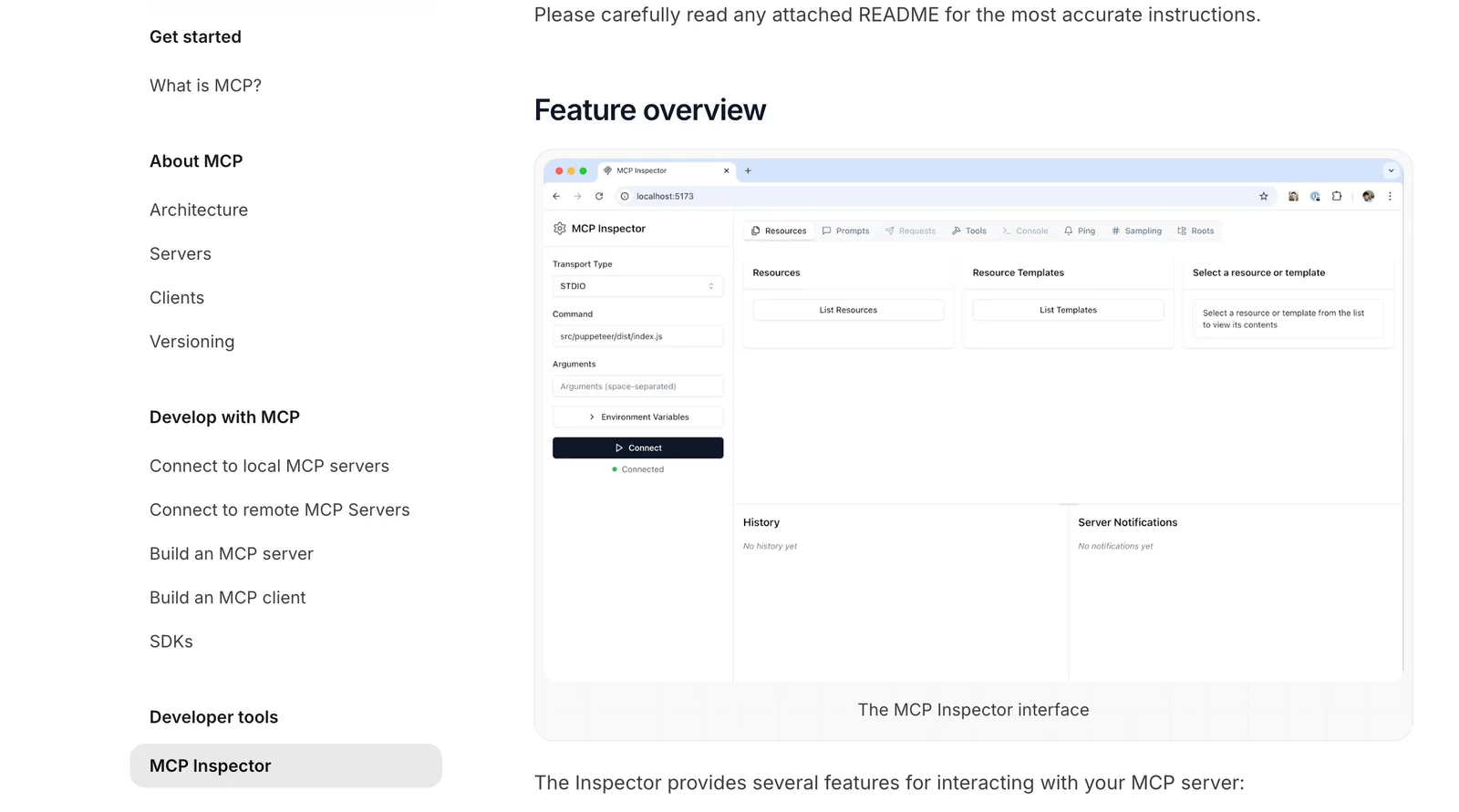
Testing and Validation: After implementation, rigorously test your MCP setup. Validate that it can communicate effectively with various AI models and that data is exchanged correctly.
Best Practices / Tips
- Start Small: If you're new to MCP, consider beginning with a basic implementation before progressing to more complex scenarios.
- Utilize Community Support: Join forums or communities dedicated to MCP to connect with other developers, share experiences, and gather insights.
- Stay Updated: Regularly check for updates on the MCP website to ensure your implementation is in line with the latest standards and best practices.
Additional Resources
By following these guidelines, you will be well on your way to leveraging the Model Context Protocol effectively in your AI applications.
How can I integrate the Model Context Protocol with my applications?
You can integrate the Model Context Protocol with your applications by utilizing the available SDKs and sample code in programming languages like Python and Java. For detailed API specifications and step-by-step integration guides, refer to the official documentation.
Key Points
- SDK Availability: SDKs for various programming languages.
- Sample Code: Access to pre-written code snippets for quick integration.
- Official Documentation: Comprehensive API details and guides.
Detailed Explanation
Integrating the Model Context Protocol (MCP) requires a structured approach using the provided Software Development Kits (SDKs) and sample code. Here’s how you can do it:
-
Choose Your Programming Language: The MCP supports multiple languages, including Python, Java, and JavaScript. Select the language that best fits your application environment.
-
Download the SDK: Visit the official MCP website to download the respective SDK for your chosen programming language. This SDK contains libraries that simplify the integration process.
-
Refer to Sample Code: Utilize the sample code provided in the SDK. For instance, if you choose Python, you can find sample scripts that demonstrate how to authenticate, send requests, and handle responses.
-
Follow the Integration Guide: The official documentation includes a detailed integration guide. It typically covers:
- Authentication: How to securely connect to the MCP service.
- API Endpoints: Overview of available endpoints and their functionalities.
- Error Handling: Common errors and how to troubleshoot them.
-
Testing: After integration, rigorously test your application to ensure that it interacts correctly with the MCP. Use unit tests and integration tests to validate functionality.
Best Practices / Tips
- Start with the Basics: Familiarize yourself with the MCP's core concepts before diving into complex integrations.
- Utilize Community Forums: Engage with developer communities for tips and solutions to common integration challenges.
- Keep Documentation Handy: Always refer back to the official documentation for updates or changes in the API.
- Version Control: Keep track of SDK versions and update them regularly to leverage new features and security improvements.
Additional Resources
How does Model Context Protocol compare to other AI data protocols?
Model Context Protocol stands out from other AI data protocols by providing an open standard with no licensing fees, which facilitates secure data sharing and supports modular deployments. This flexibility makes it an ideal choice for developers looking to implement efficient and scalable AI solutions.
Key Points
- Open Standard: Model Context Protocol promotes interoperability across different AI systems.
- No Licensing Fees: Eliminates additional costs often associated with proprietary protocols.
- Modular Deployments: Supports customizable and scalable AI applications.
Detailed Explanation
Model Context Protocol is designed to enhance data sharing while maintaining security and flexibility. Unlike proprietary protocols that often impose restrictions and fees, Model Context Protocol is open and free to use. This feature significantly lowers the barrier to entry for developers and organizations, allowing them to focus on innovation instead of licensing costs.
For instance, a startup developing an AI-driven healthcare application can leverage Model Context Protocol to share patient data securely with various stakeholders without worrying about compliance costs or vendor lock-in. Moreover, its modular deployment capability means developers can integrate it into existing systems seamlessly, enabling quick iterations and updates.
In contrast, many proprietary protocols require developers to adapt their systems to specific formats, which can introduce inefficiencies. With Model Context Protocol, developers can utilize a flexible architecture that aligns with their unique project needs, leading to faster deployment times and enhanced collaboration across platforms.
Best Practices / Tips
- Evaluate Compatibility: Before implementing Model Context Protocol, ensure your existing systems can integrate smoothly with its architecture.
- Security Measures: Always implement additional security protocols when sharing sensitive data, even with secure protocols.
- Stay Updated: Regularly check for updates and enhancements to Model Context Protocol to leverage new features and improvements.
Additional Resources
Explore more AI Mcps tools
Browse all Mcps tools →Browse by use case: Automation & Productivity
Compare Model Context Protocol: vs ai-memory · vs CrawlForge MCP · vs Popcraft · vs Pomerado