
MixHub AI
AIAll-in-one platform offering free chat, image, and video models (GPT-5, Flux, Claude, Qwen Image, Kling, Hailuo) with regular updates.
MixHub AI
All-in-one platform offering free chat, image, and video models (GPT-5, Flux, Claude, Qwen Image, Kling, Hailuo) with regular updates.
About MixHub AI
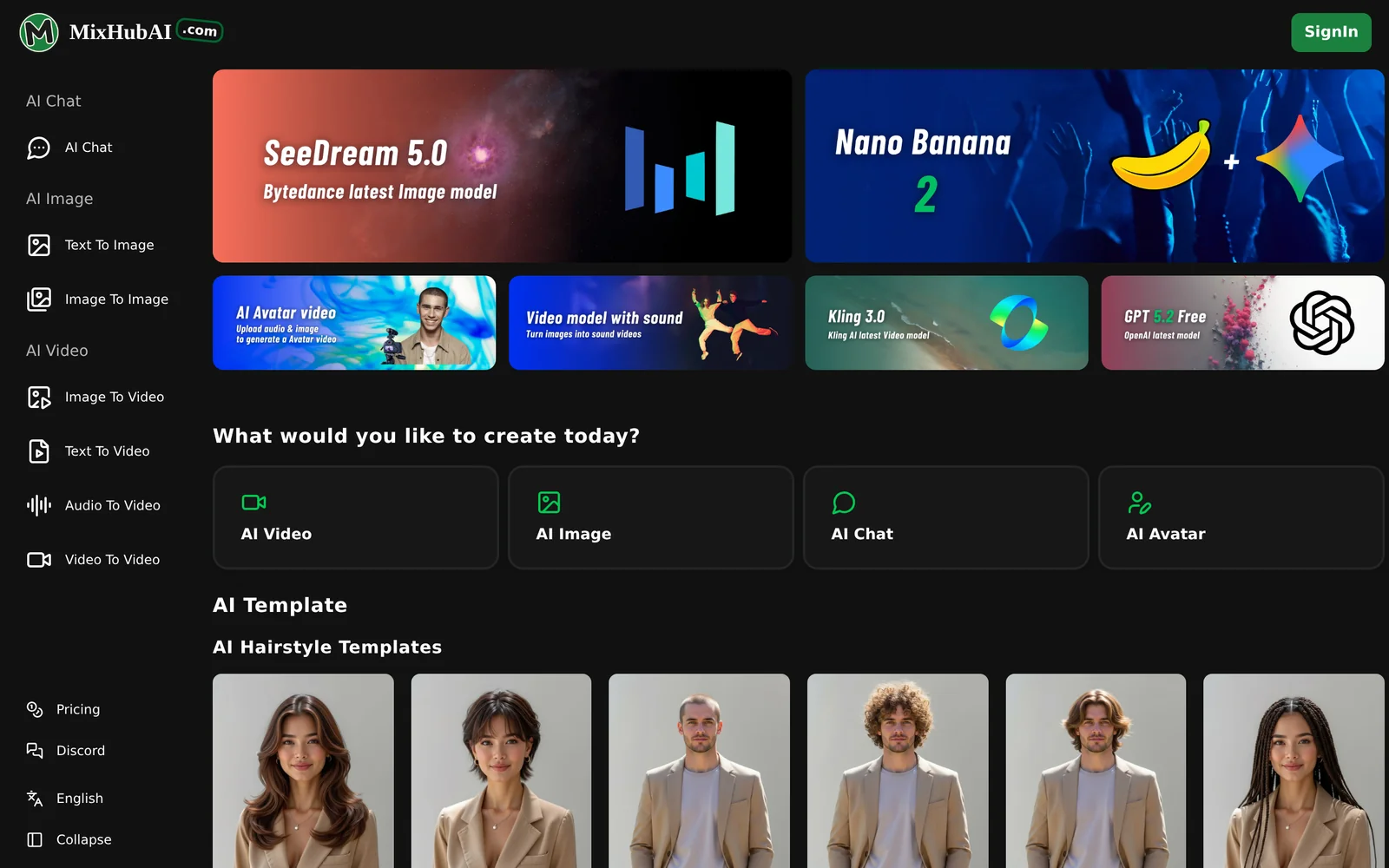
MixHub AI is a web-based platform that aggregates a wide range of state-of-the-art chat, image, and video models in a single place. It provides access to multiple backends (including GPT-5, Flux, Claude, Qwen Image, Kling, Hailuo) so users can run multimodal tasks without switching services. The site emphasizes having the latest models available and updated regularly, and promotes free access to core chat, image, and video model capabilities. Its value lies in simplifying experimentation and usage of diverse, up-to-date generative models through one unified interface.
Screenshots
Key Features
Use Cases


Frequently asked questions about MixHub AI
What is MixHub AI?
MixHub AI is an all-in-one platform that provides free access to advanced chat, image, and video models, including GPT-5, Flux, Claude, Qwen Image, Kling, and Hailuo. Users benefit from regular updates to enhance functionality and performance, making it a versatile tool for various creative and professional applications.
Key Points
- Multiple AI Models: Access to diverse AI models for chat, image, and video applications.
- Free and Regular Updates: Users enjoy no-cost access with ongoing improvements.
- Versatile Applications: Suitable for content creation, customer service, and multimedia projects.
Detailed Explanation
MixHub AI stands out by offering a comprehensive suite of AI tools designed to cater to various needs. Each model serves different purposes:
-
Chat Models: With models like GPT-5 and Claude, users can create conversational agents capable of engaging in natural dialogues. These can be utilized for customer service, virtual assistants, or interactive storytelling.
-
Image Generation: Qwen Image and Kling provide capabilities for generating high-quality images based on textual prompts. This is particularly useful for graphic designers, marketers, and content creators looking to produce unique visuals quickly.
-
Video Models: Hailuo allows users to create and edit videos with AI-assisted features, streamlining the video production process for marketers and social media managers.
The platform's free access and regular updates ensure users can leverage the latest advancements in AI technology without upfront costs. For example, a small business can use MixHub AI to create engaging social media posts and automate customer interactions, enhancing both marketing and customer support efforts.
Best Practices / Tips
- Experiment with Different Models: Explore each AI model to find the best fit for your specific project needs.
- Stay Updated: Regularly check for updates, as new features and enhancements can significantly improve your workflow and output quality.
- Optimize Prompts: When working with chat or image models, use clear and specific prompts to achieve better results. For example, asking for “a sunset over a mountain range in a watercolor style” will yield more relevant images than a vague request.
Additional Resources
How does MixHub AI work?
MixHub AI operates by leveraging advanced artificial intelligence technologies to streamline daily workflows for users. It integrates tools for automation, data analysis, and user interaction, enhancing efficiency and productivity in various tasks such as project management, content creation, and data processing.
Key Points
- Automation Capabilities: MixHub AI automates repetitive tasks, saving time.
- Data Analysis: It provides insights through data interpretation and visualization.
- User-Friendly Interface: The platform is designed for easy navigation, making it accessible for all users.
Detailed Explanation
MixHub AI combines multiple AI technologies to optimize user workflows effectively. By incorporating machine learning algorithms, it understands user preferences and automates mundane tasks. For instance, a marketing team can use MixHub AI to generate content ideas based on current trends, analyze engagement metrics, and schedule posts across social media platforms—all from a single dashboard.
Key Features:
- Intelligent Automation: Automates routine tasks like email responses and report generation, allowing users to focus on strategic activities.
- Data Insights: Uses AI to analyze large datasets, offering actionable insights that help businesses make informed decisions. For example, it can identify customer behavior patterns and recommend targeted marketing strategies.
- Collaboration Tools: Facilitates team collaboration with shared calendars, task assignments, and integrated communication channels, ensuring everyone is aligned on projects.
Best Practices / Tips
- Start Small: Begin by automating simple tasks before progressing to more complex workflows.
- Leverage Data: Regularly analyze the data MixHub AI provides to refine your strategies and improve productivity.
- Stay Updated: Keep abreast of new features and improvements in MixHub AI to maximize usage.
Additional Resources
What are the main features of MixHub AI?
MixHub AI offers a range of advanced features including natural language processing, predictive analytics, and seamless integration capabilities. These tools empower users to automate workflows, enhance decision-making, and improve team collaboration, making it a valuable asset for businesses looking to leverage artificial intelligence effectively.
Key Points
- Natural Language Processing (NLP): Enables intuitive interactions and data analysis.
- Predictive Analytics: Provides actionable insights based on historical data.
- Seamless Integration: Connects effortlessly with existing tools and platforms.
Detailed Explanation
Natural Language Processing (NLP)
MixHub AI's NLP capabilities allow users to interact with the platform using natural language commands. This feature simplifies data queries and reporting, making it accessible to non-technical users. For example, a marketing team can use NLP to generate reports on campaign performance by simply asking, “Show me the ROI for last month’s social media campaigns.”
Predictive Analytics
The predictive analytics feature uses machine learning algorithms to analyze past behaviors and forecast future trends. Businesses can leverage this functionality to anticipate customer needs, optimize inventory levels, or refine marketing strategies. For instance, an e-commerce company can analyze purchasing patterns to predict which products are likely to sell out during seasonal promotions.
Seamless Integration
MixHub AI can easily integrate with various existing tools such as CRM systems, project management software, and communication platforms. This interoperability ensures that teams can maintain their current workflows while enhancing them with AI capabilities. For example, integrating with Slack can enable real-time data insights directly within team conversations.
Best Practices / Tips
- Utilize NLP for Reporting: Encourage team members to use natural language queries for faster insights.
- Implement Predictive Analytics Gradually: Start with one department to refine your approach before scaling across the organization.
- Evaluate Integration Needs: Assess which tools your team currently uses to maximize the benefits of MixHub AI's integration capabilities.
Additional Resources
Who is MixHub AI for?
MixHub AI is designed for individuals and businesses looking to enhance their daily workflows through artificial intelligence. Whether you are a marketer, content creator, or project manager, MixHub AI offers tools to streamline processes, improve efficiency, and foster creativity in various applications.
Key Points
- Target Users: Ideal for marketers, content creators, and project managers.
- Workflow Enhancement: Streamlines day-to-day tasks through automation.
- Creativity Boost: Supports innovative solutions in various fields.
Detailed Explanation
MixHub AI caters to a wide range of users who wish to leverage AI for improving their productivity. Here are some key user categories:
-
Marketers: MixHub AI assists marketers by automating data analysis, campaign management, and customer segmentation. For instance, AI algorithms can analyze user behavior and optimize ad placements in real-time, resulting in higher conversion rates.
-
Content Creators: Writers, bloggers, and video producers can utilize MixHub AI for content generation, idea brainstorming, and editing. The tool can suggest topics based on trending keywords or even generate draft content, saving time and boosting creativity.
-
Project Managers: For project managers, MixHub AI can help in resource allocation, task scheduling, and performance tracking. By automating repetitive tasks, teams can focus more on strategic planning and execution.
Use Cases:
- Email Marketing: Automate personalized email campaigns based on user data analysis to enhance engagement.
- Social Media Management: Schedule and optimize posts automatically using AI insights on peak engagement times.
- Project Tracking: Use AI to analyze project timelines and predict potential bottlenecks.
Best Practices / Tips
- Integrate with Existing Tools: Ensure MixHub AI integrates well with your current software (like CRM or project management tools) for seamless workflow.
- Regularly Update Data Inputs: Keep your data fresh for the AI to provide the most relevant insights and suggestions.
- Monitor Performance Metrics: Use MixHub AI to track the effectiveness of implemented changes, allowing for continuous improvement.
Additional Resources
How much does MixHub AI cost?
MixHub AI is free to use, providing users with access to a range of features without any cost. This makes it an attractive option for individuals and businesses looking to leverage AI tools for various applications without financial commitment.
Key Points
- MixHub AI offers a free usage model.
- No hidden fees or subscription plans are required.
- Ideal for both personal and business use.
Detailed Explanation
MixHub AI is a versatile platform designed to harness the power of artificial intelligence for various tasks, such as content creation, data analysis, and automation. The free access allows users to explore and utilize its features without worrying about upfront costs or ongoing subscriptions.
For instance, content creators can use MixHub AI to generate blog posts, social media updates, and marketing materials efficiently. Businesses can analyze customer data and improve engagement strategies without incurring extra expenses. This no-cost model encourages experimentation and innovation as users can test different functionalities extensively.
Additionally, MixHub AI regularly updates its features, ensuring users have access to the latest advancements in AI technology without any financial burden. The platform's user-friendly interface makes it accessible to both beginners and seasoned professionals.
Best Practices / Tips
- Explore Features: Take full advantage of the free version by experimenting with various tools and functionalities available on the platform.
- Stay Updated: Regularly check for updates or new features that MixHub AI announces, as they may enhance your experience.
- Community Engagement: Join MixHub AI forums or social media groups to learn from other users’ experiences and tips on maximizing the tool's potential.
Additional Resources
How do I get started with MixHub AI?
To get started with MixHub AI, visit mixhubai.com to sign up for an account. Once registered, you can explore its features, tools, and capabilities that enhance your AI-driven projects and workflows.
Key Points
- Sign Up: Create an account to access MixHub AI features.
- Explore Features: Familiarize yourself with the tools available for AI projects.
- Utilize Resources: Access documentation and community support for better integration.
Detailed Explanation
To begin your journey with MixHub AI, follow these steps:
- Visit the Website: Go to mixhubai.com.
- Create an Account: Click on the "Sign Up" button and fill out the registration form with your details, including email and password. You may also have the option to sign up using social media accounts for convenience.
- Explore the Dashboard: After logging in, you’ll be directed to the dashboard where you can find various tools tailored for AI development. These include model training, data analysis, and project collaboration features.
- Utilize Tutorials and Documentation: MixHub AI offers comprehensive guides and tutorials to help you understand its functionalities. Check out the help section to find step-by-step instructions and best practices.
- Join the Community: Engage with other users in forums to share insights and strategies. This can be a valuable resource for troubleshooting and learning advanced techniques.
Use Cases
MixHub AI can be applied in various fields such as marketing automation, data science, and machine learning model training. By leveraging its tools, businesses can enhance customer engagement, streamline operations, and drive innovation.
Best Practices / Tips
- Start with Tutorials: Make use of the available tutorials to familiarize yourself with the platform quickly.
- Set Clear Objectives: Define what you want to achieve with MixHub AI to better utilize its features.
- Experiment and Iterate: Don’t hesitate to experiment with different tools and settings. Continuous learning and adaptation will help maximize your results.
- Network with Peers: Engaging with the community can provide insights that are not available in documentation.
Additional Resources
By following these steps and utilizing these resources, you can effectively integrate MixHub AI into your projects and unlock its full potential.
Explore more AI Ai Services tools
Browse all Ai Services tools →Browse by use case: Image Generation · Video Generation · Chatbots & Assistants
Compare MixHub AI: vs BAND for Developers · vs NitroStack · vs GBrain · vs MentionBird