

Hyvor Post
AIPrivacy-first, open-source newsletter platform built on Hyvor Relay for simple, tracker-free email publishing.
Hyvor Post
Privacy-first, open-source newsletter platform built on Hyvor Relay for simple, tracker-free email publishing.
About Hyvor Post
Hyvor Post is a privacy-first newsletter platform focused on delivering newsletters without tracking users. It is built on Hyvor Relay, an open-source, self-hosted email API that uses SMTP and your infrastructure to send mail at scale. Hyvor Post provides rich link previews and embed handling (via custom parsers and oEmbed), a frontend/backend architecture for managing issues and archives, and developer-friendly integrations through the Relay API. The project is licensed under AGPL-3.0 and aims to give publishers and developers control over email delivery and subscriber privacy.
Screenshots
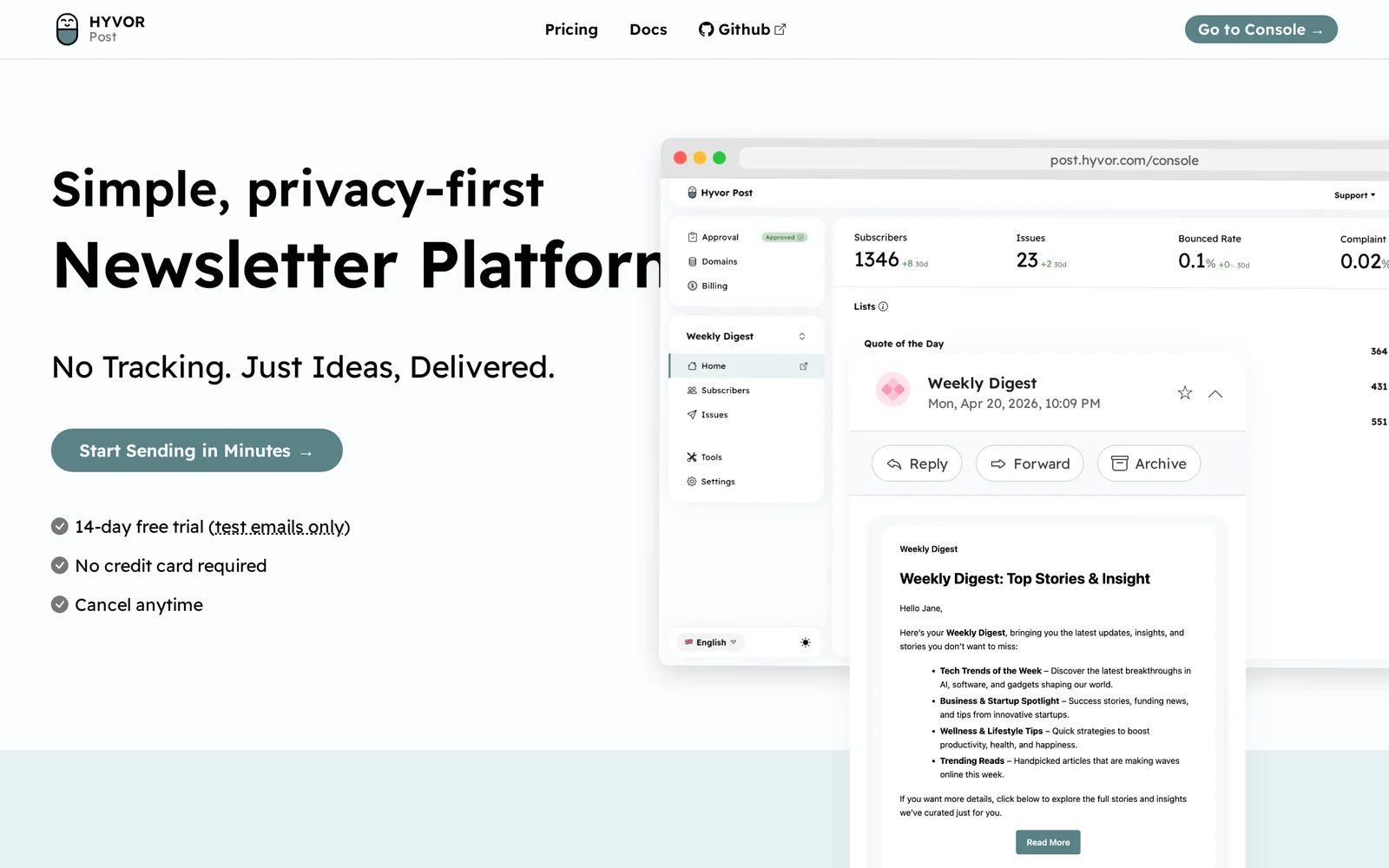
Key Features
Use Cases


Frequently asked questions about Hyvor Post
What is Hyvor Post?
Hyvor Post is a privacy-first, open-source newsletter platform designed for simple, tracker-free email publishing. Built on Hyvor Relay, it offers users the ability to create and distribute newsletters without compromising on their personal data or relying on intrusive tracking methods.
Key Points
- Privacy-Centric Design: Emphasizes user data protection.
- Open-Source Framework: Encourages community contributions and transparency.
- User-Friendly Interface: Simplifies the newsletter creation process.
Detailed Explanation
Hyvor Post stands out as a robust alternative to mainstream newsletter services by prioritizing user privacy and data integrity. It utilizes an open-source framework, allowing developers to inspect, modify, and enhance the platform. This transparency fosters trust among users, ensuring their data isn't exploited by advertisers or third-party trackers.
Key Features:
-
Privacy-First Approach: Unlike traditional newsletter platforms, Hyvor Post does not track user behavior or collect personal information. This means subscribers can feel secure knowing their data is handled responsibly.
-
Ease of Use: The platform is designed with a user-friendly interface, making it accessible for individuals and businesses alike. Users can easily set up their newsletters with customizable templates and straightforward publishing tools.
-
Integration with Hyvor Relay: By leveraging Hyvor Relay, Hyvor Post offers seamless email delivery and management. This ensures that newsletters reach subscribers effectively, with minimal delays.
Use Cases:
- Content Creators: Bloggers and vloggers can use Hyvor Post to maintain direct communication with their audience, delivering updates and exclusive content without relying on social media algorithms.
- Small Businesses: Companies can engage their customers by sending newsletters about promotions, product launches, or updates, all while ensuring their customers' privacy.
- Nonprofits: Organizations can keep their supporters informed about initiatives and events while respecting their privacy.
Best Practices / Tips
- Engage Your Audience: Regularly update your subscribers with valuable content to maintain interest and reduce unsubscribe rates.
- Personalization: Utilize subscriber data (while respecting privacy) to tailor content to different audience segments, enhancing engagement.
- Testing and Optimization: Experiment with different subject lines, formats, and sending times to determine what resonates best with your audience.
Additional Resources
By adopting Hyvor Post, users can create meaningful connections with their audience while ensuring privacy and data protection is at the forefront of their communication strategy.
How does Hyvor Post work?
Hyvor Post is an AI-powered platform designed to enhance daily workflows by integrating advanced AI capabilities. It assists users in content creation, management, and collaboration, streamlining tasks and improving productivity in a user-friendly interface.
Key Points
- AI Integration: Combines multiple AI tools for seamless workflow.
- User-Centric Design: Focuses on ease of use to enhance productivity.
- Versatile Applications: Suitable for various industries and tasks.
Detailed Explanation
Hyvor Post operates by leveraging sophisticated AI technologies to facilitate a range of tasks. For content creators, it offers tools for generating ideas, drafting articles, and optimizing posts for search engines. Users can input a topic, and the AI provides suggestions, outlines, or even full drafts tailored to their preferences.
For teams, Hyvor Post enhances collaboration through real-time editing and feedback mechanisms. Multiple users can work on a document simultaneously, making it ideal for projects that require input from different stakeholders. Additionally, the platform allows for easy integration with other tools, such as social media and analytics, enabling users to track performance and engagement metrics effortlessly.
Use Case Example: A marketing team can utilize Hyvor Post to brainstorm campaign ideas, draft promotional content, and analyze audience reactions all in one platform. By using AI to generate insights on trending topics and keywords, they can ensure their content remains relevant and engaging.
Best Practices / Tips
- Experiment with Features: Take advantage of all AI tools offered within Hyvor Post to discover which ones best suit your workflow.
- Set Clear Goals: Define what you want to achieve with Hyvor Post, whether it's improving content quality or increasing team collaboration.
- Regular Updates: Stay informed about new features and updates, as the platform continually evolves with advancements in AI technology.
Additional Resources
- Hyvor Post Official Documentation – Comprehensive guides and tutorials.
- Hyvor Blog – Insights on using AI tools for productivity and creativity.
- Use Cases and Success Stories – Real-life examples of how businesses leverage Hyvor Post for their needs.
What are the main features of Hyvor Post?
Hyvor Post offers several key features, including advanced AI capabilities for content generation, a user-friendly interface for seamless editing, and integrated analytics for performance tracking. These features empower users to create and manage content efficiently while enhancing engagement and reach.
Key Points
- AI-Powered Content Generation: Create high-quality articles effortlessly.
- User-Friendly Interface: Edit and manage posts with ease.
- Integrated Analytics: Track content performance and audience engagement.
Detailed Explanation
Hyvor Post is designed to streamline the content creation process through its advanced AI capabilities. The AI-powered content generation feature allows users to produce articles and blog posts quickly and efficiently. For instance, you can input a topic, and the AI generates a well-structured draft, saving you significant time.
The user-friendly interface is another standout feature. It enables users, regardless of technical skill, to edit and organize posts seamlessly. You can easily drag and drop elements, format text, and insert multimedia, making the editing process intuitive. This simplicity enhances productivity, allowing content creators to focus more on creativity than on technical challenges.
Additionally, Hyvor Post includes integrated analytics, which provide valuable insights into how your content is performing. You can monitor metrics such as page views, user engagement, and time spent on articles. This data helps you refine your content strategy and optimize future posts for better audience retention and interaction.
Best Practices / Tips
- Leverage AI Features: Utilize the AI to brainstorm topics and create outlines, then refine the content to match your voice.
- Engage with Analytics: Regularly analyze performance metrics to identify what resonates with your audience; adjust your content strategy accordingly.
- Stay Consistent: Publish regularly to build an audience and improve your site's SEO ranking over time.
Additional Resources
Who is Hyvor Post for?
Hyvor Post is designed for content creators, marketers, and businesses looking to streamline their AI-driven workflows. It caters to those who want to enhance their content production, optimize engagement, and improve collaboration using AI tools in their daily operations.
Key Points
- Target Audience: Content creators, marketers, and businesses.
- Workflow Enhancement: Streamlines AI-driven tasks.
- Engagement Optimization: Improves audience interaction and collaboration.
Detailed Explanation
Hyvor Post is a versatile tool that benefits various user groups, including bloggers, social media managers, and digital marketers. By integrating AI into day-to-day workflows, users can efficiently generate content ideas, automate repetitive tasks, and analyze performance metrics.
For example, a marketing team can utilize Hyvor Post to automatically curate relevant content, schedule posts, and analyze engagement metrics, allowing them to focus on strategy rather than mundane tasks. Additionally, content creators can leverage AI assistance for brainstorming topics, drafting outlines, and even generating complete articles, thus drastically reducing the time spent on content creation.
Use Cases:
- Bloggers: Quickly generate blog post ideas and drafts, enabling them to maintain a consistent posting schedule.
- Social Media Managers: Automate the scheduling of posts and track engagement metrics to refine their strategies.
- Businesses: Enhance internal communication by using AI to summarize meetings and generate reports.
Best Practices / Tips
- Set Clear Objectives: Define what you want to achieve with Hyvor Post, whether it's increasing engagement or streamlining content production.
- Utilize Analytics: Regularly review performance metrics to understand what works and what doesn’t, allowing for data-driven adjustments.
- Combine with Other Tools: Integrate Hyvor Post with other marketing tools for a more comprehensive approach to content management and strategy.
Common Pitfalls:
- Neglecting Training: Ensure that your team is well-versed in using Hyvor Post to maximize its benefits.
- Over-Automation: While automation saves time, ensure that your content retains a human touch to engage your audience effectively.
Additional Resources
How much does Hyvor Post cost?
Hyvor Post is completely free to use, offering users a robust platform for creating and managing blogs without any hidden fees or subscription costs. This makes it an ideal choice for individuals and businesses looking to establish an online presence without financial barriers.
Key Points
- Free to Use: Hyvor Post does not charge users for its features.
- User-Friendly: The platform is designed for easy navigation and content management.
- No Hidden Costs: Users can access all features without any subscription fees.
Detailed Explanation
Hyvor Post stands out as a content management system (CMS) tailored for bloggers and content creators. It offers a range of features, including customizable themes, SEO optimization tools, and analytics, all without any cost.
-
User Experience: The platform is intuitive, allowing users to quickly set up their blogs with minimal technical skills. New users can easily navigate through the dashboard, making it straightforward to publish posts, manage comments, and engage with readers.
-
SEO Features: Hyvor Post includes built-in SEO tools that help users optimize their content for search engines. This includes customizable meta tags, alt text for images, and user-friendly URLs. By leveraging these features, users can improve their visibility online.
-
Community Support: Since Hyvor Post is free, it has garnered a community of users who share tips, tricks, and support. This collaborative environment enhances the user experience and provides additional learning resources.
Best Practices / Tips
- Optimize for SEO: Take advantage of Hyvor Post’s SEO tools. Use keywords strategically in your blog posts to increase visibility.
- Engagement: Encourage reader interaction by enabling comments and responding to feedback. This builds a loyal readership.
- Regular Updates: Maintain an active blog by posting regularly. Consistency helps retain readers and improves search rankings.
Additional Resources
How do I get started with Hyvor Post?
To get started with Hyvor Post, simply visit https://post.hyvor.com/ to sign up for an account. Once registered, you can explore its features, such as content creation, community engagement, and analytics tools, designed to enhance your blogging experience.
Key Points
- Easy Sign-Up Process: Create an account quickly.
- Feature Exploration: Discover powerful blogging tools.
- Community Engagement: Interact with other users and readers.
Detailed Explanation
Hyvor Post is a user-friendly blogging platform that allows you to create and manage blog content efficiently. To begin, follow these steps:
-
Sign Up: Navigate to Hyvor Post. Click on the "Sign Up" button, and fill in your details, including your email address and a secure password. You may also sign up using social media accounts for convenience.
-
Explore the Dashboard: After signing up, you’ll be taken to your dashboard. Familiarize yourself with the layout, which includes options for creating posts, managing comments, and reviewing analytics.
-
Create Your First Post: Click on the "New Post" button. You can format your text using the built-in editor, adding images, videos, and links to enrich your content. Consider using headings and bullet points for better readability.
-
Customize Your Blog: Adjust the settings to personalize your blog. You can modify themes, add your logo, and choose color schemes to match your brand identity.
-
Engage with Your Audience: Utilize Hyvor Post's community features to engage readers. You can enable comments, respond to feedback, and create a vibrant interaction space.
-
Analyze Performance: After publishing, use the analytics tools to monitor your posts' performance, track visitor statistics, and understand audience engagement.
Best Practices / Tips
- Optimize for SEO: Use relevant keywords in your posts and titles to improve search visibility. Focus on long-tail keywords that align with your niche.
- Consistent Posting: Establish a regular posting schedule to keep your audience engaged and returning for more content.
- Utilize Multimedia: Include images, infographics, and videos in your posts to enhance engagement and shareability.
- Promote Your Content: Share your posts on social media platforms to reach a broader audience. Consider using email marketing to notify subscribers of new content.
Additional Resources
- Hyvor Post Documentation - Comprehensive guides and tutorials.
- Hyvor Blog - Insights and updates on using Hyvor products effectively.
- SEO Best Practices - Learn more about optimizing your content for search engines.
Explore more AI Ai Services tools
Browse all Ai Services tools →Browse by use case: Code Generation
Compare Hyvor Post: vs BAND for Developers · vs NitroStack · vs GBrain · vs MentionBird