

HuggingFace Gaia 2
AIOpen SourceFreeGaia2 is an open benchmark and evaluation suite of 800 dynamic scenarios for studying and comparing generalist agent capabilities.
HuggingFace Gaia 2
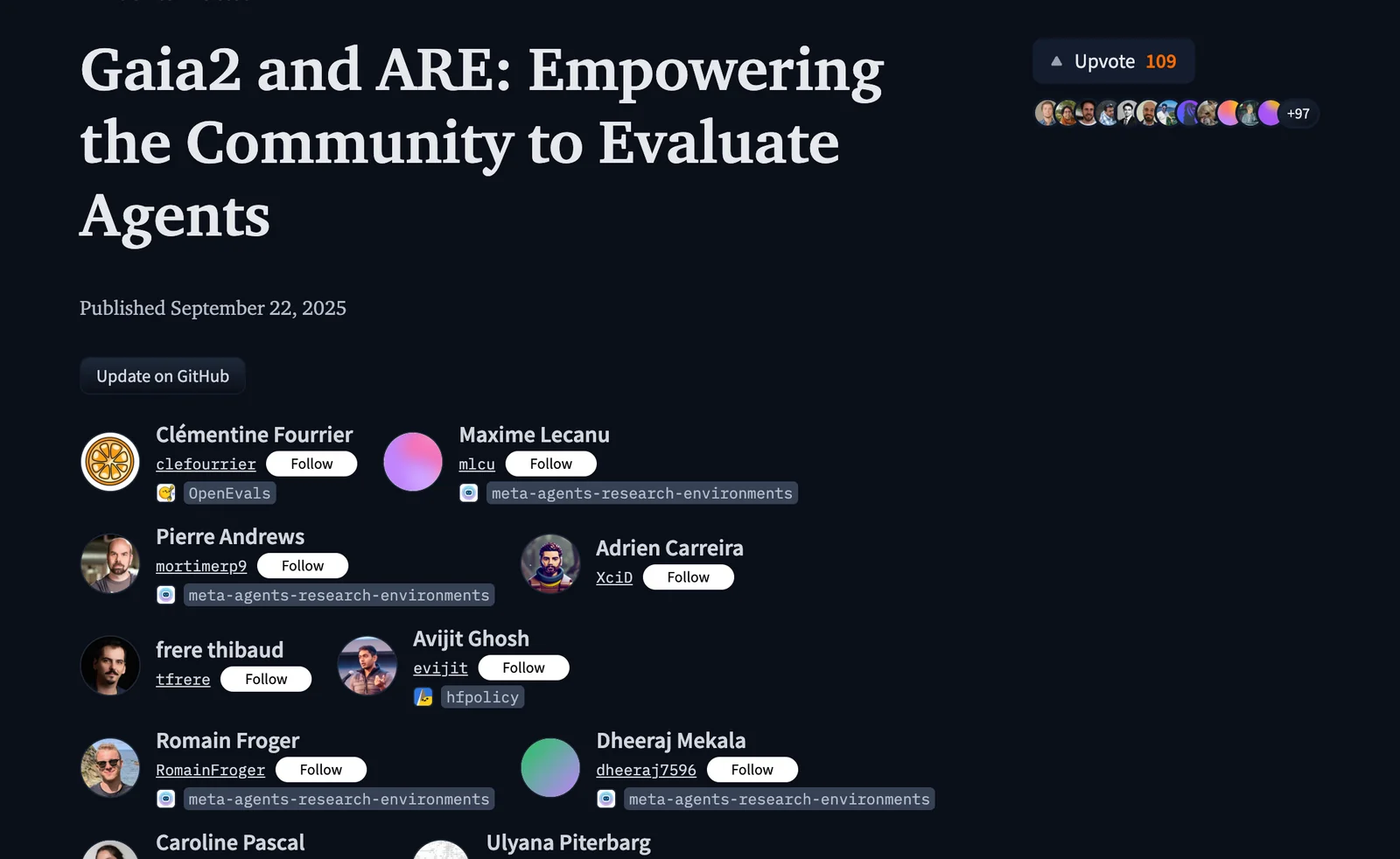
Gaia2 is an open benchmark and evaluation suite of 800 dynamic scenarios for studying and comparing generalist agent capabilities.
About HuggingFace Gaia 2
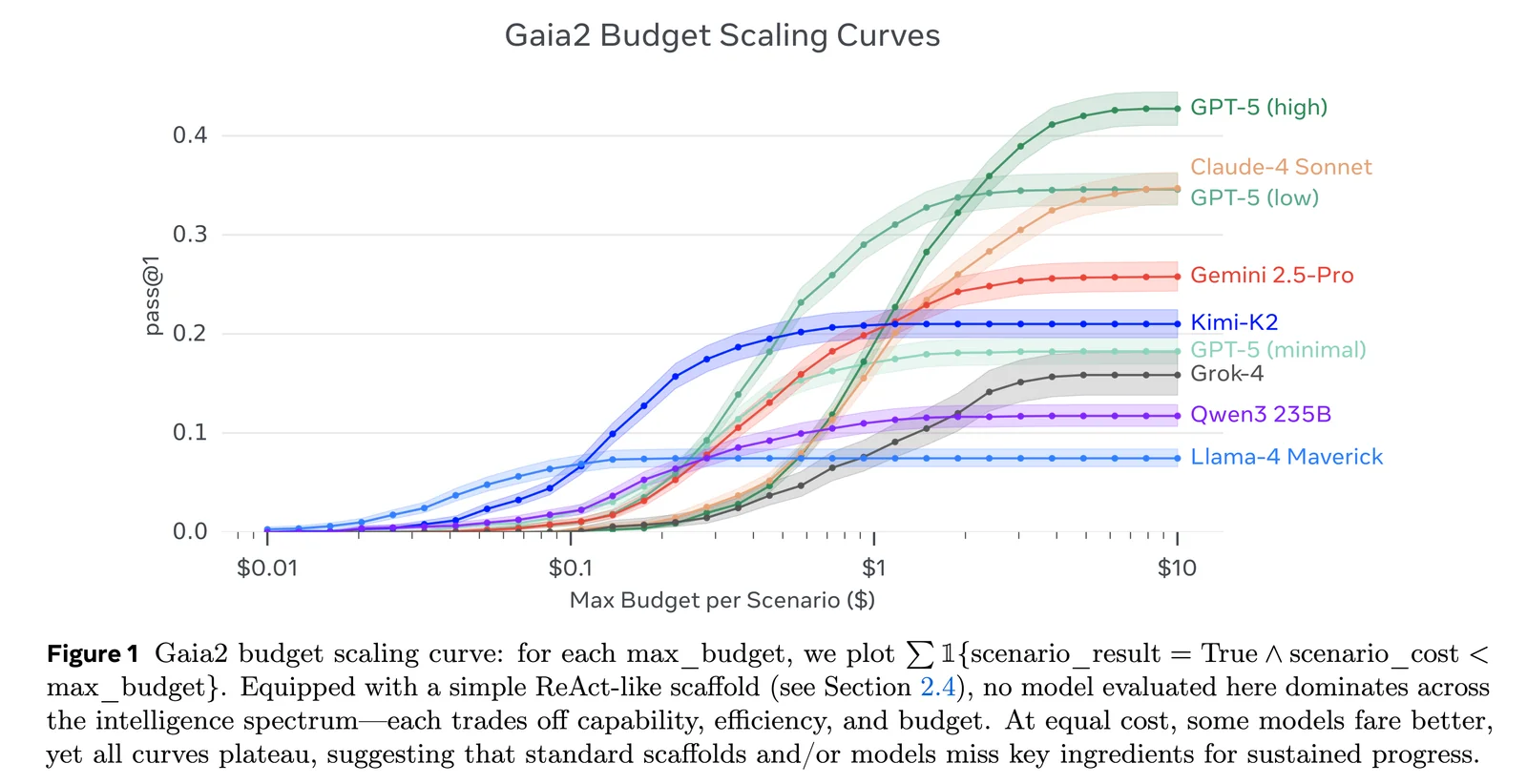
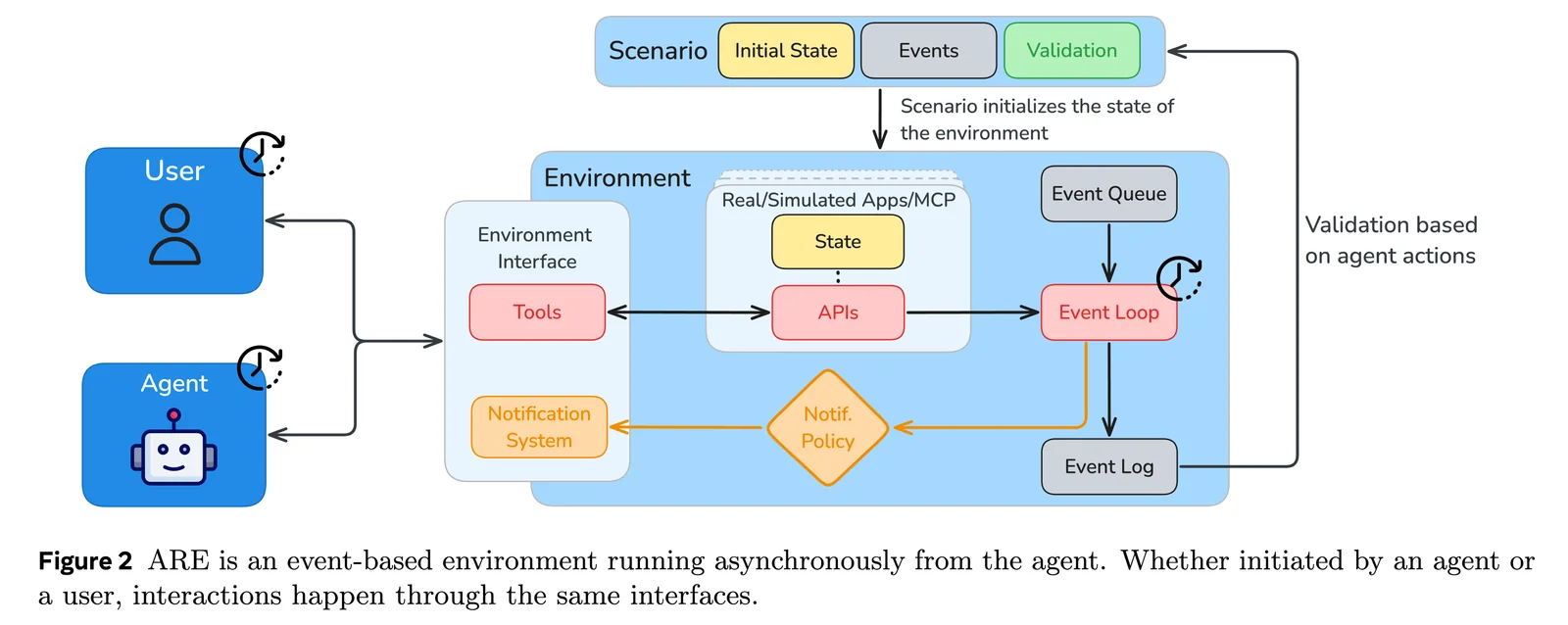
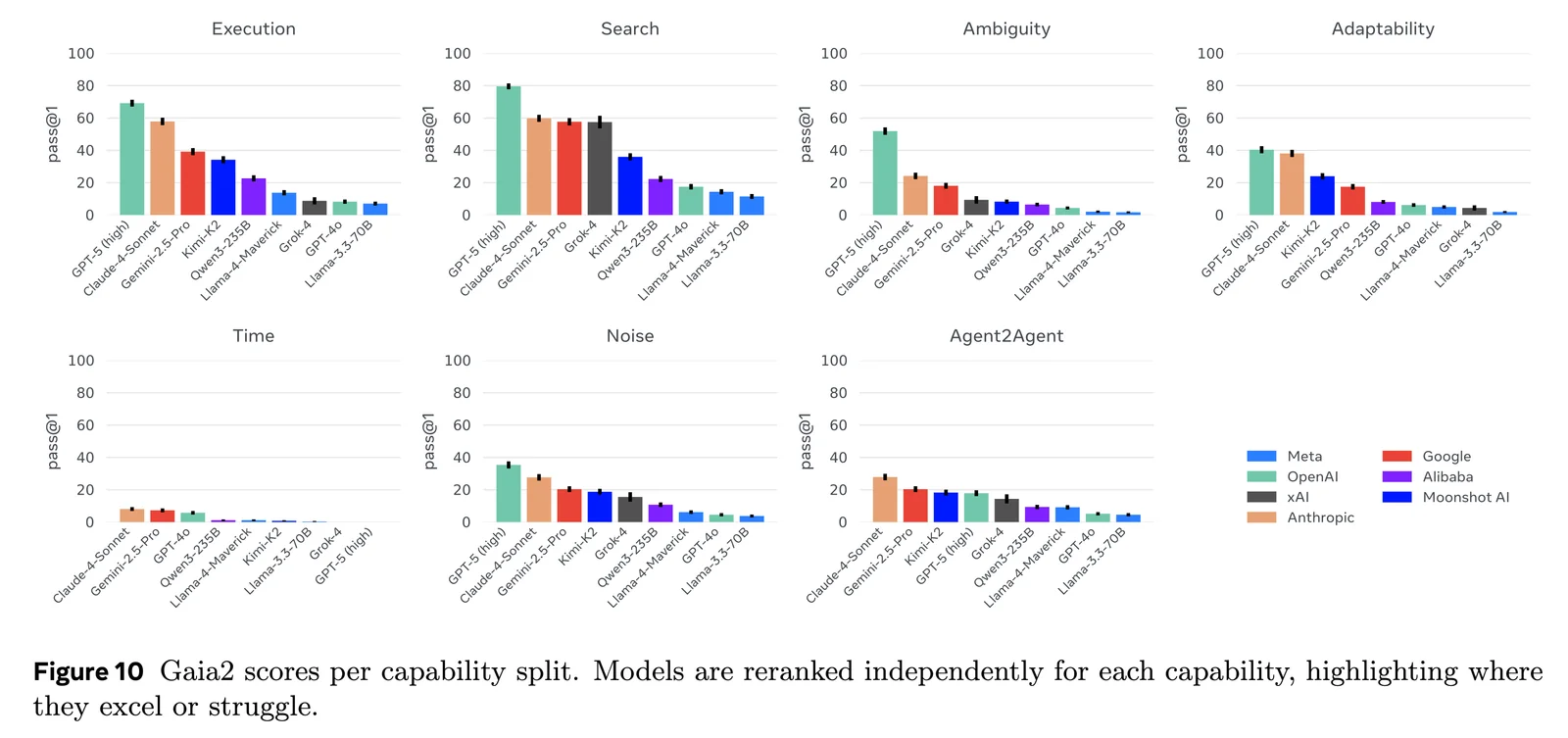
Gaia2 is a large-scale benchmark and dataset designed to evaluate generalist AI agents across multi-step, multi-tool, and multi-modal tasks. Hosted and integrated with Hugging Face and the ARE (Agent Research Environments) toolkit from Meta Research, Gaia2 provides 800 dynamic scenarios spanning multiple universes and capability configurations (execution, search, adaptability, time, ambiguity). The benchmark runs multi-phase evaluations (standard, Agent2Agent, and noise), forces multiple runs per scenario for variance analysis, and produces submission-ready traces for automated leaderboard scoring. Gaia2’s value lies in reproducible, community-driven evaluation workflows, CLI/SDK integration (are-run, are-benchmark), and a public leaderboard for comparing agent systems and research approaches.
Screenshots
Key Features
Use Cases



Frequently asked questions about HuggingFace Gaia 2
What is the pricing for HuggingFace Gaia 2?
HuggingFace Gaia 2 is free to access, allowing users to utilize its dataset and benchmarks without any cost. However, to download resources and submit evaluations, a Hugging Face account is required.
Key Points
- HuggingFace Gaia 2 is free to use.
- A Hugging Face account is necessary for downloads.
- Users can access datasets and benchmarks without cost.
Detailed Explanation
HuggingFace Gaia 2 offers an extensive array of datasets and benchmarks designed for AI and machine learning research. It supports various tasks, such as natural language processing, image recognition, and more. Users can freely access these resources, making it an excellent tool for researchers, developers, and hobbyists alike.
To get started, simply create a free Hugging Face account. Once registered, you can explore the Gaia 2 dataset, which is curated to facilitate high-quality training and evaluation of AI models. After logging in, you can download datasets directly from the Hugging Face website and submit your evaluations to compare your models against existing benchmarks.
For example, if you're developing a natural language processing model, you can use the Gaia 2 dataset to train it effectively and evaluate its performance against established metrics.
Best Practices / Tips
- Create an Account: Register for a Hugging Face account to unlock the full potential of Gaia 2.
- Explore the Datasets: Familiarize yourself with the available datasets to choose the most relevant ones for your projects.
- Stay Updated: Regularly check for updates and new datasets, as Hugging Face frequently enhances its offerings.
- Engage with the Community: Join forums or discussion groups related to Hugging Face to gain insights and share experiences.
Additional Resources
What are the main features of HuggingFace Gaia 2?
HuggingFace Gaia 2 features 800 dynamic scenarios for evaluating agent capabilities, supports various configurations, and includes a multi-phase evaluation pipeline for in-depth performance analysis. These elements make it a powerful tool for testing AI models in diverse environments and situations.
Key Points
- 800 Dynamic Scenarios: Extensive options for varied evaluations.
- Customizable Capability Configurations: Supports tailored evaluations based on specific needs.
- Multi-Phase Evaluation Pipeline: Ensures comprehensive performance analysis through structured assessments.
Detailed Explanation
HuggingFace Gaia 2 is designed to facilitate the evaluation of AI agents across a wide range of scenarios, making it ideal for developers and researchers looking to understand their model's strengths and weaknesses.
1. 800 Dynamic Scenarios
Gaia 2 provides an impressive library of 800 scenarios that simulate real-world challenges. This variety allows users to test agent performance under different conditions, from simple tasks to complex interactions. For example, scenarios can range from basic language tasks to multi-step problem-solving situations, ensuring comprehensive coverage of potential use cases for AI applications.
2. Customizable Capability Configurations
Users can tailor their evaluations by selecting specific capability configurations. This feature enables the assessment of particular skills or attributes of the AI agent, allowing for focused testing. For instance, developers may choose to evaluate the model's language understanding or its ability to follow instructions accurately, which is crucial for fine-tuning performance.
3. Multi-Phase Evaluation Pipeline
The multi-phase evaluation pipeline in Gaia 2 helps ensure that performance analysis is thorough and methodical. Each phase is designed to evaluate different aspects of the agent's capabilities, providing a structured approach to performance insights. This might include initial testing, feedback incorporation, and subsequent re-evaluation to track improvements over time.
Best Practices / Tips
- Utilize All Scenarios: Explore as many scenarios as possible for a well-rounded evaluation.
- Customize Configurations: Adjust configurations to align with your specific project goals for more relevant results.
- Iterative Testing: Regularly use the multi-phase pipeline to refine your AI agent, incorporating feedback from each evaluation round.
Additional Resources
This structured approach to understanding HuggingFace Gaia 2 ensures users can effectively leverage its capabilities for optimal AI performance evaluation.
How do I get started with HuggingFace Gaia 2?
To get started with HuggingFace Gaia 2, first create a Hugging Face account. Then, access the Gaia 2 dataset and related tools. Follow the official documentation for guidance on running evaluations and submitting your results effectively.
Key Points
- Create a Hugging Face Account: Essential for accessing tools and datasets.
- Access Gaia 2 Resources: Locate the dataset and tools within the Hugging Face platform.
- Follow Documentation: Utilize provided guides for efficient evaluations and submissions.
Detailed Explanation
-
Create a Hugging Face Account:
- Visit the Hugging Face website and click on the "Sign Up" button. Fill in your details or use social media accounts for quick access. This account is crucial for managing your projects and datasets.
-
Access the Gaia 2 Dataset:
- Once logged in, navigate to the Hugging Face hub. Search for "Gaia 2" in the datasets section. Here, you'll find all the necessary files, including pre-trained models and data samples.
-
Explore the Tools:
- Familiarize yourself with the tools available for Gaia 2, such as evaluation scripts and APIs. Use these tools to analyze the dataset effectively.
-
Follow Documentation:
- Hugging Face provides comprehensive documentation. Follow the step-by-step guides to set up your environment, run evaluations, and understand the metrics for success. This resource is invaluable for both beginners and experienced users.
-
Run Evaluations:
- Utilize the evaluation scripts provided within the documentation. You can run tests to assess the performance of models trained on the Gaia 2 dataset, ensuring that you understand the various metrics involved.
-
Submit Results:
- After running evaluations, submit your results through the Hugging Face platform. Make sure to adhere to the guidelines to ensure your submissions are valid and recognized.
Best Practices / Tips
- Stay Updated: Regularly check the Hugging Face community forums and updates for any changes or new features related to Gaia 2.
- Engage with the Community: Participate in discussions on platforms like GitHub or Hugging Face forums to learn from other users’ experiences and solutions.
- Experiment with Different Models: Try various models available on the platform with the Gaia 2 dataset to find the best fit for your specific use case.
Additional Resources
By following these steps and leveraging the available resources, you can successfully start using HuggingFace Gaia 2 and enhance your machine learning projects.
What are the technical requirements for integrating HuggingFace Gaia 2?
HuggingFace Gaia 2 requires a Hugging Face account for access, supports various model backends via LiteLLM, and necessitates the installation of the ARE CLI toolkit for local evaluations. Ensure you meet these prerequisites to facilitate seamless integration and utilization of Gaia 2's features.
Key Points
- Hugging Face Account: Required for access to Gaia 2.
- LiteLLM Support: Enables integration with multiple model backends.
- ARE CLI Toolkit: Necessary for conducting local evaluations.
Detailed Explanation
Integrating HuggingFace Gaia 2 involves several critical technical requirements:
-
Hugging Face Account:
- You must create a free or paid account on Hugging Face. This account allows you to access the platform’s extensive library of models, datasets, and tools. Visit the Hugging Face registration page to sign up.
-
Model Backends via LiteLLM:
- Gaia 2 supports various model backends through LiteLLM, which is essential for model management and deployment. LiteLLM allows you to efficiently load and run models in different environments. You can find detailed integration documentation on the LiteLLM GitHub repository.
-
ARE CLI Toolkit:
- To perform local evaluations, you need to install the ARE CLI toolkit. The toolkit can be installed via pip with the command:
pip install are-cli - This toolkit provides a robust command-line interface for running and testing models directly on your machine, enhancing development speed and flexibility.
- To perform local evaluations, you need to install the ARE CLI toolkit. The toolkit can be installed via pip with the command:
Best Practices / Tips
- Check Compatibility: Always ensure that your local environment meets the necessary system requirements, including Python version and dependencies.
- Keep Tools Updated: Regularly update your Hugging Face libraries and the ARE CLI toolkit to leverage new features and improvements.
- Utilize Community Resources: Engage with the Hugging Face community forums for troubleshooting and tips on best integration practices.
Additional Resources
How does HuggingFace Gaia 2 compare to other agent evaluation tools?
HuggingFace Gaia 2 is superior to other agent evaluation tools due to its extensive library of 800 scenarios and advanced multi-phase evaluation capabilities, allowing for comprehensive benchmarking of various agent architectures and their performance across diverse tasks.
Key Points
- Extensive Scenario Library: Offers 800 diverse scenarios for robust testing.
- Multi-Phase Evaluation: Evaluates agents across different phases for thorough performance insights.
- Benchmarking Flexibility: Supports various agent architectures and capabilities.
Detailed Explanation
HuggingFace Gaia 2 is designed to provide a comprehensive framework for evaluating AI agents. Its extensive library of 800 scenarios is one of its standout features, allowing developers to test agents in a multitude of real-world situations. This vast array of scenarios means that agents can be assessed for their versatility and adaptability across different tasks, making Gaia 2 a preferred choice for researchers and developers alike.
The multi-phase evaluation capability further enhances its utility. Unlike many other tools that offer a single phase of testing, Gaia 2 enables users to evaluate the agent's performance at various stages of task completion. This could include initial task understanding, execution, and final results assessment, providing deeper insights into the agent's strengths and weaknesses. Such thorough evaluations are crucial for fine-tuning agent performance and ensuring they meet specific requirements.
Moreover, Gaia 2's benchmarking flexibility allows it to cater to a wide range of agent architectures, from simple rule-based systems to complex deep learning models. This versatility makes it an invaluable tool for AI research and development, as it can effectively compare and contrast different approaches under consistent conditions.
Best Practices / Tips
- Define Clear Objectives: Before using Gaia 2, outline the specific capabilities you wish to evaluate in your agent.
- Utilize Diverse Scenarios: Make sure to test agents across various scenarios to gain a well-rounded understanding of their performance.
- Iterate Based on Feedback: Use insights from the evaluations to continuously refine and improve agent architectures.
Additional Resources
Explore more AI Ai Tools tools
Browse all Ai Tools tools →Compare HuggingFace Gaia 2: vs Agnost AI · vs Assistly · vs Memoria · vs nodeterm