

Gamma
AIAn AI-powered presentation platform that generates polished, storytelling-style slides and decks from prompts and templates.
Gamma
An AI-powered presentation platform that generates polished, storytelling-style slides and decks from prompts and templates.
About Gamma
Gamma is a presentation platform that uses generative models and design automation to create slides, pitch decks, and storytelling-style presentations from simple prompts and templates. It provides a design-first workflow that combines AI content generation with pre-built layouts and themes to produce professional decks quickly. Gamma also exposes an API used by integrations and automation (for example, MCP tools) so developers and LLMs can programmatically generate presentations and receive shareable links. The platform is positioned for business, marketing, and investor workflows, emphasizing speed, consistency, and design quality.
Screenshots

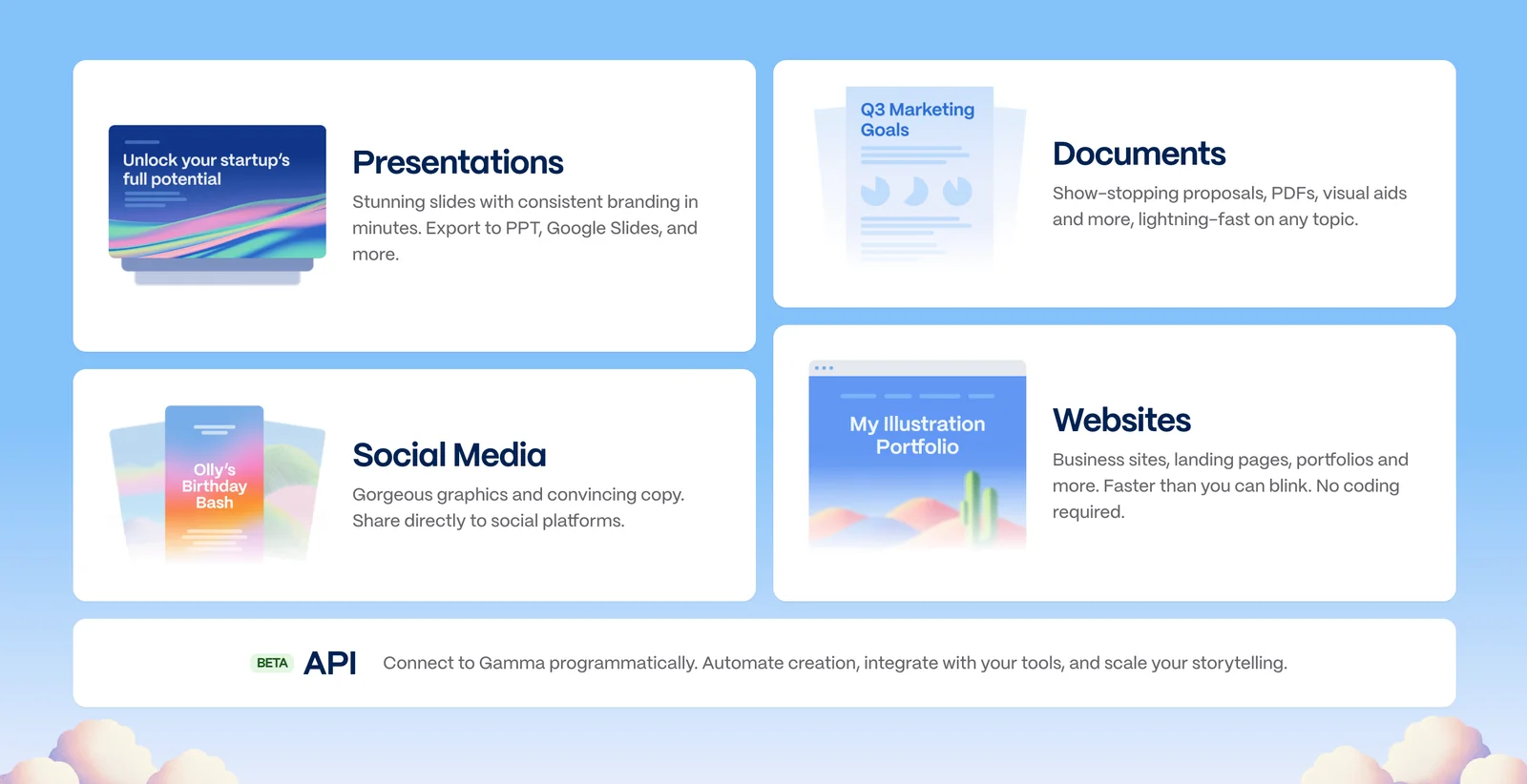

Key Features
Use Cases



Frequently asked questions about Gamma
What are the pricing plans for Gamma?
Gamma offers a freemium model with three pricing tiers: Free ($0 with approximately 400 credits), Plus ($10/month or $8/month when billed annually), and Pro ($20/month or $15/month when billed annually). Each tier provides varying levels of AI features and usage credits to suit different user needs.
Key Points
- Free Tier: Access to basic features and limited AI credits.
- Plus Tier: Enhanced features for casual users at an affordable monthly rate.
- Pro Tier: Comprehensive features and higher AI usage for professionals and businesses.
Detailed Explanation
Gamma's pricing structure is designed to cater to a wide range of users, from casual individuals to professional teams.
-
Free Tier: The Free plan offers approximately 400 credits, ideal for users who want to test Gamma’s capabilities without any financial commitment. This tier allows access to basic features and is suitable for limited, occasional use.
-
Plus Tier: At $10/month or $8/month with annual billing, the Plus plan provides additional features and increased credits, making it a great choice for casual users or small businesses that require more flexibility. Users in this tier benefit from advanced functionalities that enhance their experience and productivity.
-
Pro Tier: For $20/month or $15/month annually, the Pro plan is tailored for serious users or organizations needing extensive AI resources. It includes all features available in the Plus tier, but with even more credits and priority support, making it suitable for teams working on larger projects or requiring consistent AI assistance.
Best Practices / Tips
- Evaluate Your Needs: Consider how frequently you will use Gamma and the type of features that will benefit you most. This will help you choose the right tier.
- Utilize the Free Tier: Make the most of the Free plan initially to familiarize yourself with the platform before committing to a paid plan.
- Annual Billing Savings: Opt for annual billing if you plan to use the service long-term; it offers significant savings compared to monthly payments.
Additional Resources
- Gamma Official Website for detailed pricing and feature comparisons.
- Gamma FAQ Section for user queries and support.
- User Reviews to see how different tiers perform in real-world scenarios.
How do I use Gamma to create presentations?
To create presentations with Gamma, sign up for a free account, access the editor, and enter your prompts. Gamma's AI generates visually appealing, storytelling-style slides based on your input and the selected templates, making it easy to transform ideas into engaging presentations.
Key Points
- User-Friendly Interface: Gamma offers an intuitive editor for seamless navigation.
- AI-Driven Design: The AI crafts slides that enhance your narrative.
- Variety of Templates: Choose from a wide range of presentation templates.
Detailed Explanation
Using Gamma to create presentations involves a straightforward process. Here’s how to get started:
-
Sign Up for an Account: Visit the Gamma website and register for a free account. This will give you access to all the features of the platform.
-
Access the Editor: Once logged in, navigate to the editor. This is where the magic happens. The user interface is designed to be intuitive, allowing users of all skill levels to create stunning presentations.
-
Input Your Prompts: Enter your ideas or prompts into the text box. Be descriptive to help the AI understand the core message you want to convey.
-
Select a Template: Gamma offers various templates tailored for different types of presentations, whether it’s for business, education, or personal projects. Choose one that aligns with your content style.
-
Let the AI Generate Slides: After entering your prompts and selecting a template, click the “Generate” button. The AI will create slides that are visually engaging and aligned with storytelling principles.
-
Customize Your Presentation: Edit the generated slides as needed. You can modify text, change images, and adjust layouts to better fit your vision.
-
Save and Share: Once you are satisfied with your presentation, save it and share it directly from Gamma or download it for offline use.
Best Practices / Tips
- Be Specific with Prompts: The more detailed your prompts, the better the AI understands your needs. Include keywords relevant to your topic.
- Explore Different Templates: Don’t hesitate to experiment with various templates to find the best fit for your content.
- Review and Edit: Always review the AI-generated slides and make necessary edits to ensure accuracy and alignment with your message.
- Use Visuals Wisely: Incorporate relevant images and graphics to enhance your storytelling.
Additional Resources
By following these steps and tips, you can effectively utilize Gamma to create compelling presentations that captivate your audience.
What are the main features of Gamma?
Gamma offers powerful features such as AI-driven presentation generation, customizable storytelling layouts, an extensive template library, versatile export options, and seamless API integration for automating workflows. These features collectively enhance the presentation creation process, making it suitable for educators, marketers, and business professionals alike.
Key Points
- AI Presentation Generation: Automatically create presentations based on your content.
- Storytelling Layouts: Engage audiences with visually compelling narratives.
- Template Library: Access a wide range of design options for customization.
Detailed Explanation
Gamma’s main features revolutionize how presentations are created and delivered:
AI Presentation Generation
With AI-powered tools, Gamma can analyze your content and generate a complete presentation in minutes. Users can input text, and the AI suggests layouts, images, and even animations. This feature is perfect for busy professionals and educators who need to prepare engaging presentations quickly.
Storytelling Layouts
Gamma provides various storytelling layouts that help structure your presentation effectively. These layouts are designed to guide your audience through the content in a coherent and engaging manner. For example, you can choose from formats like "Problem-Solution," "Chronological," or "Comparative" to enhance your narrative.
Template Library
The extensive template library includes hundreds of professionally designed templates tailored for different industries and purposes. Whether you are creating a sales pitch, an academic lecture, or a project update, you can find a template that suits your needs, saving you time and effort in design.
Export Options
Gamma supports multiple export formats, including PDF, PPTX, and HTML. This flexibility allows users to share presentations easily across various platforms or integrate them into other tools. Additionally, you can export your presentation for offline use or for sharing with stakeholders who may not have access to Gamma.
API Integration
For businesses looking to automate their workflows, Gamma offers API integration. This feature allows users to connect Gamma with other software tools, streamlining the presentation creation process. For instance, you can pull data directly from your CRM into your presentations, ensuring that your content is always up-to-date.
Best Practices / Tips
- Leverage AI: Use the AI generation feature to quickly draft presentations, then customize them to fit your voice.
- Explore Templates: Spend time browsing the template library to find designs that resonate with your audience.
- Optimize for Export: Before exporting, ensure your presentation is formatted correctly and all links and media work as intended.
Additional Resources
How does Gamma's API work for presentations?
Gamma's API enables developers to create presentations programmatically by sending specific prompts and parameters. It returns shareable links to the generated presentations and is designed for seamless integration with existing workflows, particularly in Node.js environments.
Key Points
- Programmatic Presentation Creation: Generate presentations with prompts and parameters.
- Shareable Output: Provides links to easily share the generated presentations.
- Node.js Compatibility: Integrates effortlessly into existing applications.
Detailed Explanation
Gamma's API is a powerful tool for developers looking to automate the creation of presentations. By sending well-defined prompts and parameters as input, users can generate professional-looking slides without manual intervention.
How It Works:
-
API Setup: Start by setting up an account on Gamma's platform and obtaining your API key. This key will be necessary for authentication with the API.
-
Sending Requests: Using Node.js, you can make a POST request to the API endpoint. Include your API key in the headers and specify the content of your presentation in the body of the request.
Example Request:
const axios = require('axios'); axios.post('https://api.gamma.io/v1/presentation', { headers: { 'Authorization': `Bearer YOUR_API_KEY` }, data: { title: "Project Overview", slides: [ { title: "Introduction", content: "Overview of the project goals." }, { title: "Timeline", content: "Key milestones and deadlines." } ] } }) .then(response => { console.log("Presentation Link:", response.data.link); }) .catch(error => { console.error("Error creating presentation:", error); }); -
Response Handling: Upon successful creation, the API returns a link to the generated presentation. This link can be easily shared with team members or stakeholders.
Use Cases:
- Corporate Training: Automate training material generation based on specific parameters.
- Marketing Pitches: Quickly create tailored presentations for different clients.
- Educational Purposes: Generate lecture slides based on lesson outlines.
Best Practices / Tips
- Define Clear Prompts: The quality of the generated presentation heavily relies on the clarity of the prompts provided. Be specific about the content and format.
- Test Different Parameters: Experiment with various input parameters to see what yields the best results for your presentations.
- Error Handling: Implement robust error handling in your API requests to manage issues such as rate limits or invalid inputs effectively.
Additional Resources
- Gamma API Documentation - Official documentation for reference and further details.
- Node.js Guide - Helpful resources for integrating APIs with Node.js.
- Presentation Design Tips - Enhance your presentation skills with design tips and best practices.
How does Gamma compare to other presentation tools?
Gamma stands out among presentation tools due to its AI-driven design capabilities and unique storytelling templates. It offers narrative-driven layouts and seamless API integration, enhancing user experience. However, free users may encounter limitations with credit refresh, impacting their access to advanced features.
Key Points
- AI-Driven Design: Gamma leverages artificial intelligence to optimize design layouts.
- Storytelling Templates: Users can utilize narrative-driven templates for enhanced engagement.
- API Integration: Seamless integration with other tools enhances functionality, though limitations exist for free users.
Detailed Explanation
Gamma's AI-driven design makes it a compelling choice for users looking to create visually stunning presentations without extensive design skills. The platform automatically adjusts layouts, color schemes, and fonts based on content, ensuring a professional appearance. For instance, educators can use Gamma to create interactive lessons that captivate students, while businesses can craft persuasive pitches that resonate with clients.
One of Gamma's standout features is its storytelling templates. These templates are designed to guide users in crafting compelling narratives, making it ideal for presenters who want to ensure their message is communicated effectively. For example, a marketing team could use these templates to present a new product launch, weaving a story that highlights customer pain points and how their product offers solutions.
Another significant advantage of Gamma is its API integration capability. This allows users to connect with other platforms, such as CRM systems or analytics tools, facilitating data-driven presentations. For instance, a sales team can pull real-time data from their CRM directly into their presentation, providing up-to-date insights during client meetings.
However, free users of Gamma may find certain limitations, particularly regarding credit refresh rates. Unlike premium users, who receive frequent updates and access to all features, free users may experience slower refresh rates, hindering their ability to fully utilize the platform's capabilities. This aspect can be a consideration for teams that require consistent access to updated features.
Best Practices / Tips
- Utilize Templates Effectively: Start with Gamma's storytelling templates to create a cohesive narrative.
- Leverage AI Features: Take advantage of the AI design options to save time and ensure a polished look.
- Plan for API Use: If integrating with other tools, ensure you have the necessary technical resources to maximize Gamma's capabilities.
- Consider Upgrading: If you find the limitations of the free version restrictive, consider a paid plan for enhanced features.
Additional Resources
Explore more AI Ai Agents tools
Browse all Ai Agents tools →Compare Gamma: vs Sai · vs Mycel · vs Proto-Mind · vs Ami