

Display.dev
AITurns HTML or Markdown into permanent, authenticated URLs restricted to your company.
Display.dev
Turns HTML or Markdown into permanent, authenticated URLs restricted to your company.
About Display.dev
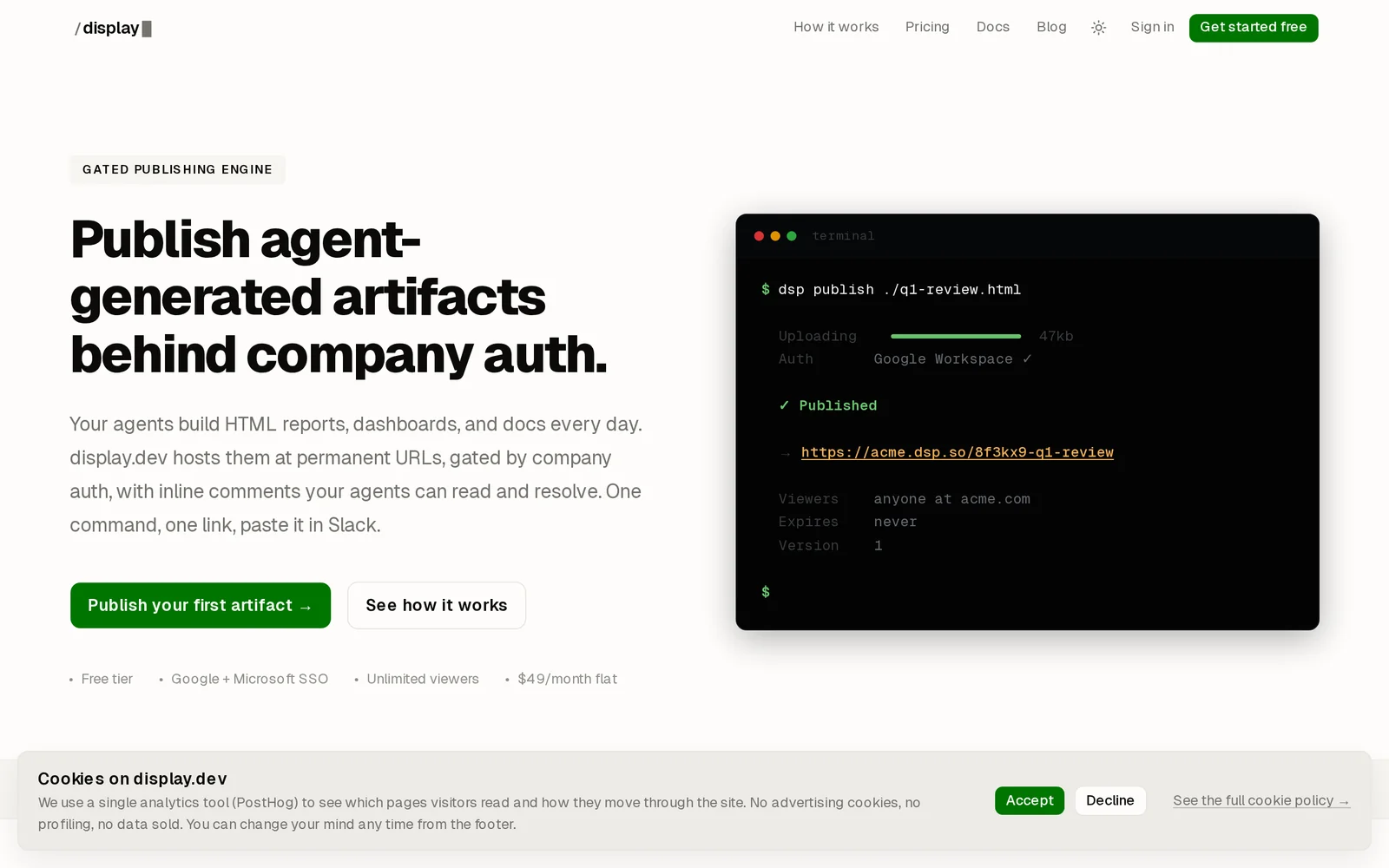
Display.dev is a gated publishing engine that converts HTML and Markdown files into permanent, access-controlled URLs restricted to a company's users. It publishes content via CLI, MCP, or browser, and integrates with company SSO to enforce authentication and restrict access to internal audiences. Display.dev is optimized for quickly sharing agent-generated artifacts, demos, docs, and reports behind corporate authentication without exposing content publicly.
Screenshots
Key Features
Use Cases



Frequently asked questions about Display.dev
What is Display.dev?
Display.dev is a platform that converts any HTML or Markdown into a permanent, authenticated URL, specifically tailored for your company. It allows users to access these URLs through existing work accounts via CLI, MCP, or a browser, ensuring secure and efficient sharing of content.
Key Points
- Secure URL Creation: Generates authenticated URLs for internal use.
- Multiple Access Methods: Available through CLI, MCP, or web browser.
- User-Friendly: Utilizes existing work accounts for easy access.
Detailed Explanation
Display.dev is designed to enhance collaboration and sharing within organizations by transforming HTML or Markdown documents into permanent URLs. This process ensures that shared content is not only easily accessible but also secure, as the URLs are restricted to your company’s users.
How It Works
- Input Format: Users can input HTML or Markdown directly into the platform.
- URL Generation: The service generates a unique, permanent URL.
- Authentication: Only users with company accounts can access the URLs, maintaining content security.
Use Cases
- Team Documentation: Create and share project documentation that team members can refer to at any time.
- Internal Presentations: Convert presentation materials into URLs for easy distribution and access.
- Knowledge Base: Develop a centralized knowledge repository using Markdown documentation.
Best Practices / Tips
- Consistent Formatting: Use consistent Markdown or HTML formatting to ensure readability.
- Regular Updates: Keep content updated to provide the most accurate information to your team.
- Access Management: Regularly review user access to maintain security standards.
Additional Resources
Using Display.dev can significantly streamline the way your organization shares and accesses critical information. By adopting this tool, teams can improve collaboration and maintain information integrity efficiently.
How does Display.dev work?
Display.dev leverages advanced AI technologies to streamline and enhance daily workflows for users. By integrating machine learning, natural language processing, and automation, it facilitates tasks such as content creation, data analysis, and project management, making AI accessible for everyday use.
Key Points
- AI Integration: Combines multiple AI technologies to improve productivity.
- User-Friendly Interface: Designed for ease of use, catering to both tech-savvy users and beginners.
- Versatile Applications: Supports various workflows, from content generation to data insights.
Detailed Explanation
Display.dev operates by utilizing a suite of AI capabilities that cater to different user needs. The platform integrates features such as:
- Natural Language Processing (NLP): This allows users to generate text, summarize information, or analyze sentiment. For instance, marketers can use Display.dev to create engaging blog posts or social media content quickly.
- Machine Learning Models: These models automate routine tasks. For example, users can automate data entry or create predictive analytics reports without extensive coding knowledge.
- Custom Workflows: Users can set up tailored workflows that suit their specific needs. For example, a project manager may integrate task tracking with automated reminders and performance reporting.
Use cases for Display.dev are abundant. Freelancers can streamline client communications, while teams can enhance collaboration through shared AI-driven insights. The platform's adaptability makes it suitable for various industries, including marketing, finance, and education.
Best Practices / Tips
- Explore Templates: Utilize pre-built templates for common tasks to save time and ensure best practices are followed.
- Regular Updates: Keep the software updated to access the latest features and improvements.
- Training Resources: Take advantage of tutorials and webinars to maximize your understanding of AI tools and features.
Additional Resources
What are the main features of Display.dev?
Display.dev features advanced AI capabilities, including seamless integration, automated testing, and real-time analytics. It empowers developers by enhancing productivity and streamlining workflows, making it a vital tool for modern web development.
Key Points
- Core AI Capabilities: Automates repetitive tasks and provides intelligent suggestions.
- Integration Flexibility: Easily connects with various development tools and platforms.
- Real-Time Analytics: Offers insights into application performance and user behavior.
Detailed Explanation
Display.dev revolutionizes the development process through its robust AI-driven functionalities.
-
Core AI Capabilities: The platform employs machine learning algorithms to automate repetitive coding tasks, enabling developers to focus on creative aspects. For instance, it can suggest code snippets based on context, helping to reduce coding errors and accelerate project timelines.
-
Integration Flexibility: Display.dev seamlessly integrates with popular development environments like VS Code, GitHub, and CI/CD pipelines. This means developers can utilize its features without disrupting existing workflows, making it an ideal choice for teams looking to enhance their current toolsets.
-
Real-Time Analytics: The platform’s analytics dashboard provides developers with real-time insights into application performance, user interactions, and potential bottlenecks. This allows for proactive optimization, ensuring that applications run smoothly and meet user expectations.
Best Practices / Tips
- Leverage AI Suggestions: Regularly utilize the AI suggestion feature to improve code quality and efficiency. This can significantly speed up development time.
- Integrate Gradually: If you're new to Display.dev, start by integrating it into a single project to familiarize yourself with its features before rolling it out across multiple projects.
- Monitor Analytics: Frequently check the real-time analytics to identify performance issues early. This proactive approach can save time and resources in the long run.
Additional Resources
Who is Display.dev for?
Display.dev is designed for professionals, developers, and organizations looking to enhance their daily AI workflows. It benefits anyone from solo entrepreneurs to large teams, helping them streamline processes, automate tasks, and leverage AI tools effectively.
Key Points
- Target Audience: Professionals, developers, and organizations.
- Use Cases: Enhancing productivity and automating workflows.
- Benefits: Simplifies complex AI tasks and improves efficiency.
Detailed Explanation
Display.dev caters to a diverse range of users, including:
-
Developers: Those involved in software development can utilize Display.dev to integrate AI features into applications seamlessly. For instance, a developer might automate testing using AI, reducing manual effort and boosting accuracy.
-
Business Professionals: Individuals in sales, marketing, and project management can employ Display.dev to analyze data, generate insights, and automate repetitive tasks. For example, marketing professionals can use AI to personalize email campaigns based on user behavior.
-
Educational Institutions: Educators and students can leverage Display.dev for research and learning purposes. It can assist in data analysis projects or generate educational content, enhancing the learning experience.
Display.dev’s intuitive interface allows users to easily navigate and implement AI tools into their everyday tasks, making it a valuable asset for increasing productivity.
Best Practices / Tips
- Start Small: Begin with a single workflow to familiarize yourself with Display.dev’s capabilities before expanding to more complex tasks.
- Utilize Templates: Take advantage of pre-built templates available in Display.dev to save time and ensure best practices are followed.
- Continuous Learning: Stay updated with the latest features and AI developments by following Display.dev’s official blog and tutorials.
Common pitfalls to avoid include overcomplicating workflows and not leveraging community resources, such as forums and user groups, for support and best practices.
Additional Resources
How much does Display.dev cost?
Display.dev pricing varies based on usage and specific features, with details accessible on their official website. Plans typically include a free tier, along with paid options that cater to different user needs, ensuring flexibility for developers and teams.
Key Points
- Display.dev offers a free tier for initial use.
- Paid plans are available with varying features.
- Pricing details are subject to change; check the website for updates.
Detailed Explanation
Display.dev provides a range of pricing options designed to meet the needs of developers, startups, and larger enterprises. The free tier allows users to explore basic features without any financial commitment, making it an excellent option for new users wanting to test the platform.
For those requiring more advanced functionalities, Display.dev offers several paid plans. These plans typically include enhanced features such as increased storage, advanced analytics, and priority support. Pricing may depend on factors such as the number of users, the volume of data processed, and specific functionalities needed. It is advisable to review the official website for the most current pricing information.
For example, if you're developing a project that requires extensive API usage or higher data limits, you might opt for a mid-tier paid plan. This ensures you have the tools necessary for your project without incurring unnecessary costs.
Best Practices / Tips
- Evaluate Your Needs: Before choosing a plan, assess your requirements carefully to avoid overpaying for features you may not use.
- Utilize the Free Tier: Take advantage of the free tier to familiarize yourself with Display.dev’s capabilities.
- Monitor Usage: Regularly check your usage metrics to identify if you need to upgrade or can downgrade your plan.
- Stay Updated: Pricing and features can change, so regularly visit the official website or subscribe to their newsletter for the latest information.
Additional Resources
By understanding the pricing structure and evaluating your needs, you can select the best plan that fits your development goals on Display.dev.
How do I get started with Display.dev?
To get started with Display.dev, visit Display.dev to sign up for an account. Once registered, you can explore its features, tools, and community resources to enhance your development projects and streamline your workflow.
Key Points
- Sign up at Display.dev to create your account.
- Explore various tools and features tailored for developers.
- Join the community for support and collaboration.
Detailed Explanation
Display.dev is an innovative platform designed specifically for developers seeking to enhance their workflow and project management. To begin, follow these steps:
-
Visit the Sign-Up Page: Go to Display.dev and click on the “Sign Up” button. You may need to provide your email address and create a secure password.
-
Confirm Your Email: After signing up, check your inbox for a confirmation email. Click the link provided to verify your account, which is essential for accessing all features.
-
Explore the Dashboard: Once logged in, you’ll be greeted by a user-friendly dashboard. Here, you can navigate through various sections, including project management tools, documentation, and community forums.
-
Utilize Tools and Integrations: Display.dev offers a range of tools such as real-time collaboration features, code snippets, and integration with popular development environments. Familiarize yourself with these tools to maximize your productivity.
-
Join the Community: Engage with fellow developers by participating in community discussions, forums, and events. This is an excellent opportunity to learn from others, share your experiences, and collaborate on projects.
-
Access Learning Resources: Display.dev also provides tutorials, webinars, and documentation to help you understand the platform better. Make sure to utilize these resources to enhance your skills and knowledge.
Best Practices / Tips
- Complete Your Profile: Fill out your user profile to connect with other developers effectively. A well-detailed profile can attract collaboration opportunities.
- Stay Updated: Follow the latest updates and features from Display.dev by subscribing to their newsletter or blog. This will help you remain informed about new tools and enhancements.
- Engage Actively: Regularly participate in community discussions and events to network and gain insights from experienced developers.
- Leverage Tutorials: Take advantage of the learning resources available on the platform to improve your skills and understand how to best use Display.dev’s features.
Additional Resources
Explore more AI Mcps tools
Browse all Mcps tools →Compare Display.dev: vs ai-memory · vs CrawlForge MCP · vs Popcraft · vs Pomerado