

Creaibo
AIAn AI-native content-creation platform for idea generation, script writing, asset production and intelligent publishing for creators and marketers.
Creaibo
An AI-native content-creation platform for idea generation, script writing, asset production and intelligent publishing for creators and marketers.
About Creaibo
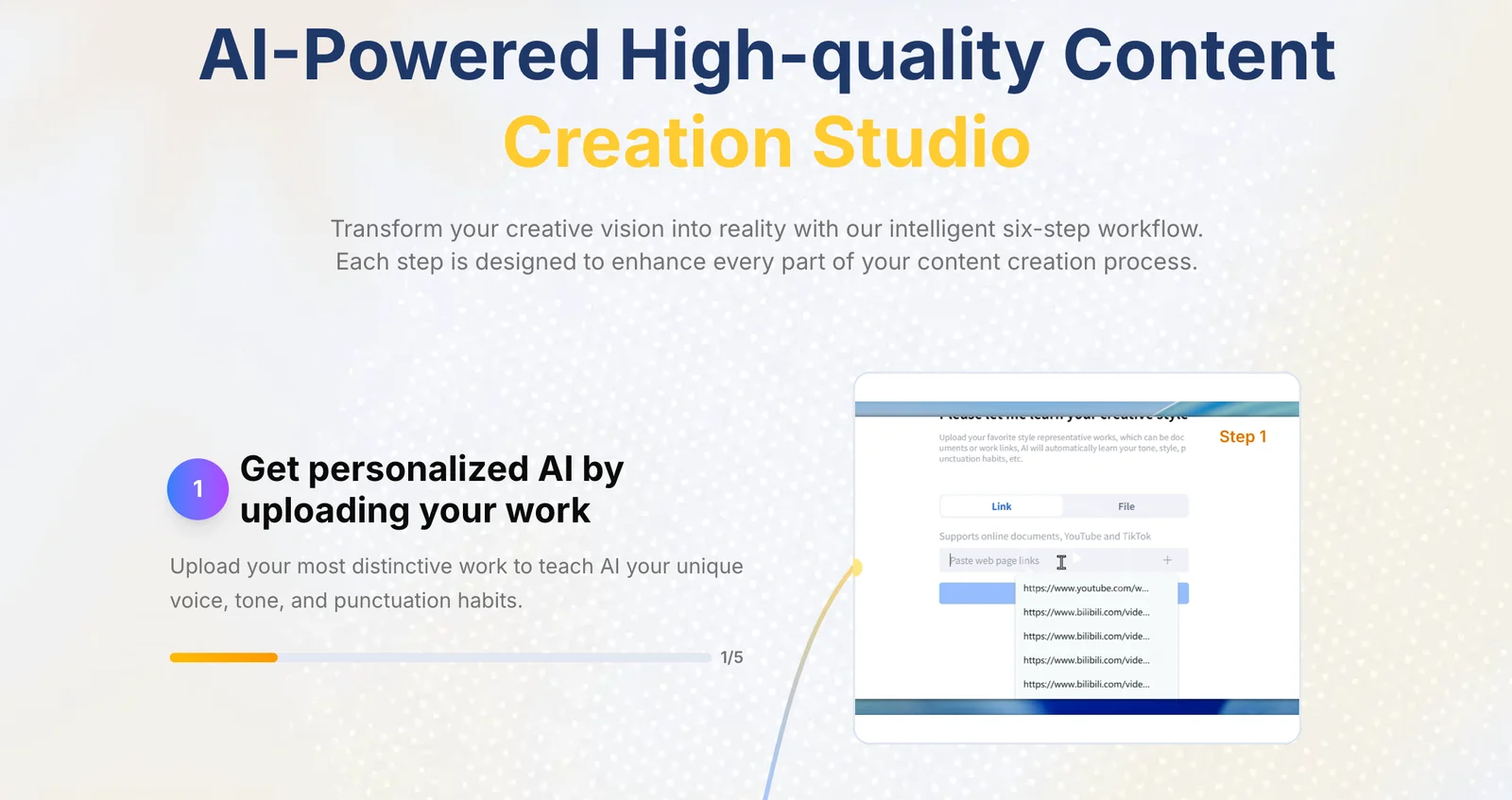
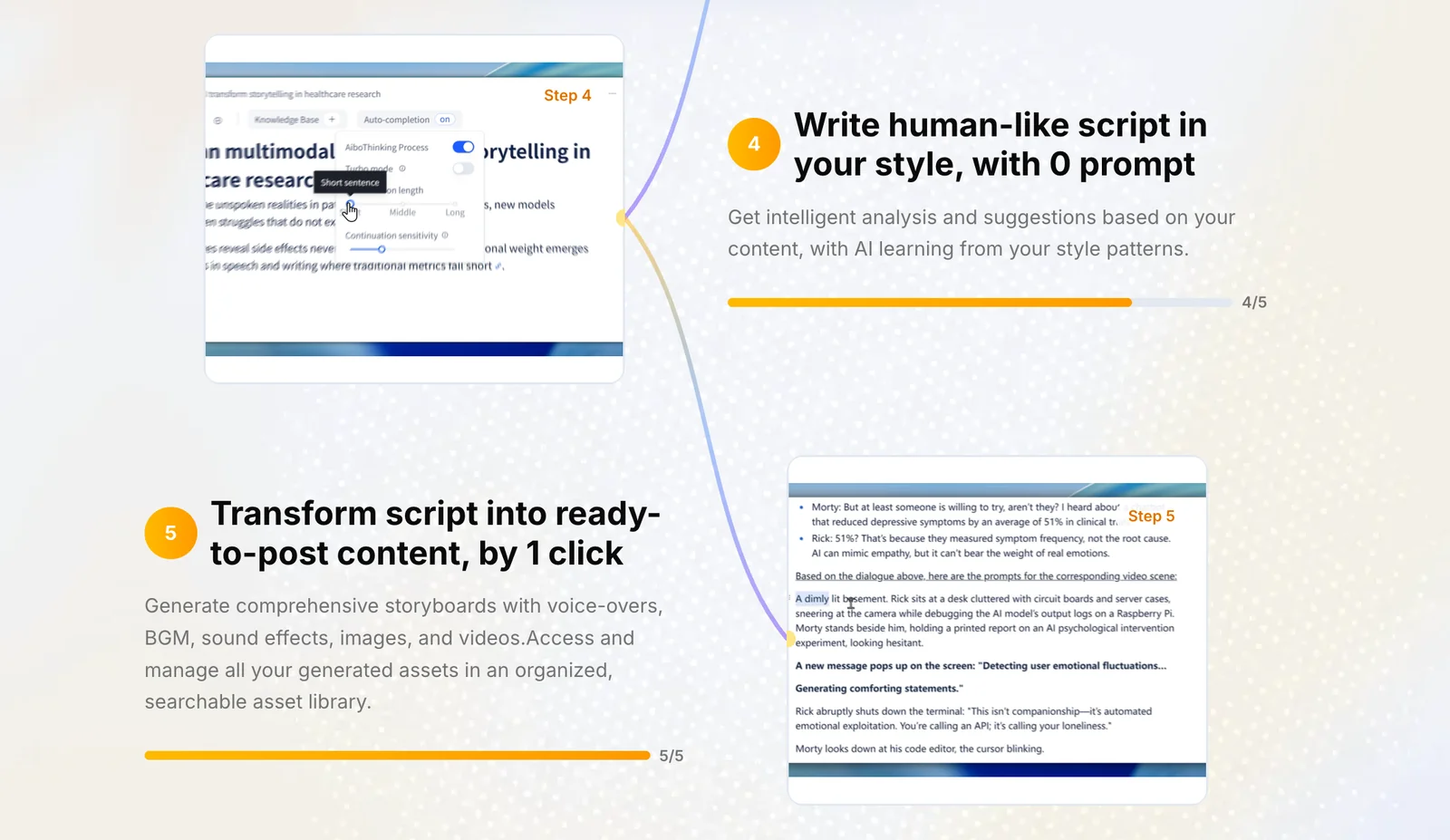
Creaibo is an integrated AI content-creation workspace designed to accelerate end-to-end content workflows for creators and brand teams. It covers topic ideation, structured framing, personalized script writing, asset generation, and intelligent publishing to reduce production time and improve content quality. Creaibo adapts to a creator's expressive fingerprint to produce ideas and edits that retain the creator's voice, and targets short-video and platform-specific needs (eg. Bilibili, Xiaohongshu) to make outputs ready-to-publish.
Screenshots


Key Features
Use Cases


Frequently asked questions about Creaibo
What pricing options does Creaibo offer for content creation?
Creaibo offers a flexible pricing model for content creation, featuring a freemium option alongside paid tiers. Users can choose from a free plan, a personal monthly subscription for ¥39, or an annual subscription for ¥390, which provides access to enhanced features and additional project points.
Key Points
- Freemium Model: Access basic features at no cost.
- Paid Tiers: Options include monthly and annual subscriptions.
- Enhanced Features: Paid plans unlock advanced tools and project capabilities.
Detailed Explanation
Creaibo caters to a variety of users by offering a freemium model, allowing potential customers to try the platform without any financial commitment. The free plan includes essential content creation features, making it ideal for individuals or small projects looking to generate content quickly.
For those seeking more robust functionalities, Creaibo's paid tiers provide substantial benefits. The personal monthly subscription costs ¥39, ideal for users needing consistent content generation without a long-term commitment. Alternatively, the annual subscription is priced at ¥390, offering a cost-effective solution for users who anticipate regular use of the platform throughout the year.
Features of Paid Plans:
- Advanced Editing Tools: Access to premium editing and AI-driven suggestions.
- Increased Project Points: Allows for the creation of more content pieces simultaneously.
- Priority Support: Faster response times for customer service inquiries.
Best Practices / Tips
- Evaluate Your Needs: Start with the free plan to understand if Creaibo meets your content creation demands before investing in a paid option.
- Consider Annual Savings: If you plan to use Creaibo extensively, opting for the annual plan can save you money in the long run.
- Utilize Advanced Features: Make sure to explore all the paid features thoroughly to maximize your investment and enhance your content quality.
Additional Resources
By understanding the pricing options and utilizing best practices, users can effectively leverage Creaibo for their content creation needs.
How does Creaibo's personalized voice modeling feature work?
Creaibo's personalized voice modeling feature analyzes a creator's unique vocal style, tone, and delivery to generate tailored scripts and content ideas. This ensures a consistent branding experience across all media. This feature is available exclusively in Creaibo's paid plans, enhancing content creation efficiency and personalization.
Key Points
- Unique Voice Analysis: The feature captures individual vocal characteristics.
- Consistent Branding: It maintains a uniform tone across different content types.
- Paid Plans: Access to this feature is limited to subscribers of Creaibo's paid plans.
Detailed Explanation
Creaibo's personalized voice modeling works through advanced machine learning algorithms that study a creator's past recordings and content. By analyzing various elements such as pitch, pace, and emotional tone, the tool creates a comprehensive profile of the creator's voice.
How It Works:
- Data Input: Users upload samples of their voice or previous content.
- Machine Learning: Creaibo processes this data to identify distinct voice patterns and styles.
- Content Generation: Using the developed voice profile, the tool generates scripts and ideas that align with the creator's unique voice.
Use Cases:
- Podcasts: Podcasters can maintain their signature voice in every episode.
- Video Narration: YouTubers can ensure their videos reflect their personal style consistently.
- Marketing Campaigns: Brands can use the same voice for all promotional materials to bolster brand identity.
Best Practices / Tips
- Regular Updates: Continuously update your voice samples to reflect any changes in your style.
- Feedback Loop: Utilize feedback from your audience to refine and enhance voice modeling accuracy.
- Experimentation: Test different vocal styles to see which resonates most with your audience, and adjust the model accordingly.
Additional Resources
What is the best way to get started using Creaibo?
To get started using Creaibo, sign up for a free account on their website, then explore the topic ideation tools and utilize the script writing feature to efficiently create content. This approach will streamline your content creation process and enhance your productivity.
Key Points
- Sign Up for Free: Create an account on Creaibo’s official website.
- Explore Topic Ideation: Use the ideation tools to generate content ideas.
- Utilize Script Writing Feature: Write and organize your scripts effectively.
Detailed Explanation
Creaibo is an innovative AI-powered tool designed to boost your content creation process. Here’s how to effectively get started:
-
Sign Up for a Free Account:
- Visit the Creaibo website and click on the "Sign Up" option. You’ll need to enter your email and create a password. The free account allows you to access basic features without any commitment.
-
Explore Topic Ideation Tools:
- Once logged in, navigate to the "Ideation" section. Here, you can input keywords related to your niche, and Creaibo will generate a list of relevant topics. This feature is beneficial for bloggers, marketers, and content creators looking for inspiration.
-
Utilize the Script Writing Feature:
- After selecting a topic, head to the "Script Writing" section. You can outline your content, and Creaibo will assist in drafting the script. This feature uses AI to ensure your content is coherent and engaging, helping you save time while maintaining quality.
By following these steps, you'll quickly acclimate to Creaibo and leverage its powerful features to enhance your content creation workflow.
Best Practices / Tips
- Experiment with Keywords: When using the topic ideation tool, try different sets of keywords to discover unique angles for your content.
- Take Advantage of Templates: Creaibo offers various templates for different types of content. Utilize these to kickstart your writing process.
- Regularly Update Your Account: Keep your account active and check for updates on new features, as Creaibo continually improves its offerings.
Additional Resources
What technical requirements are there for using Creaibo?
Creaibo is a web-based platform that requires a modern browser, such as Chrome, Firefox, or Safari, along with a stable internet connection for optimal performance. There are no specific API requirements unless you plan to integrate Creaibo with other tools or services.
Key Points
- Browser Compatibility: Use updated versions of popular browsers.
- Internet Connection: Ensure a stable and high-speed internet connection.
- API Integration: Optional depending on your use case.
Detailed Explanation
Creaibo works seamlessly in a web environment, making it accessible from any device with a modern browser. Supported browsers include:
- Google Chrome: Always keep it updated to the latest version for enhanced security and features.
- Mozilla Firefox: Known for its privacy features, make sure to use the latest release.
- Apple Safari: For Mac users, ensure your operating system is up to date to avoid compatibility issues.
Internet Connection
A stable internet connection is crucial for a smooth experience. A minimum speed of 5 Mbps is recommended to ensure that all features load quickly and efficiently. For optimal performance during heavy usage, such as uploading or downloading large files, a higher speed of 25 Mbps or more is advisable.
API Integration
While Creaibo does not require specific API settings for basic functionality, users can integrate it with other platforms for enhanced capabilities. If you plan to use APIs, consult the Creaibo documentation for detailed instructions on setting up integrations with tools like Zapier, CRM systems, or other relevant applications.
Best Practices / Tips
- Regular Updates: Always keep your browser updated to the latest version to avoid compatibility issues with Creaibo.
- Test Internet Speed: Use tools like Speedtest.net to check your connection speed before using the platform.
- Clear Cache: Regularly clear your browser cache to improve performance and access the latest features.
- Explore Integrations: Research potential integrations that can enhance your use of Creaibo, especially if you're working on collaborative projects.
Additional Resources
How does Creaibo compare to other AI content creation tools?
Creaibo distinguishes itself from other AI content creation tools through its seamless integrated workflow, personalized voice modeling, and advanced targeted publishing features for platforms like Bilibili and Xiaohongshu. This combination significantly enhances the efficiency and effectiveness of content creators aiming to engage specific audiences.
Key Points
- Integrated Workflow: Streamlines the content creation process.
- Personalized Voice Modeling: Tailors outputs to match creator’s unique style.
- Targeted Publishing Features: Optimizes content distribution on popular platforms.
Detailed Explanation
Creaibo’s integrated workflow allows users to manage their content creation process from ideation to publication without switching between multiple tools. This efficiency is crucial for creators who produce high volumes of content. For instance, with Creaibo, you can draft, edit, and schedule posts all in one platform, saving time and reducing friction.
The personalized voice modeling feature is particularly advantageous for brands and creators looking to maintain a consistent tone across their content. Creaibo utilizes advanced AI to analyze your previous writings and generate text that mirrors your unique style. This capability not only enhances brand identity but also improves audience engagement by creating a familiar voice that resonates with followers.
Targeted publishing features enable creators to tailor their content specifically for platforms like Bilibili and Xiaohongshu, which are popular among certain demographics. Creaibo allows users to format and optimize content based on the preferences and behaviors of audiences on these platforms, ensuring higher visibility and interaction rates. For example, a creator can use Creaibo to adjust video lengths, thumbnail designs, or even post timing based on platform analytics.
Best Practices / Tips
- Utilize Analytics: Regularly check platform analytics to refine your content strategy based on audience engagement.
- Experiment with Voice Models: Test different voice models to see which resonates best with your audience.
- Schedule Posts Strategically: Use Creaibo's scheduling feature to publish content when your target audience is most active.
Additional Resources
Explore more AI Ai Services tools
Browse all Ai Services tools →Browse by use case: Video Generation · Automation & Productivity
Compare Creaibo: vs BAND for Developers · vs NitroStack · vs GBrain · vs MentionBird