

Codex
AICloud-based software engineering agent that runs parallel coding agents to write features, fix bugs, review code, and create pull requests.
Codex
Cloud-based software engineering agent that runs parallel coding agents to write features, fix bugs, review code, and create pull requests.
About Codex
Codex is a software engineering agent from OpenAI that can run multiple coding agents in parallel to perform development tasks across repositories. It can write new features, answer questions about a codebase, fix bugs, generate tests, and propose pull requests for review. Codex is available as a web/cloud product (chatgpt.com/codex), a local CLI, and an IDE extension, and integrates with GitHub to read repositories and create PRs. By default Codex runs in a sandboxed environment (network access disabled) with options for cloud environments, enterprise admin configuration, and controlled internet access for agents.
Screenshots
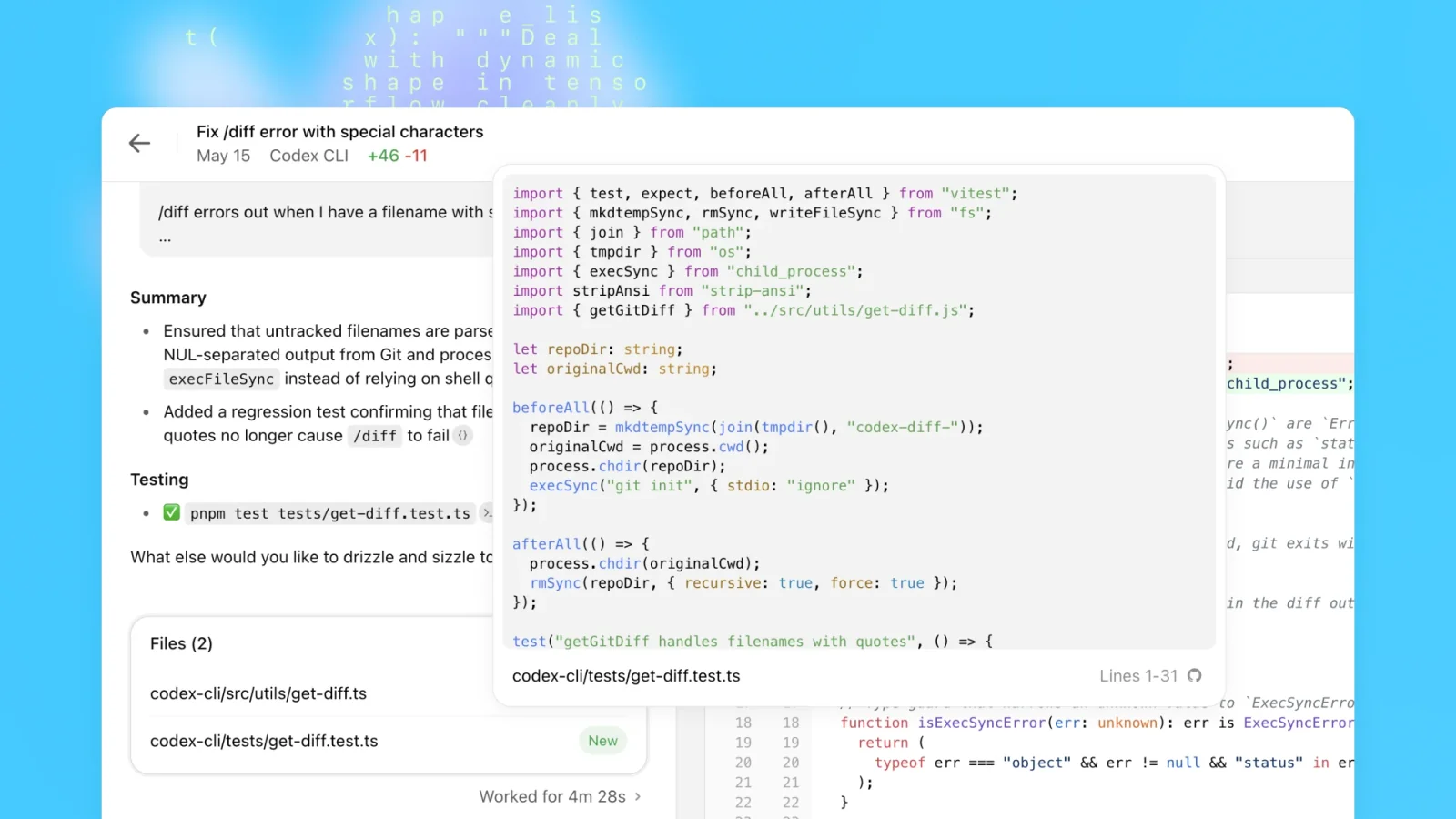
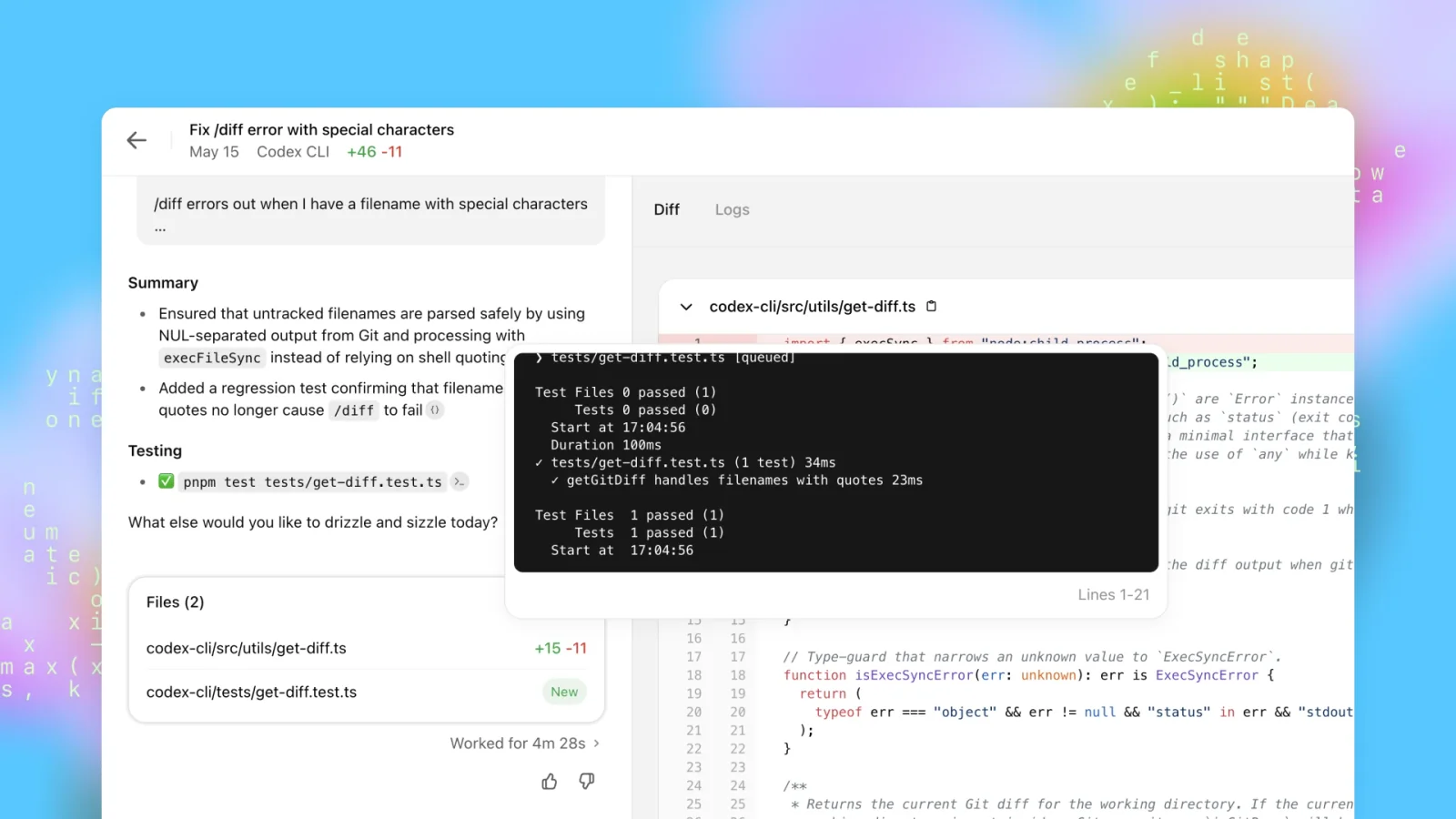
Key Features
Use Cases



Frequently asked questions about Codex
What are the pricing options for Codex?
Codex offers multiple pricing options: a free tier, a ChatGPT Plus subscription for $20 per month, and tailored enterprise solutions with custom pricing. Each plan includes unique features and varied usage limits, catering to different needs from casual users to businesses requiring advanced capabilities.
Key Points
- Free Tier: Basic access with limited features.
- ChatGPT Plus: Enhanced functionalities for $20/month.
- Enterprise Solutions: Custom pricing for advanced business needs.
Detailed Explanation
Codex's pricing structure is designed to accommodate a wide range of users, from individuals experimenting with AI to large organizations leveraging advanced technology for their operations.
-
Free Tier: This is an entry-level option allowing users to explore Codex's capabilities at no cost. While it offers basic features, it may have restrictions on usage limits, making it suitable for casual users or those testing the service.
-
ChatGPT Plus: For $20 per month, subscribers gain access to enhanced functionalities. This plan typically includes faster response times, priority access during peak usage times, and additional features that improve user experience. It’s ideal for users who rely on Codex for frequent or intensive tasks.
-
Enterprise Solutions: Tailored for businesses, these plans come with custom pricing based on specific needs and usage. Enterprises may require additional support, integration capabilities, and advanced features not available in standard plans. This option is perfect for organizations looking to integrate Codex into their operations at scale.
Best Practices / Tips
- Evaluate Your Needs: Before selecting a plan, assess your usage requirements. If you only need basic functionality, the free tier may suffice.
- Test Before Committing: Utilize the free tier to explore features before upgrading to ChatGPT Plus or an enterprise solution.
- Consider Scalability: If you foresee growth, discussing custom solutions with Codex’s sales team can ensure you have a plan that grows with your business.
Additional Resources
By understanding these pricing options, you can choose the plan that best fits your needs, whether for personal use or large-scale enterprise applications.
How can I use Codex for code review automation?
To automate code review with Codex, integrate it with GitHub by connecting your repository. Codex will then generate suggestions and create pull requests, streamlining the review process and enhancing code quality. This integration allows for efficient collaboration and faster development cycles.
Key Points
- Integration with GitHub: Seamlessly connects to your repository.
- Automated Suggestions: Codex provides real-time recommendations for code improvements.
- Streamlined Workflow: Facilitates faster code review and collaboration among team members.
Detailed Explanation
Using Codex for code review automation involves several straightforward steps:
-
Integration Setup: Begin by linking Codex with your GitHub account. You can do this by visiting the Codex integration section in your GitHub settings and authorizing the app.
-
Repository Connection: Once authorized, select the repository you want Codex to analyze. Ensure that the repository contains code in languages supported by Codex, such as Python, JavaScript, or Java.
-
Code Review Process:
- Automated Suggestions: As you push code changes, Codex scans your code and provides automated suggestions. This includes identifying potential bugs, recommending best practices, and optimizing code performance.
- Pull Requests: Codex can automatically generate pull requests with its recommendations, allowing your team to review and implement changes efficiently.
- Feedback Loop: Encourage team members to interact with Codex’s suggestions. This fosters a collaborative environment where developers can learn from the feedback provided.
-
Customization: You can customize Codex's behavior by adjusting settings to match your team's coding standards and preferences.
-
Continuous Improvement: Regularly review the feedback from Codex to ensure that it evolves with your code base and coding practices.
Best Practices / Tips
- Regular Updates: Keep Codex updated to benefit from the latest features and enhancements.
- Encourage Team Adoption: Train your team on how to utilize Codex effectively to maximize its impact on the code review process.
- Monitor Performance: Analyze the effectiveness of Codex-generated suggestions over time to fine-tune its configuration.
- Avoid Over-reliance: While Codex is a powerful tool, it’s essential to maintain human oversight in the review process to capture nuances that AI may miss.
Additional Resources
What are the key features of Codex compared to other coding tools?
Codex offers unique features such as parallel multi-agent execution, automated code review, and seamless integration with GitHub, which significantly enhance coding efficiency. These capabilities enable developers to manage multiple tasks simultaneously, resulting in faster development cycles compared to traditional coding tools.
Key Points
- Parallel Multi-Agent Execution: Allows simultaneous processing of tasks.
- Automated Code Review: Streamlines code quality assessment.
- GitHub Integration: Facilitates collaboration and version control.
Detailed Explanation
Codex is an advanced AI coding tool that leverages machine learning to enhance software development. Here’s a deeper look at its standout features:
1. Parallel Multi-Agent Execution
This feature enables Codex to handle multiple coding tasks at once. For example, while one agent writes new code, another can troubleshoot existing code or integrate APIs. This parallel execution significantly reduces the coding time, allowing teams to deliver projects faster.
2. Automated Code Review
Codex includes an automated code review system that checks the quality and security of the code. It can identify potential bugs, suggest improvements, and ensure adherence to coding standards. For instance, if a developer submits code, Codex can provide instant feedback, which helps in maintaining high-quality codebases.
3. GitHub Integration
The seamless integration with GitHub allows developers to manage their projects efficiently. Codex can automatically commit code changes, create pull requests, and sync with repositories. This integration enhances collaboration among team members, making it easier to share code and track changes.
Best Practices / Tips
- Leverage Parallel Execution: Utilize Codex’s ability to run multiple tasks concurrently to boost productivity. Plan your projects to maximize this feature.
- Regular Automated Reviews: Schedule regular automated code reviews to maintain code quality. This can help catch issues early in the development process.
- Utilize GitHub Features: Take full advantage of GitHub integration by using features like branching and pull requests effectively. This will streamline your workflow and improve team collaboration.
Additional Resources
Does Codex provide an API for integration?
Yes, Codex provides an API for integration through a local CLI and IDE extensions. By using an OpenAI API key, developers can seamlessly incorporate Codex into various development environments, enhancing their coding workflows and productivity.
Key Points
- API Availability: Codex offers a robust API for developers.
- Integration Options: Local CLI and IDE extensions facilitate seamless use.
- OpenAI API Key Requirement: Access requires an OpenAI API key.
Detailed Explanation
Codex, a powerful AI coding assistant developed by OpenAI, provides an API that allows developers to integrate its capabilities into their own applications and workflows. This API can be accessed via a local Command Line Interface (CLI) and IDE extensions, making it versatile for different development environments.
To get started with the Codex API, developers need to obtain an OpenAI API key. This key authenticates requests made to the Codex services, ensuring secure and efficient access. Once the API key is in hand, developers can utilize Codex to generate code, provide coding suggestions, and even assist in debugging tasks.
Use Cases
- IDE Integration: By integrating Codex into popular IDEs like Visual Studio Code, developers can receive real-time coding assistance, improving efficiency and reducing errors.
- Automation Scripting: Codex can be used in automation scripts to generate repetitive code patterns, thus saving time and effort.
- Learning and Development: New developers can use Codex to learn coding best practices through suggestions and examples provided by the AI.
Best Practices / Tips
- Keep Your API Key Secure: Ensure that your OpenAI API key is stored securely and not exposed in public repositories.
- Monitor API Usage: Regularly check your API usage to avoid exceeding limits and incurring additional costs. OpenAI provides a dashboard for tracking usage.
- Test Integration Thoroughly: Before deploying Codex in a production environment, run extensive tests to ensure compatibility and reliability with your existing systems.
Additional Resources
What should I know about getting started with Codex?
To get started with Codex, install it using npm or Homebrew for local applications, or sign up for a ChatGPT plan to access cloud features. Review the official documentation for detailed setup instructions and best practices to maximize your experience and efficiency with Codex.
Key Points
- Installation Options: Use npm or Homebrew for local setups, or sign up for ChatGPT for cloud access.
- Documentation: Official guides provide setup instructions and usage best practices.
- Use Cases: Codex can assist with coding tasks, automating workflows, and enhancing productivity.
Detailed Explanation
Getting started with Codex involves a few essential steps:
-
Installation:
- For local development, install Codex using npm by running
npm install codex. Alternatively, if you're on macOS, you can install it via Homebrew using the commandbrew install codex. - If you prefer cloud capabilities, sign up for a ChatGPT plan, which offers enhanced access to Codex’s features through the web interface.
- For local development, install Codex using npm by running
-
Exploring Documentation:
- The official Codex documentation is a vital resource. It includes setup guidance, API references, and comprehensive tutorials to help you understand how to leverage Codex effectively.
- Familiarize yourself with the different functionalities Codex offers, such as code generation, language translation, and debugging assistance.
-
Use Cases:
- Codex can be utilized for automating repetitive coding tasks, generating code snippets based on natural language prompts, and even integrating with existing development environments. For example, developers can ask Codex to write a function in Python, and it will generate the code accordingly.
Best Practices / Tips
- Start Small: When beginning with Codex, start with simple queries and gradually explore more complex tasks. This approach helps you understand its capabilities without overwhelming yourself.
- Use Clear Prompts: Formulate clear, specific prompts to get the best results from Codex. For instance, instead of asking “Write code,” specify the function or task, like “Write a Python function to calculate the factorial of a number.”
- Review Generated Code: Always review the code generated by Codex for accuracy and security. While it can significantly speed up development, it may not always produce flawless output.
Additional Resources
Explore more AI Ai Agents tools
Browse all Ai Agents tools →Browse by use case: Code Generation · Automation & Productivity
Compare Codex: vs Proto-Mind · vs Ami · vs Duvi · vs AskDeck