

CLI Manager
AIFree, open-source macOS app that manages Claude Code, Codex CLI and Gemini CLI sessions, projects and worktrees from one dashboard.
CLI Manager
Free, open-source macOS app that manages Claude Code, Codex CLI and Gemini CLI sessions, projects and worktrees from one dashboard.
About CLI Manager
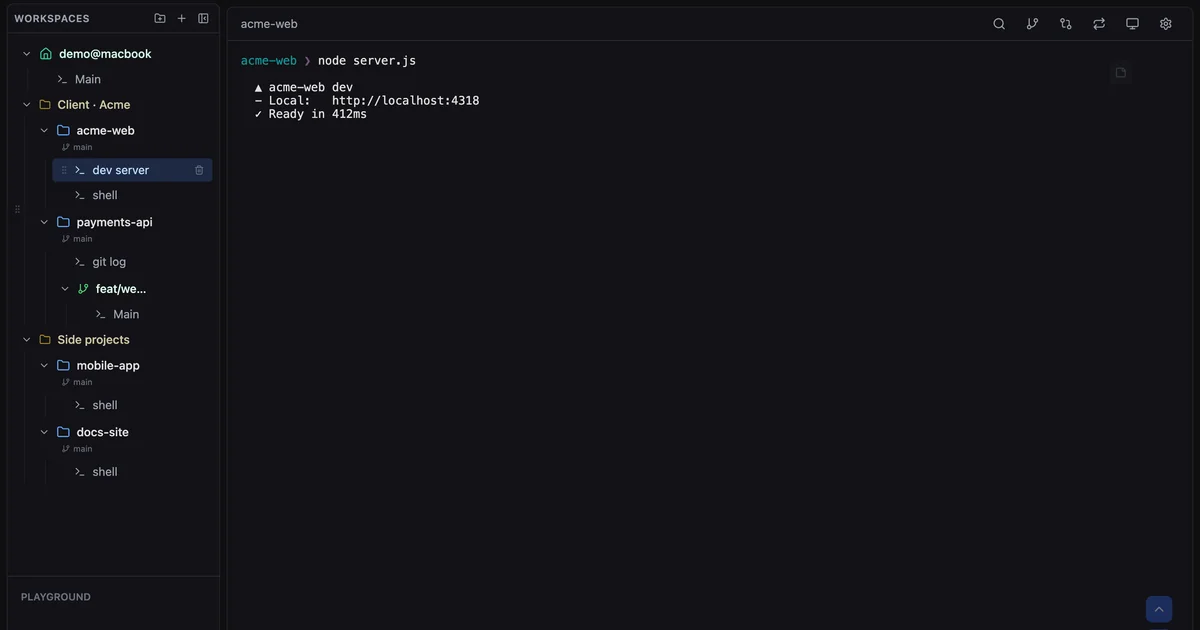
CLI Manager, built by Solhun, is a desktop app for macOS that puts every terminal-based coding agent in a single workspace. Claude Code, Codex CLI, Gemini CLI and plain shells live side by side in one sidebar, grouped into project folders, so developers can switch between running sessions without losing context. Its AI Control API lets another agent open visible sessions, send prompts and read the screen, while the user can watch and take over at any time. Session status is driven by official Claude Code and Codex hooks, and a built-in diff review sends line comments back to the agent. The app is free and open source under the MIT licence, processes data locally, and is Apple notarized.
Screenshots
Key Features
Use Cases



Frequently asked questions about CLI Manager
What is CLI Manager?
Free, open-source macOS app that manages Claude Code, Codex CLI and Gemini CLI sessions, projects and worktrees from one dashboard.
How does CLI Manager work?
CLI Manager works by combining Unified Agent Dashboard: Claude Code, Codex CLI, Gemini CLI and plain shells run side by side in one sidebar, grouped into project folders and named by role., AI Control API: Lets Claude Code, Codex or a script open visible terminal sessions, send prompts and read the screen over a local, token-protected connection; off by default., In-App Diff Review: Open the diff for any workspace, select lines and send a comment with file and line numbers straight back to the agent's terminal., Hook-Based Session Status: Uses official Claude Code and Codex hooks so a permission prompt is never mistaken for a finished task, plus usage alerts before the 5-hour or weekly limit., Built-In Git Worktrees: Each worktree becomes its own workspace with its own sessions, and a Source Control panel handles stage, commit, push and history. to help users with Multi-Agent Development: Running Claude Code, Codex and Gemini CLI on different tasks in parallel while keeping every session visible in one sidebar., Agent Orchestration: Having a primary coding agent open and drive other CLI agents in watchable terminals through the AI Control API., Code Review of Agent Output: Reviewing diffs from an agent's worktree and sending line-level feedback back without leaving the app., Parallel Feature Branches: Using Git worktrees as separate workspaces so several features progress at once, each with its own agent session., Usage Limit Monitoring: Tracking Claude Code and Codex usage so long-running agent work is not cut off unexpectedly..
What are the main features of CLI Manager?
Key features include Unified Agent Dashboard: Claude Code, Codex CLI, Gemini CLI and plain shells run side by side in one sidebar, grouped into project folders and named by role., AI Control API: Lets Claude Code, Codex or a script open visible terminal sessions, send prompts and read the screen over a local, token-protected connection; off by default., In-App Diff Review: Open the diff for any workspace, select lines and send a comment with file and line numbers straight back to the agent's terminal., Hook-Based Session Status: Uses official Claude Code and Codex hooks so a permission prompt is never mistaken for a finished task, plus usage alerts before the 5-hour or weekly limit., Built-In Git Worktrees: Each worktree becomes its own workspace with its own sessions, and a Source Control panel handles stage, commit, push and history..
Who is CLI Manager for?
CLI Manager is useful for anyone interested in Multi-Agent Development: Running Claude Code, Codex and Gemini CLI on different tasks in parallel while keeping every session visible in one sidebar., Agent Orchestration: Having a primary coding agent open and drive other CLI agents in watchable terminals through the AI Control API., Code Review of Agent Output: Reviewing diffs from an agent's worktree and sending line-level feedback back without leaving the app., Parallel Feature Branches: Using Git worktrees as separate workspaces so several features progress at once, each with its own agent session., Usage Limit Monitoring: Tracking Claude Code and Codex usage so long-running agent work is not cut off unexpectedly..
How much does CLI Manager cost?
CLI Manager is free to use.
How do I get started with CLI Manager?
Visit https://climanager.solhun.com/ to sign up and explore CLI Manager.
Explore more AI Ai Tools tools
Browse all Ai Tools tools →Compare CLI Manager: vs Helicon · vs PostNitro · vs diagram-design · vs ExcaliClaw