

Zenflow
AIA free desktop orchestration platform that runs spec-driven workflows, coordinates coding agents, and adds verification to AI-powered engineering.
Zenflow
A free desktop orchestration platform that runs spec-driven workflows, coordinates coding agents, and adds verification to AI-powered engineering.
About Zenflow
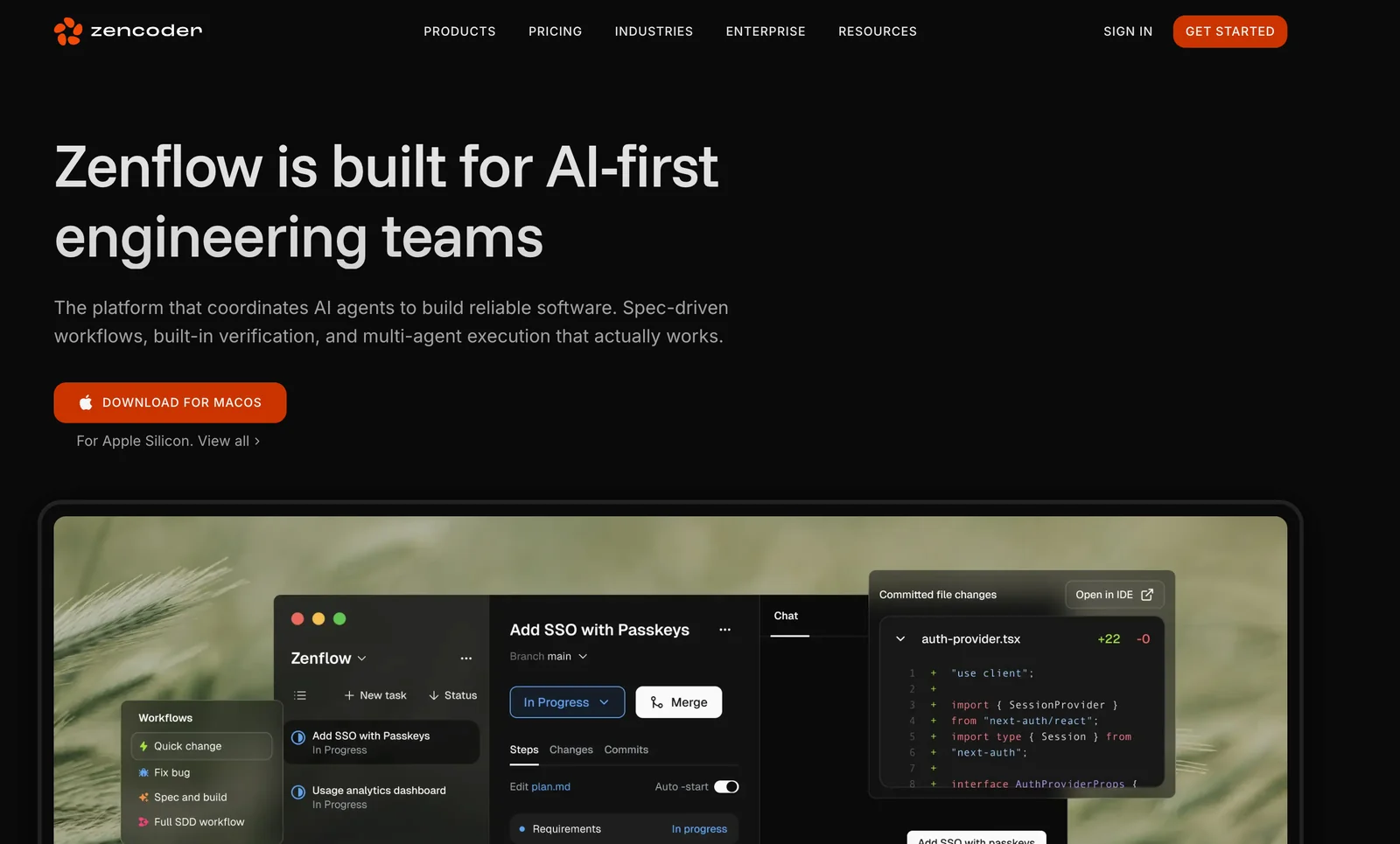
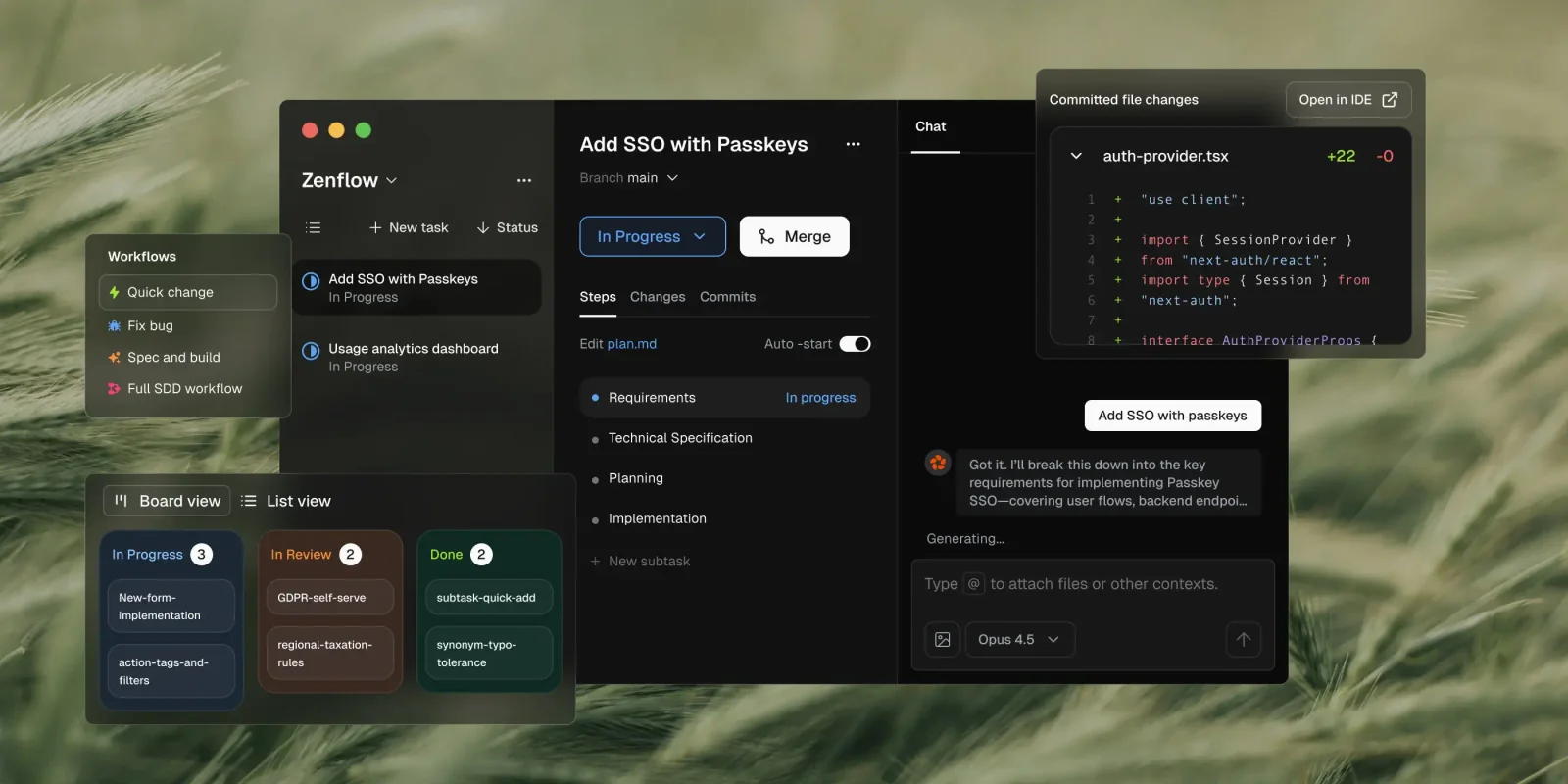
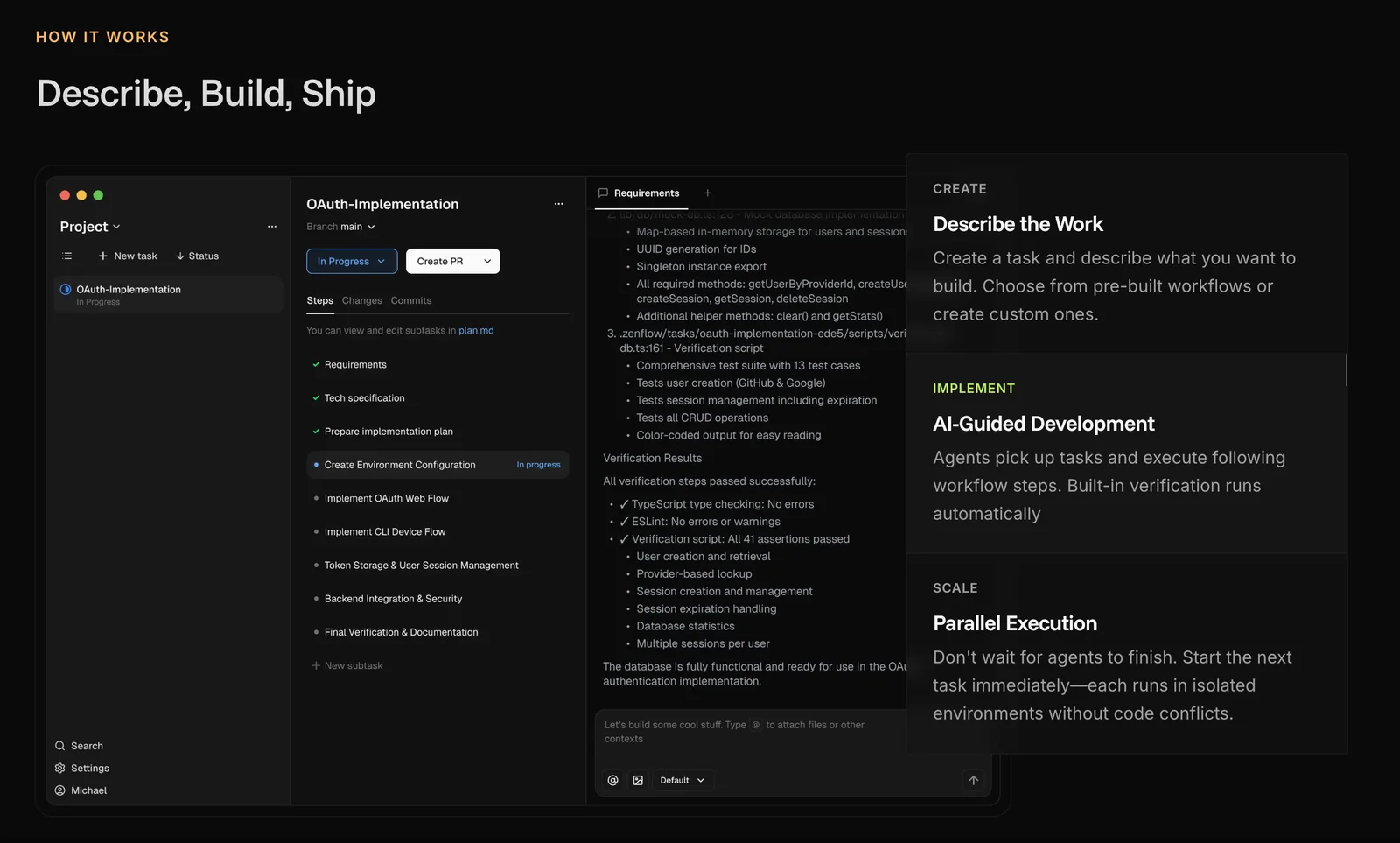
Zenflow is a desktop orchestration platform from Zencoder that analyzes developer tasks, plans work, and assigns steps to specialized coding agents. Agents research the codebase, implement changes, generate and run tests, and perform reviews under spec-driven workflows. Zenflow provides automated verification and multi-agent coordination to turn ad-hoc model interactions into repeatable, verifiable engineering processes, integrating with popular IDEs on macOS and Windows to streamline developer workflows and improve reliability and scalability.
Screenshots
Key Features
Use Cases



Frequently asked questions about Zenflow
What pricing options are available for Zenflow?
Zenflow is completely free to use with no hidden fees. It offers a desktop application for both Windows and macOS, featuring spec-driven workflows and automated verification at no cost, making it accessible for individuals and teams looking to streamline their processes.
Key Points
- Zenflow is free with no hidden fees.
- Available on both Windows and macOS.
- Features include spec-driven workflows and automated verification.
Detailed Explanation
Zenflow provides users with a powerful, cost-effective solution for managing workflows and verification processes. The application is designed to help teams implement spec-driven methodologies, which can significantly improve project efficiency and accuracy. Users can download the app directly from the Zenflow website, where they will find simple installation instructions for both Windows and macOS.
One of the standout features of Zenflow is its automated verification system. This feature ensures that all specifications are met during the development process, reducing errors and saving time. For example, if a team is working on a software project, Zenflow can automatically check that the code adheres to specified guidelines, allowing developers to focus on more critical tasks.
Zenflow’s user interface is intuitive, making it easy for new users to adapt without extensive training. Additionally, the application is regularly updated, ensuring that users benefit from the latest features and improvements.
Best Practices / Tips
- Start with the free version to explore Zenflow's features before considering any premium tools.
- Utilize the automated verification feature to enhance project accuracy and reduce manual errors.
- Regularly check for app updates to make use of new functionalities and security improvements.
- Engage with the Zenflow community for tips and best practices to maximize your workflow efficiency.
Additional Resources
By leveraging Zenflow's robust features, teams can improve their workflow efficiency without incurring costs, making it an ideal solution for small businesses and startups looking to optimize their processes.
How does Zenflow automate verification in coding workflows?
Zenflow automates verification in coding workflows by generating and executing comprehensive tests automatically. This process ensures that any AI-generated code changes comply with defined requirements, facilitating seamless integration before merging or deploying updates.
Key Points
- Automated Test Generation: Zenflow creates tests based on code changes.
- Continuous Integration: Integrates testing within the development pipeline.
- Requirement Compliance: Validates code against specific criteria prior to deployment.
Detailed Explanation
Zenflow's automation capabilities significantly enhance coding workflows by performing verification through various stages. When developers make changes, Zenflow automatically generates tests tailored to those modifications. This ensures that every piece of AI-generated code is scrutinized against predefined requirements.
-
Automated Test Generation: Zenflow uses algorithms to create unit tests and integration tests that reflect the logic and functionality of the code changes. For instance, if a developer modifies a function to process user data, Zenflow may generate tests that check for data integrity, error handling, and performance benchmarks.
-
Continuous Integration (CI): Zenflow integrates seamlessly with CI/CD pipelines. As part of the workflow, it executes these tests every time new code is pushed, ensuring that the application remains stable. This continuous feedback loop allows developers to identify issues early and reduces the risk of deploying flawed code.
-
Requirement Compliance: Before any code is merged into the main branch, Zenflow checks it against a set of defined requirements. For example, if a project mandates that all code must pass security checks, Zenflow enforces this rule, preventing non-compliant code from being deployed.
Best Practices / Tips
- Define Clear Requirements: Ensure that all stakeholders agree on the testing criteria and requirements to maximize the effectiveness of Zenflow's automation.
- Regularly Update Tests: As the codebase evolves, continuously update the tests to reflect new functionalities or changes in requirements.
- Monitor and Analyze Results: Use Zenflow’s analytics features to monitor test results and identify recurring issues, allowing for proactive fixes and improvements.
Additional Resources
How can I get started using Zenflow for my projects?
To get started using Zenflow for your projects, download the free desktop application from the official Zenflow website, install it on your Windows or macOS system, and begin creating spec-driven workflows tailored to your coding tasks for improved productivity and efficiency.
Key Points
- Download the Application: Access the official website to download Zenflow.
- Installation Process: Follow the installation prompts for Windows or macOS.
- Creating Workflows: Start building your spec-driven workflows for coding tasks.
Detailed Explanation
Zenflow is designed to streamline project management and enhance coding efficiency through spec-driven workflows. Here’s how to get started:
-
Download the Application: Visit the official Zenflow website and click on the download button for the desktop application. It is available for both Windows and macOS systems.
-
Installation Process: Once the download is complete, locate the installer file in your downloads folder. For Windows, double-click the
.exefile, and for macOS, open the.dmgfile and drag the Zenflow icon to your Applications folder. Follow on-screen instructions to complete the installation. -
Creating Spec-Driven Workflows: After installation, launch Zenflow. You’ll find an intuitive interface that allows you to create workflows tailored to your coding projects. Start by defining your project specifications, which Zenflow uses to guide your coding tasks. You can create multiple workflows for different projects, manage deadlines, and assign tasks to team members.
Example Use Case
For instance, if you are developing a web application, you can set up a workflow that specifies user authentication features, database integration, and UI design tasks. Zenflow will help track progress and ensure all aspects of the project are covered.
Best Practices / Tips
- Set Clear Specifications: Ensure your project specifications are detailed and clear to avoid confusion.
- Regularly Update Your Workflows: As your project evolves, update your workflows to reflect changes in scope or requirements.
- Utilize Collaboration Tools: If working in a team, leverage Zenflow’s collaboration features to enhance communication and ensure everyone is aligned with project goals.
Additional Resources
- Zenflow Documentation - Official documentation for detailed guidance and troubleshooting.
- Zenflow Community Forum - Engage with other users to share tips and best practices.
Does Zenflow integrate with existing IDEs for better development experience?
Yes, Zenflow seamlessly integrates with popular IDEs like Visual Studio Code, IntelliJ IDEA, and Eclipse. This integration enhances the development experience by providing agent assistance, inline review suggestions, and automated test generation, allowing developers to streamline their workflows efficiently.
Key Points
- Wide IDE Compatibility: Integrates with leading IDEs such as VS Code and IntelliJ.
- Enhanced Workflow: Offers agent assistance and inline suggestions to improve coding efficiency.
- Automated Testing: Facilitates quicker test generation, reducing manual effort.
Detailed Explanation
Zenflow's integration capabilities allow developers to enhance their existing Integrated Development Environments (IDEs) significantly. Here’s how Zenflow works with popular IDEs:
-
Agent Assistance: Zenflow's AI agents provide real-time support within the IDE. For instance, while coding in Visual Studio Code, developers receive contextual suggestions that can help resolve issues or suggest code improvements as they type.
-
Inline Review Suggestions: When you write code, Zenflow analyzes it on-the-fly and provides inline feedback. This means as you write functions or classes, the tool can suggest best practices or highlight potential bugs. For example, if you miss a closing bracket, Zenflow can alert you immediately.
-
Automated Test Generation: One of Zenflow’s standout features is its ability to automatically generate unit tests based on your code. In IntelliJ IDEA, developers can quickly create test cases that ensure their code behaves as expected, thus saving time and improving code quality.
-
Customizable Workflows: Developers can tailor Zenflow's integration to fit their workflow. You can configure it to focus on specific coding standards or frameworks, making it adaptable to various project requirements.
Best Practices / Tips
- Leverage Inline Suggestions: Always review the inline suggestions provided by Zenflow to enhance your coding practices and catch errors early.
- Utilize Automated Testing: Make it a habit to generate and run automated tests as you develop. This will save time during the debugging phase and improve overall code reliability.
- Stay Updated on Integrations: Regularly check for updates from Zenflow to take advantage of new features or improved compatibility with your IDE.
Additional Resources
- Zenflow Official Documentation
- Getting Started with Zenflow in Visual Studio Code
- Automated Testing with Zenflow
By utilizing Zenflow's features effectively, developers can create a more productive and efficient coding environment tailored to their needs.
How does Zenflow compare to other AI orchestration tools?
Zenflow distinguishes itself from other AI orchestration tools through its unique free pricing model and emphasis on specification-driven workflows. It offers automated verification and multi-agent coordination, making it a compelling choice compared to traditional paid orchestration platforms, which often lack these features.
Key Points
- Free Pricing Model: Zenflow offers a no-cost entry point.
- Spec-Driven Workflows: Focuses on specifications for better accuracy and efficiency.
- Automated Verification: Ensures quality and reliability of workflows.
Detailed Explanation
Zenflow's free pricing model makes it accessible to startups, small businesses, and individual developers who may find other orchestration tools prohibitively expensive. Unlike many paid tools that charge monthly fees ranging from $50 to $500, Zenflow allows users to explore its full capabilities without financial constraints.
One of Zenflow's standout features is its spec-driven workflows. This approach ensures that workflows are built around clear specifications, leading to improved accuracy and reduced errors. For example, if a user is developing a complex API, Zenflow can help define the specifications and automate the orchestration process, ensuring that all components meet predefined criteria.
Additionally, Zenflow provides automated verification of workflows, which is often a manual and time-consuming process in other platforms. This feature not only saves time but also enhances the reliability of projects by automatically checking for compliance with the specified requirements. For instance, in a multi-agent scenario, Zenflow can coordinate tasks among different agents while ensuring that each task meets the set specifications before moving on to the next stage.
Best Practices / Tips
- Utilize the Free Version: Take full advantage of Zenflow's free model to explore its functionalities before committing to paid options.
- Define Clear Specifications: Invest time in outlining precise specifications to enhance the effectiveness of the orchestration process.
- Test Automated Verification: Regularly test the automated verification feature to ensure it aligns with your project needs and maintains quality control.
Additional Resources
Explore more AI Ai Agents tools
Browse all Ai Agents tools →Browse by use case: Automation & Productivity
Compare Zenflow: vs Sai · vs Mycel · vs Proto-Mind · vs Ami