

Unosend
AIDeveloper-first email API offering transactional and marketing sending with 99.9% deliverability and 5,000 free emails/month.
Unosend
Developer-first email API offering transactional and marketing sending with 99.9% deliverability and 5,000 free emails/month.
About Unosend
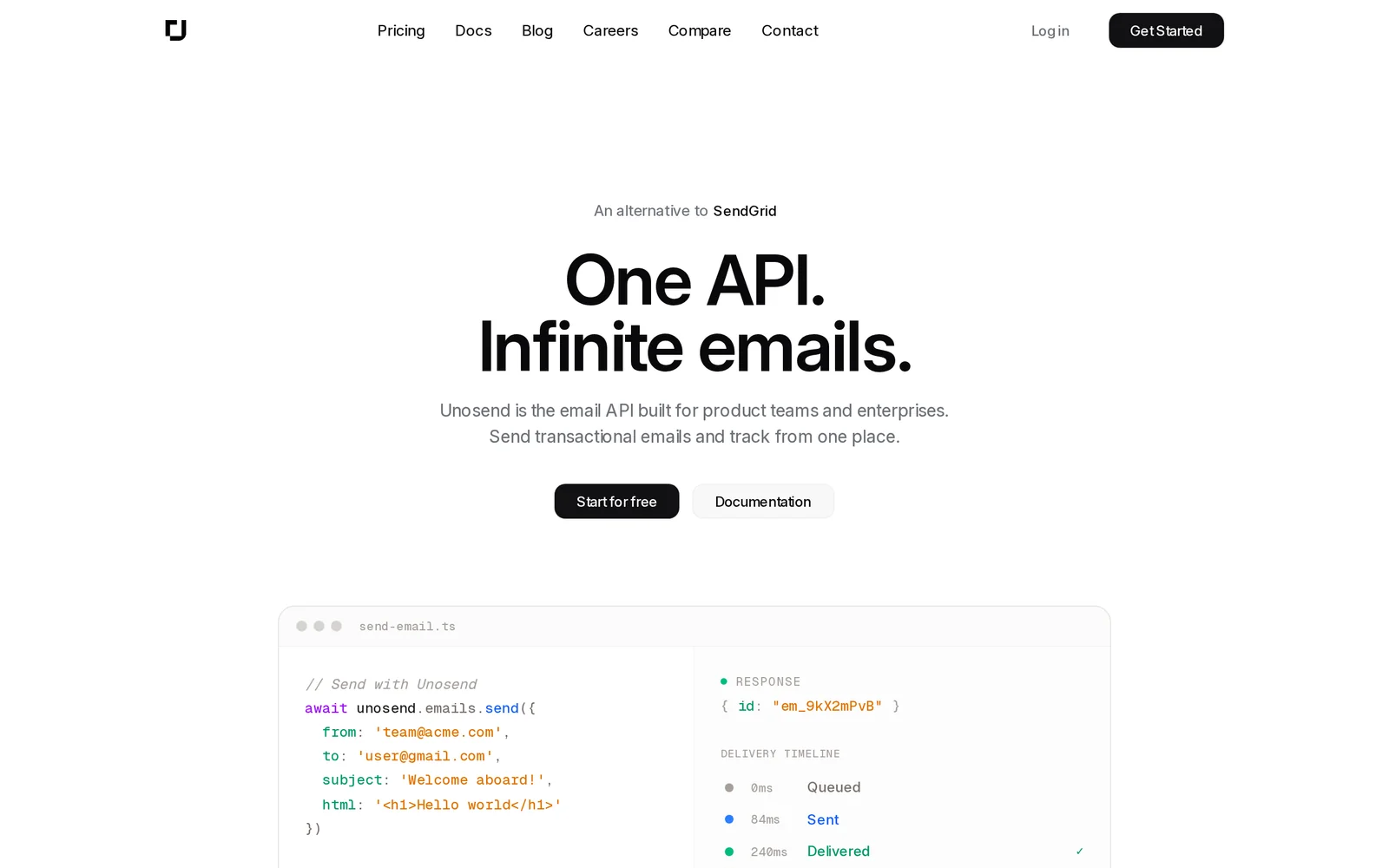
Unosend is an email API built for developers to send both transactional and marketing emails via a simple REST API. It emphasizes high deliverability (advertised at 99.9%), easy integration, and a generous free tier (5,000 free emails/month) for testing and small projects. The service positions itself as a competitive alternative to providers like Resend and SendGrid and provides developer tooling such as an official Go SDK (unosend-go) and email support.
Screenshots
Key Features
Use Cases



Frequently asked questions about Unosend
What is Unosend?
Unosend is a developer-first email API that offers reliable transactional and marketing email services with an impressive 99.9% deliverability rate. Users can send up to 5,000 emails per month free of charge, making it a cost-effective solution for businesses looking to enhance their email communication.
Key Points
- Developer-Centric API: Designed for seamless integration with existing applications.
- High Deliverability Rate: Ensures emails reach recipients, minimizing bounce rates.
- Free Tier Offering: Allows businesses to start without upfront costs.
Detailed Explanation
Unosend is specifically built for developers who need a robust email solution that integrates easily with their applications. The API allows for both transactional emails—such as order confirmations and password resets—and marketing emails like newsletters and promotional offers.
Features:
- 99.9% Deliverability Rate: This high rate means that nearly all emails sent through Unosend will reach their intended recipients, which is critical for maintaining customer engagement and satisfaction.
- Free Tier: Unosend offers 5,000 emails per month for free, a perfect starting point for small businesses or startups. This allows companies to test the platform without financial commitment.
- Easy Integration: With comprehensive documentation, developers can quickly integrate Unosend into their systems, whether it’s a web application, mobile app, or e-commerce platform.
Use Cases:
- E-commerce: Sending automated order notifications and promotional campaigns to boost sales.
- SaaS Products: Notifying users about updates, features, and account activities.
- Content Marketing: Distributing newsletters and valuable content to subscribers.
Best Practices / Tips
- Utilize the Free Tier: Start with the free 5,000 emails to familiarize yourself with the platform before scaling.
- Monitor Deliverability: Regularly check your deliverability metrics to ensure your emails are reaching the inbox.
- Optimize Email Content: Personalize emails and include strong calls-to-action to increase engagement rates.
Common Pitfalls:
- Ignoring Data Analytics: Failing to analyze email performance can lead to missed opportunities for improvement.
- Not Following Best Practices: Avoid spammy content and ensure compliance with email regulations like GDPR.
Additional Resources
How does Unosend work?
Unosend utilizes advanced AI capabilities to streamline daily workflows by automating tasks, enhancing communication, and providing insights. This powerful tool helps users manage emails, schedule meetings, and improve productivity through seamless integration with existing platforms.
Key Points
- AI-Powered Automation: Automates repetitive tasks to save time.
- Enhanced Communication: Facilitates effective messaging and collaboration.
- Integration Capabilities: Works with various applications for a unified experience.
Detailed Explanation
Unosend is designed to optimize daily workflows through its core AI functionalities. Here are some of the key features:
-
AI-Powered Automation: Unosend automates repetitive tasks such as responding to emails, setting reminders, and generating reports. For example, users can create templates for common email responses, allowing them to handle customer inquiries faster.
-
Enhanced Communication: The tool improves communication by providing smart suggestions for replies and summarizing lengthy email threads. This feature is particularly useful for teams that need to stay updated on ongoing discussions without reading every message in detail.
-
Integration Capabilities: Unosend seamlessly integrates with popular applications like Google Workspace, Slack, and Microsoft Office. This means users can manage their workflow from a single dashboard, eliminating the need to switch between multiple tools.
Use Cases
- Small Businesses: Unosend can help small business owners manage customer interactions efficiently, allowing them to focus on growth.
- Remote Teams: For remote teams, it streamlines communication and keeps everyone on the same page, which is vital for productivity.
- Busy Professionals: Individuals with packed schedules can benefit from automated meeting scheduling and task reminders.
Best Practices / Tips
- Customize Templates: Take advantage of Unosend's template feature to tailor responses for different audiences, which enhances personalization.
- Regularly Update Integrations: Ensure that all integrated applications are updated to maintain functionality and security.
- Monitor Performance: Utilize analytics features to track how Unosend impacts your productivity, allowing for continuous optimization.
Additional Resources
By leveraging Unosend’s AI capabilities, users can transform their workflows, increase efficiency, and ultimately achieve better outcomes in their professional endeavors.
What are the main features of Unosend?
Unosend offers key features such as advanced AI-driven automation, seamless integration capabilities, and robust analytics tools. These functionalities empower businesses to streamline their communication processes, optimize workflow, and enhance user engagement effectively.
Key Points
- AI-Driven Automation: Automates repetitive tasks for efficiency.
- Seamless Integration: Connects easily with other platforms and tools.
- Robust Analytics: Provides insights into user engagement and communication effectiveness.
Detailed Explanation
Unosend stands out in the AI tools landscape with its powerful features designed to optimize business communication.
AI-Driven Automation
Unosend's core automation capabilities leverage artificial intelligence to handle routine tasks, such as email delivery and follow-ups, freeing up valuable time for users. For instance, businesses can set up automated responses based on customer interactions, ensuring timely and relevant communication without manual effort.
Seamless Integration
The platform allows for seamless integration with popular tools like CRM systems, social media, and e-commerce platforms. This interoperability ensures that businesses can maintain a unified communication strategy across various channels. For example, a company using Unosend can sync its customer data from Salesforce to personalize marketing campaigns effectively.
Robust Analytics
Unosend provides deep analytics features that track user interactions and campaign performance. Users can access detailed reports on open rates, engagement metrics, and conversion statistics, enabling data-driven decision-making. This level of insight helps businesses refine their messaging and target audience effectively, ultimately increasing ROI.
Best Practices / Tips
- Utilize Automation Features: Take full advantage of Unosend's automation tools to minimize manual tasks and focus on strategy.
- Integrate for Efficiency: Ensure that Unosend connects with your existing tools to provide a holistic view of your communication efforts.
- Analyze Regularly: Regularly review analytics to adapt strategies based on user behavior and campaign performance.
Additional Resources
Who is Unosend for?
Unosend is designed for individuals and businesses seeking to enhance their daily workflows with AI. This tool is particularly beneficial for marketers, content creators, project managers, and anyone aiming to automate repetitive tasks and improve productivity through AI-driven solutions.
Key Points
- Target Audience: Unosend serves a diverse range of users, including marketers and content creators.
- AI Workflow Automation: It streamlines daily tasks and enhances productivity.
- User-Friendly Interface: The intuitive design makes it accessible for both novices and experienced users.
Detailed Explanation
Unosend caters to a variety of users who wish to integrate AI into their everyday operations. Here are some examples of how different groups can benefit:
-
Marketers: Unosend automates email marketing campaigns, allowing marketers to schedule messages, personalize content, and analyze engagement metrics, all from a single platform. For instance, a marketer can set up automated follow-up emails based on user behavior, increasing conversion rates without additional effort.
-
Content Creators: Writers and bloggers can utilize Unosend to generate content ideas, optimize SEO, and automate social media sharing. By leveraging AI, they can produce high-quality content more efficiently, freeing up time for creativity.
-
Project Managers: Those managing teams can use Unosend to streamline communication and task assignments. The tool can help track project milestones and deadlines, ensuring that everyone stays aligned and informed.
Best Practices / Tips
- Define Your Goals: Before using Unosend, clarify what tasks you want to automate. This focus will help you maximize the tool's potential.
- Utilize Templates: Take advantage of pre-built templates for emails and social media posts to save time and ensure consistency in branding.
- Monitor Performance: Regularly review analytics to understand what works best. Adapt your strategies based on performance data to improve outcomes.
Additional Resources
How much does Unosend cost?
Unosend offers a free tier that allows users to access basic functionalities, while its paid plans start at approximately $10 per month. These plans provide advanced features tailored for businesses looking to enhance their email marketing and automation capabilities.
Key Points
- Unosend provides a free tier for basic users.
- Paid plans begin around $10 per month.
- Advanced features include automation, analytics, and integrations.
Detailed Explanation
Unosend is an email marketing platform that caters to various user needs, offering a free tier suitable for small businesses or individuals who want to test the service. This free plan includes limited access to email campaigns, subscriber management, and basic analytics.
For users requiring more robust capabilities, Unosend offers several paid plans. The pricing typically starts at about $10 per month, which unlocks advanced features such as:
- Email Automation: Create automated workflows based on user behavior and interactions.
- In-depth Analytics: Gain insights into campaign performance with detailed reports.
- Integrations: Connect with popular platforms like Shopify, WordPress, and social media channels for seamless marketing efforts.
Unosend’s pricing structure is designed to accommodate growing businesses. As your subscriber list expands or your needs become more complex, you can easily scale to a higher-tier plan that offers additional features and higher sending limits.
Best Practices / Tips
- Evaluate Your Needs: Start with the free tier to determine if Unosend meets your requirements before committing to a paid plan.
- Utilize Automation: Leverage the automation features in paid plans to save time and improve engagement.
- Monitor Analytics: Regularly check your campaign analytics to optimize performance and adjust your strategy accordingly.
Additional Resources
How do I get started with Unosend?
To get started with Unosend, visit Unosend's official website and sign up for an account. Once registered, you can explore its features, including email marketing automation, list segmentation, and analytics tools tailored for your business needs.
Key Points
- Sign up via the Unosend website.
- Explore features like email automation and analytics.
- Utilize user-friendly interface for effective marketing.
Detailed Explanation
Unosend is an intuitive email marketing platform designed for businesses and marketers looking to optimize their outreach. To begin, navigate to Unosend's official website. Here’s a step-by-step guide:
-
Sign Up: Click on the "Sign Up" button prominently displayed on the homepage. You’ll need to provide your email address and create a password.
-
Choose a Plan: Unosend offers various pricing tiers, including a free trial that allows you to test its features. Familiarize yourself with what each plan offers to select the one that best fits your needs.
-
Set Up Your Profile: After signing up, complete your profile by adding business details and preferences. This helps tailor your experience.
-
Explore Features: Take advantage of Unosend's features such as:
- Email Automation: Automate your email campaigns based on user behavior and preferences.
- List Segmentation: Organize your contacts into segments for targeted marketing.
- Analytics Dashboard: Monitor your campaign performance with detailed analytics.
-
Create Your First Campaign: Use the drag-and-drop editor to design visually appealing emails. Incorporate elements like images, call-to-action buttons, and personalized content.
-
Launch and Analyze: After designing your campaign, schedule or send it immediately. Post-launch, use the analytics dashboard to track open rates, click-through rates, and other metrics to refine future campaigns.
Best Practices / Tips
- Use A/B Testing: Experiment with different subject lines and content to see what resonates best with your audience.
- Optimize for Mobile: Ensure your emails are responsive and look good on mobile devices, as a significant portion of users read emails on their phones.
- Regularly Clean Your List: Remove inactive subscribers to maintain a healthy email list and improve engagement rates.
- Leverage Automation: Set up automated workflows to nurture leads and engage customers without manual effort.
Additional Resources
- Unosend Documentation - Comprehensive guides and tutorials.
- Blog on Email Marketing Best Practices - Tips and strategies to enhance your email marketing efforts.
- Unosend Pricing Plans - Compare plans to find the best option for your business.
Explore more AI Ai Services tools
Browse all Ai Services tools →Compare Unosend: vs Claude Academy · vs Switchyard · vs Router by Ramp · vs Supernova