

Quaso
AINotte is browser infrastructure for AI agents: fast concurrent browser sessions, prompt-driven browser agents, and serverless browser functions.
Quaso
Notte is browser infrastructure for AI agents: fast concurrent browser sessions, prompt-driven browser agents, and serverless browser functions.
About Quaso
Notte is a developer-focused platform that gives AI agents native access to the web through three composable primitives: Browser Sessions launch thousands of concurrent, low-latency browser instances with autoscaling, antibot detection, residential proxies, and authenticated profiles; Browser Agents accept a natural-language task and complete it end-to-end with a reported >90% success rate, model-agnostic across major LLMs; and Browser Functions run serverless logic colocated with the browsers for near-zero network hops and sub-200 ms cold starts. Around this stack, Notte adds Agent Vaults for encrypted credential storage, Agent Identities with real emails and phone numbers for OTP and 2FA, and Session Profiles that snapshot browser state so agents can skip re-authentication on future runs. The SDK is drop-in with Playwright, Puppeteer, Selenium, browser-use, and Stagehand, and works with OpenAI, Anthropic, Gemini, LangChain, Claude Code, and Cursor.
Screenshots
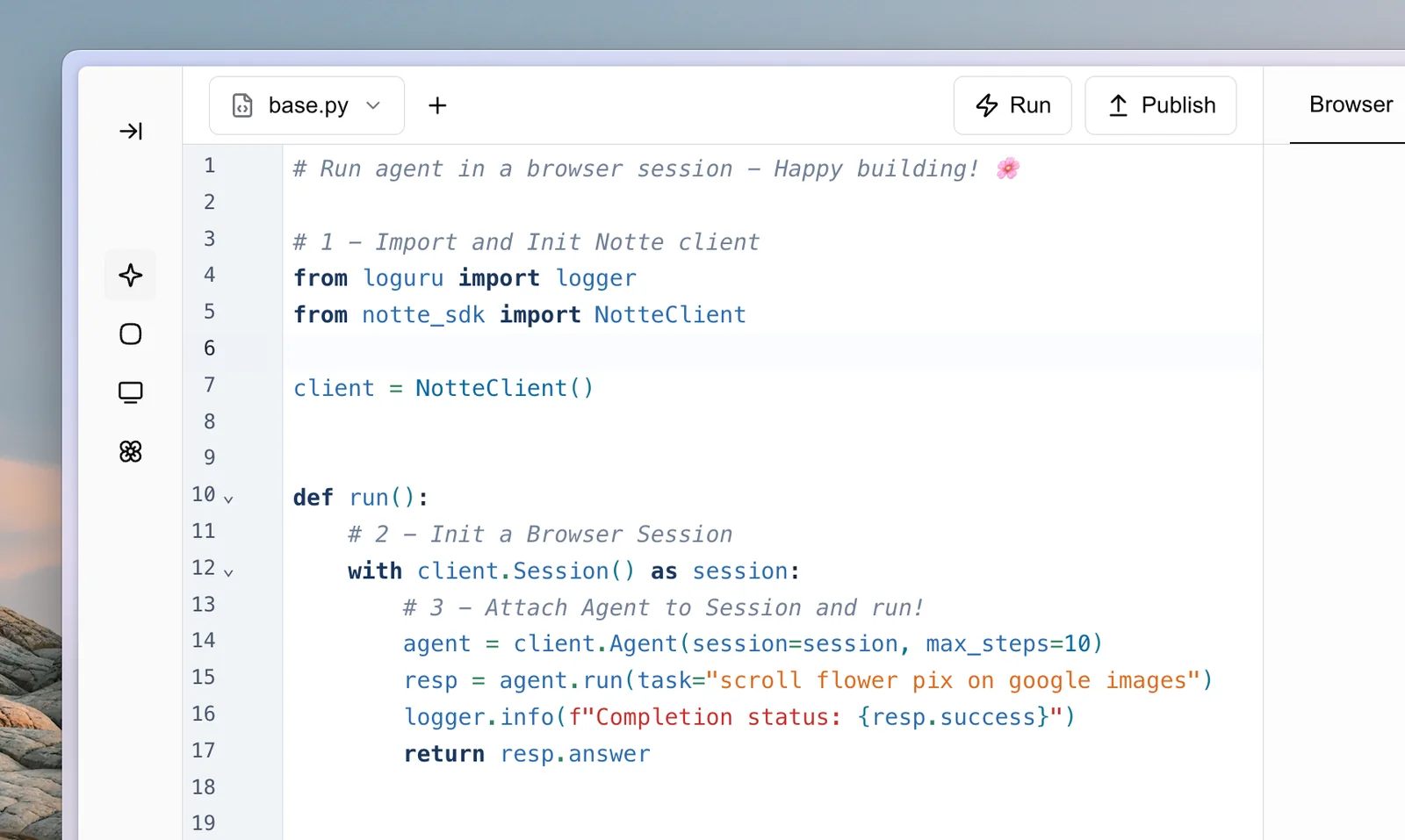
Key Features
Use Cases



Frequently asked questions about Quaso
What is Quaso?
Quaso is an advanced browser infrastructure designed specifically for AI agents, enabling fast concurrent browsing sessions, prompt-driven browser agents, and serverless browser functions. This platform enhances the efficiency and performance of AI applications that require real-time data interaction from the web.
Key Points
- Concurrent Browser Sessions: Quaso supports multiple browser sessions simultaneously, allowing AI agents to gather information quickly.
- Prompt-Driven Functionality: AI agents can be programmed to respond to specific prompts, making interactions more dynamic and responsive.
- Serverless Architecture: The serverless model streamlines deployment and scaling, reducing overhead for developers.
Detailed Explanation
Quaso provides a robust environment for developing AI agents that require web browsing capabilities. Its architecture allows for:
-
Fast Concurrent Browsing: Quaso's ability to manage multiple browser instances simultaneously means that AI agents can scrape data, conduct research, or analyze web content without delay. For example, an AI agent could monitor price changes across various e-commerce sites concurrently, providing real-time updates to users.
-
Prompt-Driven Agents: With its prompt-driven functionality, developers can create AI agents that react to specific user requests or events. This capability is crucial for applications in customer service, where the agent needs to retrieve information based on user queries rapidly.
-
Serverless Browser Functions: The serverless model eliminates the need for developers to manage server infrastructure. This allows for effortless scalability; as user demand increases, Quaso can automatically allocate resources, ensuring high availability and performance without manual intervention.
Overall, Quaso is ideal for businesses looking to integrate AI capabilities with web data, enhancing both user experience and operational efficiency.
Best Practices / Tips
- Optimize for Speed: Ensure that your AI agents are programmed to minimize loading times by efficiently managing resources within Quaso.
- Test Thoroughly: Before deploying your AI agents, conduct extensive testing in various scenarios to ensure they handle prompts and concurrent sessions effectively.
- Monitor Performance: Regularly review the performance metrics of your AI agents to identify bottlenecks or areas for improvement.
Additional Resources
How does Quaso work?
Quaso operates by leveraging a global edge network to run over 1,000 concurrent browser instances, enabling prompt-driven automation without the need for manual selectors. Its features include serverless script deployment, encrypted credential storage, dedicated agent identities, and the ability to handle automated tasks like e-commerce checkouts and large-scale scraping efficiently.
Key Points
- Concurrent Browser Sessions: Launch over 1,000 instances for high availability.
- Prompt-driven Automation: Achieve tasks without complex setups, boasting a >90% success rate.
- Secure Agent Management: Use encrypted storage and dedicated identities for robust workflows.
Detailed Explanation
Quaso employs a multi-faceted approach to automate web tasks effectively. Its Browser Sessions at Scale feature allows users to initiate thousands of concurrent browser instances, ensuring low latency (sub-50 ms) and high uptime (99.9%) across a global edge network. This is particularly useful for businesses needing to gather real-time data or handle numerous user interactions simultaneously.
The Prompt-driven Browser Agents enable users to describe tasks simply in one prompt, eliminating the need for intricate selectors or constant maintenance. With a success rate exceeding 90%, this feature significantly streamlines automation processes such as e-commerce checkouts. For instance, a user can instruct an agent to complete an entire checkout flow, including handling OTP verifications using dedicated Agent Identities.
Quaso also incorporates a Browser Functions Runtime, which allows users to deploy serverless scripts colocated with browsers. This results in zero network hops and faster execution times (under 200 ms cold start). Such efficiency is crucial for tasks like invoice fetching or subscription cancellations, where quick responses are essential.
With Agent Vaults, users benefit from AES-256 encrypted credential storage. This feature ensures secure management of sensitive information, with automatic credential rotation and detailed access logs. Furthermore, each agent can operate with unique inboxes and SMS numbers, allowing seamless handling of two-factor authentications across various platforms.
Best Practices / Tips
- Utilize Batch Processing: When running large-scale scraping tasks, batch your requests to optimize performance and reduce server load.
- Monitor Uptime and Latency: Regularly check performance metrics to ensure that your browser instances maintain the required 99.9% uptime and low latency.
- Test Prompt Structures: Experiment with different prompt formulations to maximize the success rate of your automated tasks.
Additional Resources
What are the main features of Quaso?
Quaso's main features include the ability to launch over 1000 concurrent browser sessions globally with low latency, prompt-driven browser agents for easy task execution, a serverless runtime for browser functions, secure credential storage, and unique agent identities for two-factor authentication.
Key Points
- Browser Sessions at Scale: Launch 1000+ concurrent sessions globally.
- Prompt-driven Browser Agents: Simplified task execution with high success rates.
- Secure Credential Management: Encrypted storage and automatic credential rotation.
Detailed Explanation
Quaso is designed for high-performance web automation and testing, offering several robust features:
Browser Sessions at Scale
Quaso enables users to launch more than 1000 browser instances simultaneously on a global edge network, ensuring sub-50 ms latency and 99.9% uptime. This capability is essential for large-scale data collection, web scraping, and automated testing, allowing businesses to efficiently manage multiple tasks across different regions.
Prompt-driven Browser Agents
With prompt-driven browser agents, users can describe a task in a single prompt without needing to write complex selectors or maintain extensive code. This feature boasts over a 90% success rate and requires only a three-line setup, making it accessible for both technical and non-technical users. For example, a user can instruct the agent to "log into my banking app and retrieve the last three transactions" with minimal setup.
Browser Functions Runtime
Quaso’s serverless script deployment is colocated with browsers, resulting in zero network hop and cold start times of less than 200 ms. This setup is beneficial for executing scripts that require immediate interaction with web pages, such as real-time data processing or automated responses to user actions. Users can also schedule tasks with cron jobs, enhancing operational efficiency.
Secure Credential Management
Security is paramount in automation tools. Quaso offers Agent Vaults, which provide AES-256 encrypted credential storage with scoped-per-session access. This feature includes automatic credential rotation and full access logs for monitoring agent workflows. It ensures that sensitive information is securely managed while allowing seamless access for automated tasks.
Unique Agent Identities
Each Quaso agent is assigned a dedicated inbox and SMS number, enabling the interception of one-time passwords (OTPs) necessary for two-factor authentication (2FA). This functionality is crucial for automating interactions with platforms that require enhanced security, allowing a smooth process for logging in and conducting transactions without manual intervention.
Best Practices / Tips
- Utilize Prompt-driven Features: Take advantage of the prompt-driven agents for quick setup and execution, especially for repetitive tasks.
- Monitor Performance: Regularly check the performance of your browser sessions to ensure optimal speed and reliability.
- Implement Security Best Practices: Always use Agent Vaults for credential management to safeguard sensitive information and reduce the risk of data breaches.
Additional Resources
Who is Quaso for?
Quaso is designed for businesses and individuals who require automated solutions for e-commerce checkout, invoice retrieval, subscription management, large-scale data scraping, and authenticated workflows. Its features streamline repetitive tasks, making it ideal for tech-savvy users looking to enhance efficiency and data accuracy in their operations.
Key Points
- Automated Checkout Flows: Seamlessly complete purchases without manual intervention.
- Invoice and Document Fetching: Easily retrieve important documents from vendor portals.
- Large-Scale Scraping: Collect real-time market data with thousands of concurrent sessions.
Detailed Explanation
Quaso serves a diverse audience, including e-commerce businesses, data analysts, and finance professionals. Here’s how Quaso can benefit various users:
-
Automated Checkout Flows: Quaso allows users to automate the entire e-commerce checkout process. This feature eliminates the need for hand-written selectors, ensuring a faster and error-free purchase experience. For instance, businesses can set up a Browser Agent to handle multiple transactions simultaneously, significantly increasing sales efficiency.
-
Invoice and Document Fetching: Users can efficiently retrieve invoices or receipts from vendor portals with Quaso. By simply firing a task, the Browser Agent fetches the required documents and returns them to the user. This feature is particularly beneficial for finance teams needing to track expenditures and maintain accurate records.
-
Subscription Cancellations: Quaso simplifies subscription management by enabling users to cancel services through the live UI. The agent can handle One-Time Passwords (OTPs) through Agent Identities, ensuring secure and straightforward cancellation processes.
-
Large-Scale Scraping: For market researchers and data analysts, Quaso offers the capability to fan out thousands of concurrent Browser Sessions using residential proxies. This allows for real-time data scraping, providing invaluable insights into market trends and competitor activities.
-
Authenticated Agent Workflows: Quaso allows users to take a snapshot of a logged-in session profile, which can be reused in future runs. This eliminates the hassle of re-authentication, saving time and enhancing productivity.
Best Practices / Tips
- Optimize Task Scheduling: Schedule tasks during off-peak hours to avoid server overload and improve efficiency.
- Use Proxies Wisely: Implement residential proxies for scraping to reduce the risk of IP bans and ensure data integrity.
- Monitor Performance: Regularly review the performance of automated tasks to identify areas for improvement.
- Secure Sensitive Data: Always ensure that sensitive information, such as login credentials and payment details, are handled securely by the agent.
Additional Resources
How much does Quaso cost?
Quaso offers a free tier for basic functionalities, while its paid plans range from $10 to $50 per month, depending on the features you choose. These paid plans unlock advanced tools that enhance user experience and productivity, making Quaso suitable for both individuals and businesses.
Key Points
- Free Tier Availability: Quaso provides a no-cost option for basic features.
- Paid Plans: Pricing ranges from $10 to $50 per month.
- Advanced Features: Paid subscriptions unlock additional tools and functionalities.
Detailed Explanation
Quaso is designed for individuals and businesses looking to leverage AI tools for efficiency and productivity. The free tier allows users to access essential features, making it a great choice for those testing the platform or with limited needs. This tier often includes basic analytics, limited project management tools, and a user-friendly interface.
For users who require more robust capabilities, Quaso offers several paid plans:
- Basic Plan: Starting at $10 per month, this plan includes advanced analytics, customizable dashboards, and the ability to manage multiple projects simultaneously.
- Pro Plan: At $30 per month, users gain access to collaboration tools, enhanced customer support, and integrations with other platforms.
- Enterprise Plan: For larger organizations, the $50 per month plan includes all features, priority support, and tailored solutions to fit specific business needs.
These paid plans are designed to cater to a variety of user requirements, ensuring that both casual users and businesses can find a suitable option that maximizes efficiency.
Best Practices / Tips
- Evaluate Your Needs: Before selecting a plan, assess what features are essential for your workflow. Start with the free tier to understand your requirements better.
- Take Advantage of Trials: If available, utilize free trials of paid plans to explore features without immediate financial commitment.
- Stay Updated: Regularly check Quaso’s website for any promotional offers or updates on pricing, as these can change based on new feature releases or market trends.
Additional Resources
How do I get started with Quaso?
To get started with Quaso, visit notte.cc to sign up for an account. Once registered, explore Quaso’s features to enhance your productivity and streamline your projects effectively.
Key Points
- Sign up for a free account at Quaso's official website.
- Familiarize yourself with Quaso's user-friendly interface.
- Utilize available resources and tutorials to maximize your experience.
Detailed Explanation
Quaso is an innovative tool designed to improve collaboration and efficiency in project management. To begin, follow these steps:
- Visit the Website: Go to notte.cc.
- Sign Up: Click on the "Sign Up" button. You can choose between a free trial and various subscription plans, depending on your needs.
- Explore Features: After signing up, take a moment to navigate through the dashboard. Quaso offers features such as task assignments, deadline tracking, and real-time collaboration tools.
- Personalize Your Workspace: Customize your workspace by setting up projects and inviting team members.
- Utilize Tutorials: Quaso provides various tutorials and guides that can help you understand its functionalities fully. Look for resources on the website or within the application.
With these steps, you’ll be well on your way to leveraging Quaso for effective project management.
Best Practices / Tips
- Start with a Free Trial: If you are unsure, start with the free trial to evaluate if Quaso meets your needs before committing to a paid plan.
- Engage with Community: Join forums or social media groups related to Quaso to share experiences and tips with other users.
- Regularly Update Projects: Keep your projects updated to ensure team members are aware of current statuses and deadlines.
- Explore Integrations: Quaso offers integrations with other tools. Make use of these to streamline your workflow.
Additional Resources
Explore more AI Ai Services tools
Browse all Ai Services tools →Compare Quaso: vs Claude Academy · vs Switchyard · vs Router by Ramp · vs Supernova