

Varchive
AIA curated showcase of AI-assisted builds, offering AI-generated summaries, interactive previews, and how-to publishing tools.
Varchive
A curated showcase of AI-assisted builds, offering AI-generated summaries, interactive previews, and how-to publishing tools.
About Varchive
Varchive is a curated showcase that highlights apps, websites, and experimental projects built with AI assistance. It provides concise AI-generated summaries of projects, interactive WebGL previews, and documents human+AI collaboration to help users understand how projects were built. The platform includes an admin for approving submissions, publishing tools, and tutorials (many pages were generated with assistance from Cursor), enabling creators to publish and contextualize AI-assisted work for discovery and learning.
Screenshots
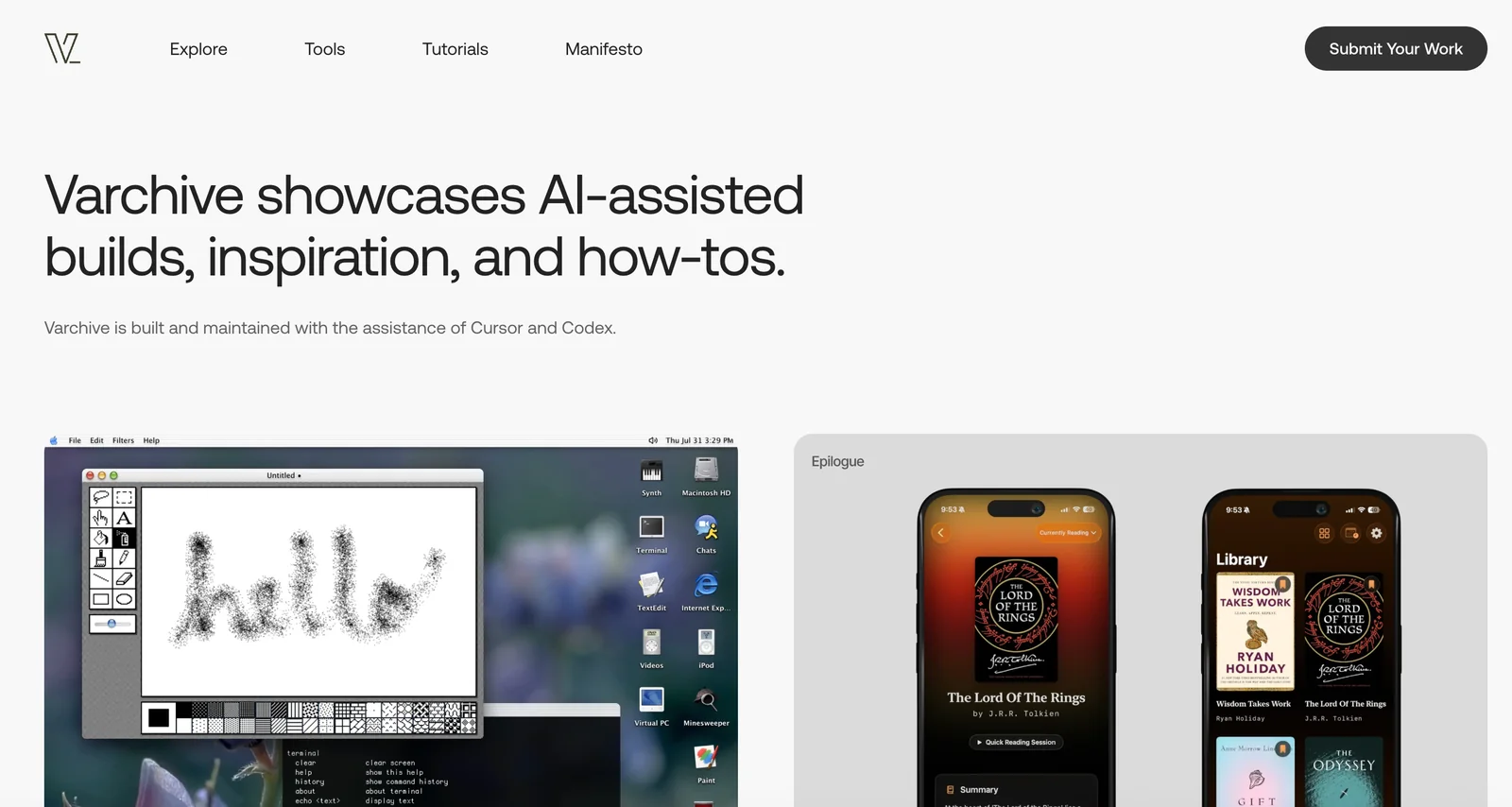
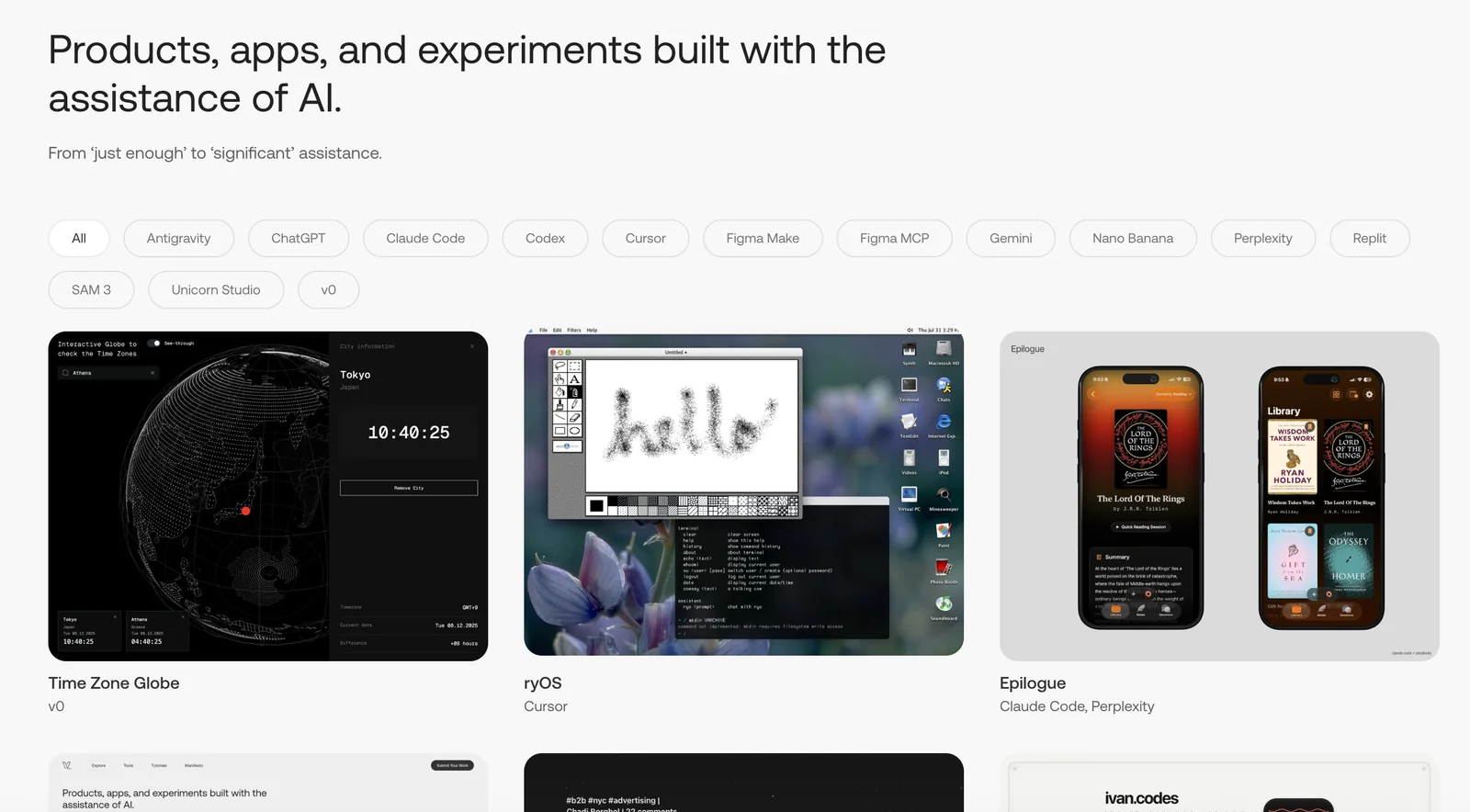
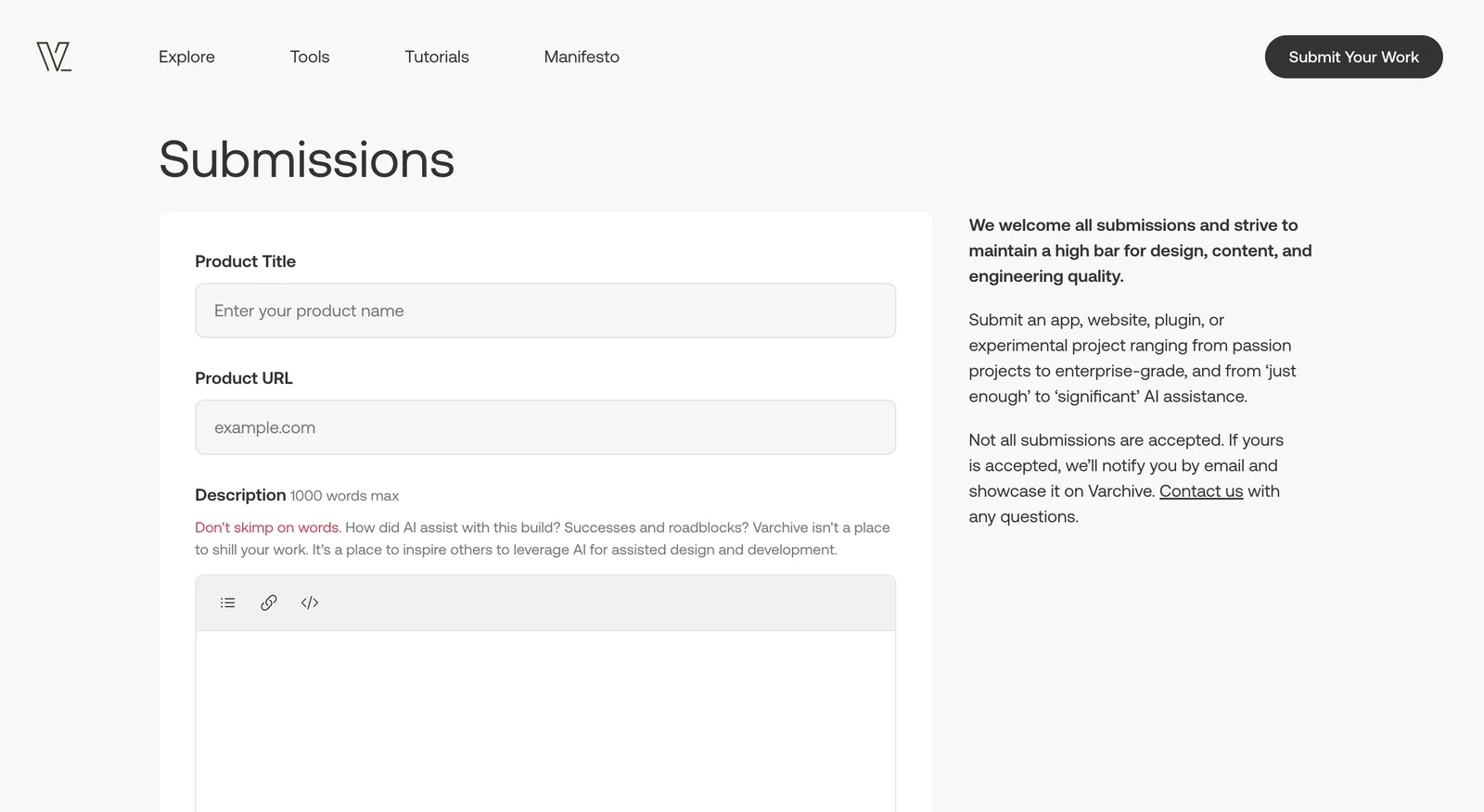
Key Features
Use Cases



Frequently asked questions about Varchive
Is Varchive free to use?
Yes, Varchive is completely free to use, offering users access to a variety of AI-assisted applications, AI-generated summaries, and interactive previews without any official pricing or paid plans. This makes it an attractive option for those looking to explore AI tools without financial commitment.
Key Points
- No Cost Involved: Varchive offers free access to all its features.
- Variety of Tools: Users can explore multiple AI-assisted applications.
- No Hidden Fees: There are no subscription plans or hidden charges.
Detailed Explanation
Varchive is a unique platform that provides users with comprehensive access to a range of AI-powered tools at no cost. This includes:
-
AI-Assisted Applications: Varchive showcases numerous applications that utilize artificial intelligence to enhance productivity and creativity. These tools can assist in various tasks, from content generation to data analysis.
-
AI-Generated Summaries: The platform offers AI-generated summaries that can help users quickly grasp complex information. This is particularly useful for students and professionals seeking to save time while keeping informed.
-
Interactive Previews: Users can interact with previews of these AI tools, allowing them to evaluate their functionality and usability before diving deeper.
By providing these resources for free, Varchive stands out in a market where many similar platforms charge for access. Users can explore the potential of AI without worrying about subscription fees or in-app purchases.
Best Practices / Tips
-
Explore Variety: Take advantage of the different AI tools offered on Varchive. Each tool has its unique strengths, so experimenting with various applications can help you discover the best fit for your needs.
-
Stay Updated: Since Varchive is continuously evolving, keep an eye on new features or tools that may be added. Regular visits to the platform can ensure you don't miss valuable resources.
-
Utilize Summaries: Make the most of AI-generated summaries for efficient learning. Use them as study aids or for quick briefs on topics of interest.
Additional Resources
By leveraging Varchive's free offerings, users can enhance their understanding and application of AI technology without any financial investment, making it an ideal resource for individuals and organizations alike.
What are the key features of Varchive?
Varchive boasts several key features, including AI-generated summaries that streamline content review, interactive WebGL previews for immersive experiences, comprehensive publishing tools for easy content distribution, and a user-friendly submission workflow that enhances project collaboration and discovery.
Key Points
- AI-Generated Summaries: Automatically condense long documents into essential insights.
- Interactive WebGL Previews: Create engaging, 3D-rendered previews of projects.
- Publishing Tools: Simplify the distribution process across various platforms.
Detailed Explanation
Varchive is designed to enhance user experience with a suite of powerful features:
-
AI-Generated Summaries: Utilizing advanced natural language processing, Varchive can generate concise summaries from lengthy texts. This feature allows users to quickly grasp key points, making it ideal for researchers, students, and professionals who need to process large volumes of information rapidly.
-
Interactive WebGL Previews: This cutting-edge feature enables creators to showcase their projects in a 3D environment. By leveraging WebGL technology, users can present their work dynamically, allowing viewers to interact with the content. This is particularly beneficial for fields like architecture, game design, and product development, where visual representation is crucial.
-
Comprehensive Publishing Tools: Varchive offers an array of publishing tools that facilitate the sharing of content across multiple platforms. Users can easily format and distribute their projects, ensuring that their work reaches a broader audience without the hassle of technical barriers.
-
User Submission Workflow: The platform includes a streamlined submission workflow that encourages collaboration. Users can submit their projects for review, making it easier for teams to provide feedback and enhance the quality of the work collaboratively.
Best Practices / Tips
- Utilize AI Summaries: Always start by generating AI summaries to save time and focus on critical information.
- Engage with WebGL Previews: When presenting projects, use the WebGL previews to capture your audience's attention and enhance their understanding of your work.
- Optimize Publishing: Make sure to familiarize yourself with the publishing tools to maximize your content’s reach. Use SEO strategies, including keywords and meta descriptions, to improve visibility.
- Participate in the Submission Workflow: Encourage team members to submit their projects for feedback to foster a collaborative environment and improve overall quality.
Additional Resources
How can I get started using Varchive?
To get started using Varchive, visit the official website to explore showcased projects, tutorials, and tools. These resources will guide you through submitting your own AI-assisted builds, making it easy to engage with the platform and contribute your creative ideas.
Key Points
- Explore Projects: Check out existing AI-assisted builds for inspiration.
- Utilize Tutorials: Follow step-by-step guides to understand the submission process.
- Engage with Community: Join forums and discussions for support and feedback.
Detailed Explanation
Starting your journey with Varchive is straightforward. First, head to the Varchive official website. Here, you'll find an array of showcased projects that illustrate the potential of AI-assisted builds. This will give you a clear idea of what can be created using the platform.
Step-by-Step Guide:
- Browse Showcased Projects: Familiarize yourself with various AI-assisted designs and functionalities. This will help you identify what you might want to create.
- Access Tutorials: Navigate to the tutorial section to find comprehensive guides. These tutorials cover everything from basic concepts to advanced techniques, ensuring you understand the tools at your disposal.
- Create an Account: If you want to submit your projects, sign up for an account. This may involve providing an email address and setting a password.
- Submit Your Build: After completing your build, follow the submission guidelines provided in the tutorials to upload your project. Ensure you include all necessary documentation and descriptions to enhance visibility.
Best Practices / Tips
- Start Simple: If you're new to AI-assisted builds, begin with smaller projects to build your confidence.
- Engage Actively: Participate in community forums to learn from experienced users and receive constructive feedback on your projects.
- Stay Updated: Regularly check the Varchive website for updates, new tutorials, or community challenges that can spark your creativity.
- Utilize Feedback: Use feedback from the community to refine your projects and enhance your skills.
Additional Resources
By following these steps and utilizing these resources, you can effectively navigate Varchive and begin creating your own AI-assisted builds with ease.
Does Varchive provide an API for integration?
Currently, Varchive does not provide an API for integration. Instead, it focuses on showcasing AI-assisted builds and delivering interactive content directly through its platform, making it user-friendly without the need for external integration options.
Key Points
- Varchive lacks an API for third-party integration.
- The platform emphasizes AI-assisted builds for users.
- Content is presented interactively within the Varchive environment.
Detailed Explanation
Varchive is designed primarily as a platform to showcase AI-assisted builds, allowing users to interact with and explore various features directly. The absence of an API means that users cannot programmatically access Varchive's services or integrate them with other applications. This choice streamlines the user experience, as all functionalities are hosted within the Varchive ecosystem.
Use Cases
For instance, educators can use Varchive to create engaging presentations without needing to connect external data sources via an API. Similarly, businesses can utilize the interactive content features to enhance their marketing strategies without the complexity of integration.
Future Considerations
While Varchive currently does not offer an API, users interested in integration should monitor updates from the platform. As demand for API functionalities grows, Varchive may consider introducing integration options in future releases.
Best Practices / Tips
- Maximize Platform Features: Familiarize yourself with all the built-in features of Varchive to make the most of the platform.
- Stay Updated: Regularly check Varchive’s official communications for announcements regarding any potential API developments.
- Engage with Support: If integration is vital for your projects, reach out to Varchive’s support team to express your needs, which may influence future offerings.
Additional Resources
How does Varchive compare to other AI showcase tools?
Varchive excels among AI showcase tools due to its innovative blend of AI-generated content, interactive previews, and a comprehensive submission process. Unlike platforms that focus only on AI tools or demos, Varchive enhances user experience with engaging features and detailed showcases, making it a preferred choice for developers and creators.
Key Points
- AI-Generated Content: Varchive utilizes advanced AI to create dynamic content.
- Interactive Previews: Users can engage with content previews for better understanding.
- Robust Submission Process: A streamlined process for submitting and showcasing AI tools.
Detailed Explanation
Varchive distinguishes itself in the competitive landscape of AI showcase tools through several key features.
1. AI-Generated Content
Varchive harnesses the power of AI to generate high-quality content that is not only informative but also engaging. This feature allows users to showcase their tools with content that adapts to audience interests, ensuring higher viewer retention and interaction rates.
2. Interactive Previews
One of the standout aspects of Varchive is the interactive previews it offers. Users can experience a hands-on demonstration of AI tools before deciding to engage further. This feature is particularly beneficial for developers looking to present their solutions in a more captivating manner, which can lead to increased downloads or inquiries.
3. Robust Submission Process
The submission process on Varchive is designed to be user-friendly yet thorough. Unlike other platforms that may have cumbersome or complex submission guidelines, Varchive facilitates an easy onboarding experience. Users can quickly submit their AI tools, ensuring they are showcased effectively and reach their target audience.
Best Practices / Tips
- Optimize Content: Use relevant keywords related to your AI tool for better visibility.
- Engage with Users: Encourage feedback on your showcases to improve engagement and refine your offerings.
- Leverage Analytics: Utilize Varchive's analytics to track the performance of your showcases, helping you to adjust your strategy accordingly.
Additional Resources
By leveraging these features and best practices, users can maximize their effectiveness on Varchive, setting themselves apart from the competition in the AI showcase market.
What is Varchive?
Varchive is a curated platform that showcases AI-assisted builds, providing users with AI-generated summaries, interactive previews, and powerful publishing tools. It enhances the user experience by streamlining the process of discovering and sharing innovative AI applications.
Key Points
- Curated Showcase: Features a handpicked selection of AI-assisted projects.
- AI-Generated Summaries: Offers concise overviews of each build for quick understanding.
- Interactive Previews: Users can engage with projects before committing to usage.
Detailed Explanation
Varchive serves as an invaluable resource for developers, enthusiasts, and businesses looking to leverage artificial intelligence in their projects. By curating AI-assisted builds, it simplifies the discovery process, allowing users to find relevant tools tailored to their needs.
Features of Varchive
- Curated Showcase: Varchive's team meticulously selects projects that demonstrate the potential of AI. This ensures high-quality content that users can trust.
- AI-Generated Summaries: Each project comes with an AI-generated summary, providing an overview of its functionality and potential applications. This feature saves users time by allowing them to grasp the essence of a project quickly.
- Interactive Previews: Users can interact with previews, offering hands-on experience with the AI tools before diving deeper. This interactive element enhances user engagement and helps in decision-making.
Use Cases
- Developers: Can find inspiration and reference implementations for their own AI projects.
- Businesses: May explore AI tools to enhance operations, improve customer service, or streamline processes.
- Educators: Can utilize Varchive to discover innovative teaching tools in AI.
Best Practices / Tips
- Stay Updated: Regularly check Varchive for new builds and updates, as the AI landscape evolves rapidly.
- Engage with the Community: Participate in discussions or forums related to Varchive to gain insights and share experiences.
- Utilize Filters: Take advantage of any available filtering options to narrow down projects by category or functionality, making your search more efficient.
Additional Resources
By leveraging Varchive's features, users can efficiently explore the burgeoning field of AI, discover innovative tools, and enhance their projects with the latest technologies.
How does Varchive work?
Varchive operates by integrating advanced AI functionalities to streamline day-to-day workflows for users, enhancing productivity and efficiency. It uses machine learning and data analytics to automate tasks, organize information, and provide intelligent insights tailored to specific user needs.
Key Points
- AI Integration: Combines various AI technologies for seamless workflow management.
- Automation: Reduces manual tasks, allowing users to focus on strategic activities.
- Intelligent Insights: Provides data-driven suggestions to improve decision-making.
Detailed Explanation
Varchive leverages a combination of machine learning, natural language processing, and data analytics to optimize user workflows. By gathering and processing data, Varchive can automate repetitive tasks such as data entry, file organization, and report generation. For instance, if a user needs to compile sales data for a report, Varchive can automatically pull relevant information from various sources, analyze it, and generate a draft report.
User-Centric Features:
- Task Automation: Users can set up automated workflows that trigger actions based on specific criteria, significantly reducing time spent on routine tasks.
- Data Organization: Varchive categorizes and tags information intelligently, making it easier to retrieve and access when needed.
- Real-Time Analytics: Offers real-time data insights, helping users make informed decisions quickly. For example, it can analyze customer feedback trends and suggest actions to improve service.
Best Practices / Tips
- Regular Updates: Keep the Varchive tool updated to access the latest features and security enhancements.
- Training: Invest time in training to understand all functionalities and maximize benefits.
- Data Privacy: Be mindful of the data you input, ensuring compliance with privacy regulations.
Additional Resources
What are the main features of Varchive?
Varchive offers a range of powerful features, including advanced AI capabilities, seamless data integration, and robust security measures. These features make it a versatile tool for managing and analyzing large datasets efficiently while ensuring data privacy and compliance.
Key Points
- Advanced AI Capabilities: Automated insights and predictive analytics.
- Seamless Data Integration: Compatibility with various data sources and formats.
- Robust Security Measures: Enhanced data protection and compliance features.
Detailed Explanation
Varchive's advanced AI capabilities empower users to derive actionable insights from their data effortlessly. By leveraging machine learning algorithms, Varchive can analyze patterns and trends, enabling predictive analytics that helps businesses make informed decisions. For example, companies can forecast sales trends or customer behavior by analyzing historical data.
The seamless data integration feature allows Varchive to connect with various data sources, including cloud services, databases, and even real-time data streams. This flexibility ensures that users can consolidate their data into one platform without the hassle of manual entry. Varchive supports multiple data formats, making it easy to import data from spreadsheets, APIs, and more.
Additionally, robust security measures are implemented to protect sensitive information. Varchive adheres to industry standards and regulations, ensuring data compliance and privacy. Features like encryption, role-based access control, and regular security audits help safeguard user data from unauthorized access and breaches.
Best Practices / Tips
- Utilize AI Features: Regularly explore Varchive's AI tools to maximize data insights.
- Integrate Fully: Take advantage of the data integration capabilities to streamline workflows and improve efficiency.
- Regularly Update Security Protocols: Ensure that your security settings are up to date to protect sensitive information.
Additional Resources
Who is Varchive for?
Varchive is designed for a wide range of users, including businesses, researchers, and individuals interested in enhancing their AI workflows. It serves anyone looking to streamline their daily tasks, improve productivity, and leverage AI for data management and analysis.
Key Points
- Target Audience: Businesses, researchers, and individuals.
- Use Cases: Daily task management, productivity enhancement, data analysis.
- Industries: Applicable across various sectors like marketing, education, and technology.
Detailed Explanation
Varchive caters to users who want to optimize their daily AI workflows. Businesses can utilize Varchive for project management, enabling teams to automate routine tasks and improve collaboration. For researchers, it provides tools to manage vast amounts of data, making it easier to analyze and visualize findings. Individuals looking to boost personal productivity can use Varchive to organize tasks efficiently, set reminders, and track progress.
For example, a marketing team may use Varchive to analyze customer engagement data, allowing them to tailor campaigns more effectively. Researchers can employ Varchive’s AI capabilities to conduct literature reviews, automatically summarizing relevant studies and generating insights.
Best Practices / Tips
- Identify Your Needs: Before using Varchive, assess your specific requirements to maximize its benefits.
- Leverage Automation: Utilize Varchive’s automation features to reduce repetitive tasks, freeing up time for strategic planning.
- Regular Updates: Keep your Varchive tools updated to take advantage of the latest features and improvements.
- Training & Support: Take advantage of Varchive’s training resources to fully understand its capabilities.
Additional Resources
How much does Varchive cost?
Varchive is completely free to use, making it an accessible tool for individuals and businesses looking to manage and archive information efficiently. Users can take advantage of its features without any subscription fees or hidden costs, allowing for seamless integration into their workflows.
Key Points
- Varchive is free for all users.
- No subscription or hidden fees are required.
- Ideal for personal and business use.
Detailed Explanation
Varchive offers a robust platform for information management without any cost barriers. Users can easily create, store, and retrieve documents in a structured format, which is particularly beneficial for professionals in fields like research, law, and education. With its intuitive interface, Varchive allows users to categorize their archives effectively, making it simple to navigate through vast amounts of data.
For example, educators can utilize Varchive to store lesson plans, curriculum materials, and student records in a centralized location. Similarly, businesses can streamline document management by archiving contracts, reports, and meeting notes, ensuring that critical information is always at their fingertips.
Use Cases:
- Academic Research: Researchers can archive papers and articles for easy access and citation.
- Legal Documentation: Law firms can keep client files organized and secure within Varchive.
- Project Management: Teams can store project-related documents and track changes over time.
Best Practices / Tips
- Organize Efficiently: Use clear naming conventions and categories to make searching for documents easier.
- Regular Backups: Even though Varchive is a stable platform, regularly back up your archives to prevent data loss.
- Explore Features: Take advantage of tagging and metadata features to enhance searchability.
Common pitfalls include neglecting to organize archives, which can lead to difficulties in retrieving information later. Additionally, users should familiarize themselves with all the features of Varchive to maximize its potential.
Additional Resources
These resources provide further insights into using Varchive effectively and can help users troubleshoot common issues or learn new features.
How do I get started with Varchive?
To get started with Varchive, visit Varchive's official website and create an account. Once registered, you can explore its features, upload documents, and utilize its AI capabilities to enhance your data management and retrieval processes effectively.
Key Points
- Sign Up: Create an account on the Varchive website.
- Explore Features: Familiarize yourself with the platform's tools and functionalities.
- Utilize AI: Leverage AI for efficient document management and retrieval.
Detailed Explanation
To begin using Varchive, follow these simple steps:
-
Visit the Website: Go to varchive.ai. The user-friendly interface allows you to navigate easily.
-
Create an Account: Click on the "Sign Up" button. You’ll need to provide basic information such as your name, email, and a password. Ensure that you use a strong password for security.
-
Email Verification: After signing up, check your email for a verification link. Click on it to activate your account.
-
Log In: Once your account is verified, return to the Varchive site and log in using your credentials.
-
Explore the Dashboard: Familiarize yourself with the dashboard. Here, you’ll find options for uploading documents, managing files, and accessing AI tools.
-
Upload Documents: Start uploading your documents. Varchive supports various file formats, making it easy to digitize your existing paperwork.
-
Utilize AI Features: Experiment with the AI capabilities, such as search optimization and automated tagging, to enhance your document management experience.
-
Seek Support: Use the help section or contact support if you encounter any issues during setup.
Best Practices / Tips
- Regular Updates: Keep your documents organized and updated regularly for optimal performance.
- Utilize Tags: Make use of tagging features to categorize documents effectively, which enhances searchability.
- Explore Tutorials: Check out any available tutorials or webinars on the Varchive website to maximize your understanding of the platform.
- Backup Data: Regularly back up your documents to avoid potential data loss.
Additional Resources
By following these steps and tips, you'll be well on your way to effectively utilizing Varchive for your document management needs.
Explore more AI Ai Services tools
Browse all Ai Services tools →Compare Varchive: vs Claude Academy · vs Switchyard · vs Router by Ramp · vs Supernova